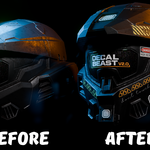
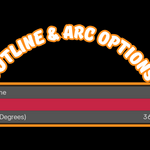

Updated! Decal Beast V2.0.1

Bala in Presets


Item Rating

This item has an average rating of 5 from 1 rating by the community.

100%
0%
0%
0%
0%

Purchase this item to leave a review!

  • Jeroen
    7 months ago

    This addon is amazing, and so is its developer.

    I already had plenty of ways to place a couple of simple decals, but now I needed to wrap an entire car! And good.

    I was working on designing a car wrap for various vans for a client. A very cool design with cartoon characters running all over the vehicle. I needed as accurate a representation of the final result as possible as an example for my client and the car wrapper.

    Both sides of the car have one big image going from the back to the front bumper. Also an image on the roof and an image on the back doors, but it was the sides, flowing into the front bumper that were the problematic parts.
    I was happy that I found Decal Beast, because this addon can place a decal on multiple objects at once, which was ideal for this thing (bumper, doors, sidepanels, etc.).
    I already knew the developer from the Better Cutter add-on, which was brilliantly put together. So I figured that his addon was also probably a smart one and I already knew that Bala’s support is great.

    So, logically, but unfortunately, like all car bumpers in the world, the angle of the bumper was different from the side of the car where I placed the decal on.
    Because this add-on allows for adjusting the projection depth, it still produced a good result on that bumper, despite the slight distortion caused by the different angles. It looked pretty good right away, but because it had to serve as a model of reality, I needed it to be more accurate.

    So I sent Bala a message in which I explained to him what I was working on, and that I was actually looking for a way to wrap a decal around the shape of an object.
    I learned then that Blender just doen’t work that way, and knew now why I never found an addon before that could do this.

    I already tried a couple of other things. Shrinkwrap makes it ugly, Substance Painter couldn’t even load the model.

    Then after a little bit of chatting, Bala built a new function on his addon: Split Decals.
    With this I could place the decal on the side of the car like before, but now I could split it and give my bumper his own copy, rotate it and bam! A projection in exactly the angle that I chose, with minimal distortion!

    This was awesome!
    So I happily messaged Bala back that it was working like a charm, but that it was a little hard to select the different decals as they came into existence exactly on top of each other. A couple of hours later he brought out an update with a new function to select the different decals fast and easy. Wow!

    Now this addon was without a doubt the best decal tool I have ever seen.
    Placing a large decal on top of multiple objects at once, but with the ability to edit them apart if you need.
    The cool thing is, because of the split decals, I can open the car doors of my model without the need of baking. Because I can give the doors their own parented copy of the decal.
    That is some top notch non-destructive decal placing!

    And, this works just as good on the nice clean UV unwrapped versions I made myself as on the partially not and partially ultra crappy unwrapped original models that I bought from CG Trader.

    Still, if you want to bake the decals into the textures, that’s always possible and a one click job in this addon. (For this your model does need to be UV unwrapped)
    And if you like to make a copy of your baked images you can easily find them in the shader nodes, but you don’t even need to.
    Because when I asked him for an easy way to save the baked images, he made another update: a dedicated “Save baked images” button with which you can backup them where you want, without any hassle, in different image formats.
    The way this went convinced me that Bala is without a doubt one of the smartest, kind and helpful developers I talked to on Superhive.

    The things this add-on can do with text are amazing and the integrated gallery which you can fill with your own designs is a huge time saver. But is, even without all of that, because of everything I wrote above, well worth its money.

    Now, where did I find the time to write a review this long?
    At first, I figured I would need a couple of hours to put my designs accurately on the models of the vans.
    Thanks to Bala and his genius addon I was done in seconds. And now I don’t know what to do with all that free time! :-D

    TLDR:
    The addon is the best in its category!
    The developer is an awesome guy!
    Recommended! Big time!

    • Bala

      7 months ago

      Jeroen, this review genuinely made my day. Thank you for taking the time to write something so detailed, it means a lot. And I have to say, having a buyer like you has been one of the best parts of building Decal Beast.

      The multiple object decal placement was already a feature, but I never thought about moving objects like a car. The way it worked was a single empty controlling the decal across all the objects it touched, which was fine for most static scenarios. But the real problem is that empty gets parented to one object, so when you open the other door, the decal doesn't come along with it since the empty's position is what controls the placement. The decal just breaks apart.

      Baking would solve it, but I didn't want to sacrifice the non destructive workflow. That's what led me to add the separate empties per object option, where each object gets its own empty and its own control while still behaving as part of the same decal. I only realized this was even a problem because you dealt with it firsthand.

      That kind of real world feedback is exactly what helps me improve the addon in ways I wouldn't think of on my own. Keep hitting me up whenever you run into something!

      Thank you very much!

  • Displaying 1 rating
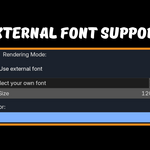
  • Everything you see in the videos with External font Support.

    $39
$39

Have questions about this product?
Login to message

Details
Sales 20+
Rating
1 ratings
Dev Fund Contributor
Published 11 months ago
Blender Version 4.1 - 5.0
Extension Type N/A
Render Engine Used Blender-Internal, Blender-Game-Engine, Cycles, Eevee
License GPL