 shanef3d



Documentation:
Installation
Follow these steps to install the DeepFocus addon in Blender:
Open Blender and go to Edit > Preferences > Add-ons
Click the "Install..." button in the top right corner
Select the DeepFocus addon file (
.zipformat)Click "Install Add-on"
Enable the addon by checking the checkbox next to "Camera: DeepFocus"
Alternative Installation: Drag and drop the .zip file directly into Blender's Preferences window
Activation
Once installed, switch renderer to Cycles, select your camera in the outliner, and access the tool via Sidebar (N-Panel): View 3D > DeepFocus tab
Main Components
Camera Configuration
Physical Specs: Define Focal Length and Sensor Size to match real-world lens characteristics.
Zoom Factor: Crop into the frame digitally without altering perspective distortion.
Focus Management
Targeting: Use Focus Object to auto-track a mesh or Focus Distance for manual control.
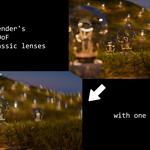
F-Stop: Adjust aperture size to control blur intensity (lower values = shallower depth of field).
Max Blur Size: Clamp the maximum defocus radius to keep background elements recognizable.
Bokeh Styling
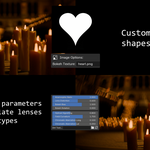
Shape Modes: Switch between Disc (perfect circle), Bladed (geometric polygon), or Image (custom texture).
Rotation & Bias: Rotate the aperture shape or adjust light distribution within the blur.
Advanced Features
Hover on each N-panel parameter for detailed explanations
Optical Characteristics
Anamorphic Ratio: Stretch bokeh vertically (e.g., 2.0) to simulate cinematic anamorphic lenses.
Lens Distortion: Introduce realistic barrel or pincushion warping to the image.
Aberrations: Add Chromatic Aberration (color fringing) and Field Curvature (blurrier corners) for realism.
Tilt-Shift: Shift the lens plane (X/Y) to simulate miniature effects or correct perspective.
Focus Visualization
Focus Peaking: Toggle the Preview checkbox to see a high-contrast overlay on in-focus geometry.
Texture & Customization
Lens Dirt: Load a grunge map into Dirt Texture to simulate dust, scratches, and smudges on the glass.
Custom Bokeh: When in Image mode, load a PNG into Bokeh Texture to turn highlights into custom shapes (e.g., hearts/stars).
Compatibility
Blender 4.5+, NVIDIA GPU with OptiX enabled. None-OptiX system supported in CPU Mode only.
Troubleshooting
- Peaking not visible: Switch Viewport Shading to "Solid" or "Material Preview". Peaking may be hidden in "Rendered" view depending on overlay settings.
- Email: [email protected]
Tutorial and Demo:
Have questions about this product?
Login to message
Discover more products like this
Open Shading Language depth of field cinematic camera bokeh lens physical camera