 Dani K Daniel


Easy Cursor Snapper
Snapping the 3D Cursor and objects is something you do hundreds of times per project. Easy Cursor Snapper puts the two snaps you use most on permanent buttons in the sidebar, so they're always one click away.
What it does
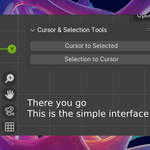
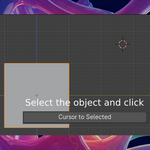
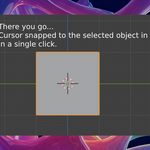
Cursor to Selected: moves the 3D Cursor to the center of your selected objects.
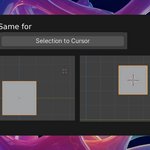
Selection to Cursor: moves your selected objects to the 3D Cursor.
Cursor to Selected: moves the 3D Cursor to the center of your selected objects.
Selection to Cursor: moves your selected objects to the 3D Cursor.
Both actions support Undo (Ctrl+Z) and warn you if nothing is selected.
Why use it instead of Shift+S?
Always visible. The buttons sit in the sidebar. You don't need to open a menu or remember a shortcut.
Faster for repetitive work. Lining up a scene or placing props? Click, click, done.
Great for beginners who haven't learned the Shift+S snap menu yet.
Handy for tablet and pen users who'd rather click than reach for the keyboard.
Always visible. The buttons sit in the sidebar. You don't need to open a menu or remember a shortcut.
Faster for repetitive work. Lining up a scene or placing props? Click, click, done.
Great for beginners who haven't learned the Shift+S snap menu yet.
Handy for tablet and pen users who'd rather click than reach for the keyboard.
Where to find it
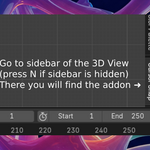
3D Viewport → press N → Cursor Snap tab
Details
Lightweight: two buttons, no settings to configure
Works with Blender 3.0 and newer (tested up to Blender 4.4)
Includes a PDF Read Me
License: GPL v3
Lightweight: two buttons, no settings to configure
Works with Blender 3.0 and newer (tested up to Blender 4.4)
Includes a PDF Read Me
License: GPL v3
Installation
Download the .zip file (don't unzip it).
In Blender, go to Edit → Preferences → Add-ons.
Click Install… (in Blender 4.2+: the dropdown arrow at the top right → Install from Disk…) and select the .zip.
Enable Easy Cursor Snapper.
Download the .zip file (don't unzip it).
In Blender, go to Edit → Preferences → Add-ons.
Click Install… (in Blender 4.2+: the dropdown arrow at the top right → Install from Disk…) and select the .zip.
Enable Easy Cursor Snapper.