Easy Sky
 Techqon core





Documentation – Easy Sky
What is Easy Sky?
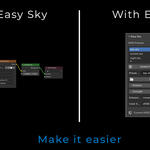
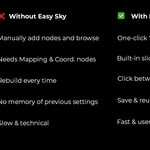
Easy Sky is a Blender addon designed to help you manage multiple HDRI lighting environments quickly and efficiently. Whether you’re testing lighting moods or organizing your favorite skies, Easy Sky makes it effortless to create, store, and switch between HDRI presets with a single click.
Installation
-
Download the
.zipfile from this product page. -
In Blender, go to
Edit > Preferences > Add-ons > Install. -
Select the downloaded ZIP file and click Install Add-on.
-
Activate the addon by checking the box next to “Easy Sky”.
-
Go to the World Properties tab to start using it.
How to Use
1. Create a Preset
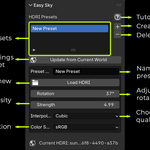
Click the ‘+’ button to add a new HDRI preset.
2. Load an HDRI
Click ‘Load HDRI’ to browse and select an HDRI image from your computer.
It will be automatically applied to the current World environment.
3. Adjust Settings
Fine-tune lighting parameters for each preset:
-
Rotation: Control light direction.
-
Strength: Adjust the light intensity.
-
Interpolation: Set texture quality. (Cubic is recommended)
-
Color Space: Typically use sRGB for HDRIs.
4. Switch Presets Instantly
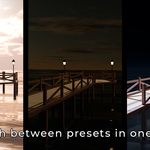
Click on any preset from the list to apply it instantly—ideal for testing different lighting moods on the fly.
Features
-
Save and manage multiple HDRI setups.
-
One-click loading and switching.
-
User-friendly interface within the World tab.
-
Fully compatible with Cycles and Eevee.
-
Minimal setup, works out of the box.
Requirements
-
Blender 3.0 or newer
-
HDRI image files (not included)
-
Works with: Cycles and Eevee
Have questions about this product?
Login to message
| Sales | 10 |
| Published | over 1 year ago |
| Blender Version | 4.2 - 4.5 |
| Extension Type | N/A |
| Render Engine Used | Cycles, Eevee |
| License | GPL |
Discover more products like this
hdri Scene Setup Render 3d artistic rendering world blender addon addon presets Enviroment Lighting sky