Easy-Drive
 Morpho Kreative




📘 Documentation
Installation
EasyDrive is installed like any standard Blender addon.
-
Download the EasyDrive_Vx.zip file.
-
Open Blender and go to Edit → Preferences → Add-ons.
-
Click Install, select the downloaded .zip, and confirm.
-
Enable EasyDrive from the Add-ons list.
Once enabled, EasyDrive will be available in the N-Panel.
Quick Start
Follow these steps to generate a car rig using EasyDrive:
-
Rename Mesh Objects
Use the EasyRenamer tool to rename all required mesh objects according to the expected naming convention. -
Apply Transforms & Orientation
-
Make sure rotation and scale are applied on all mesh objects.
-
The body mesh should be:
-
centered on the X and Y axes
-
facing the –Y direction
-
-
Wheels and wheel brake objects must be meshes (not empties).
The body object can be an empty if desired.
-
-
Center the Cursor
Move the 3D cursor to the world origin before adding the deformation rig. -
Select Required Parts
Select all parts required for rig generation, ensuring that the body mesh is selected last. -
Add the Deformation Rig
Use:
Shift + A → Armature → EasyDrive Deformation Rig -
Generate Animation Rig
After the deformation rig is added, click the Generate button to complete the setup.
If all steps are followed correctly, the rig will be generated successfully.
Using the Addon
-
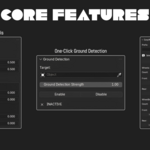
All EasyDrive controls are available in the N-Panel.
-
A visual step-by-step guide is also included directly inside the addon UI.
-
Post-rig controls allow you to adjust suspension behavior, steering, drift, camber, toe, and root motion.
Notes & Limitations
-
Correct naming is required before rig generation.
-
Applying transforms is strongly recommended to avoid unexpected behavior.
-
Ground detection strength is animatable.
-
Suspension pitch and roll strength can be adjusted after rig generation.
-
Front and rear wheels can be controlled independently for camber and toe.
Wheel Support
-
EasyDrive supports a theoretical maximum of up to 999 wheels.
-
This limit applies to the individual axes - front and rear.
-
Practical limits may depend on scene complexity and system performance.
Troubleshooting
If rig generation fails:
-
Double-check mesh naming.
-
Ensure the correct object is selected last.
-
Confirm all required parts are meshes.
-
Verify scale and rotation transforms are applied.
⚠️ Important License Notice
EasyDrive is distributed under the GNU General Public License (GPL).
Any redistribution must strictly comply with the GPL.
Unauthorized redistribution that removes attribution, source code, or licensing information is a violation of the license and is not allowed.
Purchasing EasyDrive supports continued development, updates, and support.
Discover more products like this
Render 3d easy vehicle rigging addon car blender caranimation car rig addon automotive drive