 DHA
DHA


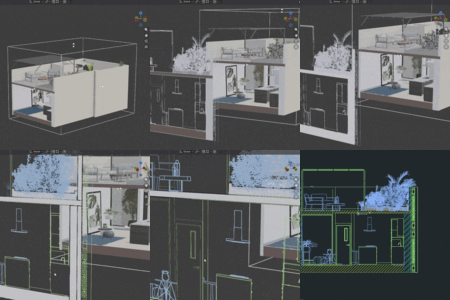
📖 Product Documentation & Feature Guide
Looking
for a detailed breakdown? You can read our full EasySection User Guide & Documentation to master the tool.
Here is a summary of what
EasySection offers:
1. Smart Collection Management (Performance Boost)
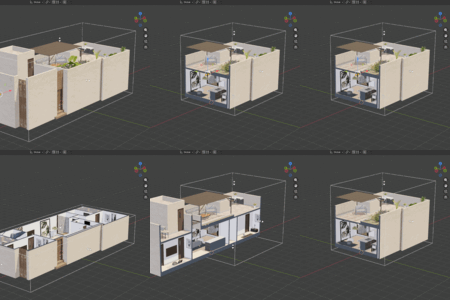
- Section Collection: Dedicated for structural elements like walls, floors, and ceilings to perform clean slices.
- Object Collection: Dedicated for furniture, plants, and props. Instead of destructive slicing, the add-on intelligently hides them entirely if they fall outside the section box, saving millions of vertices and significantly boosting viewport performance.
2. Live Modifiers & Real-Time Viewport Control
- Enable Capholes & Cleaner: Instantly seals hollow geometries (like sliced walls) with a solid surface and merges overlapping vertices to eliminate viewport flickering.
- Custom Cap Materials: Assign specific textures or global solid fills (e.g., solid black section cuts) directly from the N-Panel.
- 12 CAD Hatch Patterns: Apply standard architectural patterns (like ANSI31, ANSI37) that are fully visible in 2D views and scale perfectly.
3. Advanced Sections & Elevations Exporter
- Layered Line Weight Control: Customize thickness and colors for different layers (Section Lines, Furniture Lines, Elevation Lines).
- Depth Cueing: Automatically fades lines based on distance from the camera, giving your 2D drawings a professional architectural sense of depth.
- One-Click DXF Export: Flatten your 3D views into fully organized 2D vector CAD drawings, preserving line weights, colors, and hatches.
4. Interactive Viewport Gizmos
- Easily push, pull, or rotate your section plane using intuitive 3D arrows with features like automatic occlusion fading and full Undo (Ctrl+Z) support.
Have questions about this product?
Login to message
Discover more products like this
cad sort wall section 3d model Architectural drawings architecture smart 2d section drawings plan