Sci-Fi Drone Spaceship Rigged Animated PBR 3D Model 3D Model
 Enviable Game studio


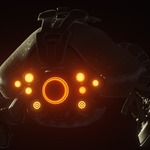
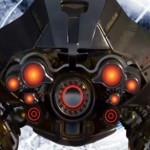
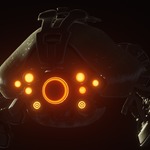
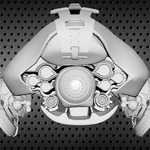

Drone / Spaceship – Product Documentation
1. Product Overview
Thank you for purchasing the Drone / Spaceship 3D Model.
This product is a detailed sci-fi spacecraft designed for futuristic games, cinematic projects, animation, concept art, visualization, and other 3D applications.
The model is based on a Swordbreaker-class battleship / drone concept and features a modular mechanical design with multiple functional-looking spacecraft components, including missile launchers, repulsors, engine modules, a central targeting screen, CPU module, fuel tank, and core module.
The asset is supplied in multiple industry-standard formats, making it suitable for a variety of 3D workflows and applications.
2. What's Included
The package includes the following main components:
Complete sci-fi drone / spaceship model
Modular spacecraft components
Two universal missile launcher modules
Central target-selection screen
CPU module
Fuel tank
Engine module
Y-side engine exhaust modules
Core module
-
Six repulsers
Three left-side repulsers
Three right-side repulsers
Rigged and skinned model
Simple animations
Standard materials
PBR texture maps
Multiple texture resolutions
The model is structured to allow users to work with individual spacecraft components where supported by the provided scene and rig setup.
3. File Formats
The product is available in several formats to support different production pipelines.
Blender
.BLEND
The Blender version is the primary native format and includes the model with its materials.
Autodesk Maya
.MA
Maya-compatible scene files are included with standard materials.
Unity
.UNITYPACKAGE
A Unity package is included for users who want to bring the asset into a Unity project.
FBX
.FBX
Suitable for importing the model into many 3D applications and game engines.
OBJ
.OBJ
A widely supported exchange format for static geometry.
glTF
.GLB
Suitable for modern real-time, web, visualization, and compatible 3D workflows.
Collada
.DAE
Included as an additional interchange format.
MTL
.MTL
Material information associated with the OBJ workflow.
4. Blender Setup
Opening the Product
Download the product package from your Superhive purchase.
Extract the downloaded archive if necessary.
Open the included
.blendfile using Blender.Allow Blender to load the scene and associated resources.
Check the Outliner to inspect the model components.
Open the Shading workspace to inspect the included materials.
For the best experience, use the Blender version specified on the product page or a compatible current Blender release.
5. Model Structure
The spacecraft is designed around a modular sci-fi mechanical structure.
The primary components include:
Weapon Modules
The model includes two universal missile launcher modules that form part of the spacecraft's weapon system.
Targeting Screen
A central screen module is included for the spacecraft's target-selection area.
CPU Module
A dedicated CPU component contributes to the technological/mechanical design of the spacecraft.
Fuel Tank
The fuel tank module is integrated into the spacecraft's mechanical structure.
Engine System
The spacecraft includes engine modules together with Y-side engine exhaust components.
Core
A dedicated core module forms part of the central spacecraft structure.
Repulsers
Six repulser components are included:
3 × Left-side repulsers
3 × Right-side repulsers
These components contribute to the spacecraft's futuristic propulsion system.
6. Materials
The model includes standard materials and PBR texture resources.
Depending on the application or engine being used, materials may require minor adjustment after import.
The included texture resources can be connected to the corresponding material channels to achieve the intended appearance.
For Blender users, inspect the Shader Editor to review and modify the material setup.
7. PBR Textures
The package includes PBR texture resources in multiple resolutions.
Available texture resolutions include:
1K — 1024 × 1024
2K — 2048 × 2048
4K — 4096 × 4096
8K — 8192 × 8192
The package includes the following texture types:
Albedo / Base Color
Ambient Occlusion
Illumination
Normal
Metalness
Emissive
Specular
Roughness
Texture files are provided in PNG format.
Choosing Texture Resolution
Use the texture resolution appropriate for your project:
1K:
Recommended when memory usage and performance are important.
2K:
A good balance between visual quality and performance for many real-time projects.
4K:
Recommended for high-quality games, cinematics, close-up shots, and detailed visualization.
8K:
Recommended for high-resolution cinematic rendering and situations where maximum texture detail is required.
For real-time applications, using unnecessarily high-resolution textures may increase memory consumption. Choose the resolution according to the required viewing distance and target platform.
8. Emissive / Illumination Materials
The asset includes illumination and emissive texture resources.
These maps can be used to create glowing futuristic elements such as:
Engine effects
Exhaust elements
Technology panels
Screens
Energy components
Other illuminated spacecraft details
When using Blender, connect the appropriate emissive texture to the material's Emission input and adjust the emission strength according to the desired visual effect.
For real-time engines, configure the material's emission settings according to the engine's material system.
9. Rigging and Animation
The model is supplied with a rigged and skinned setup and includes simple animations.
The rig allows supported components of the spacecraft to be animated and controlled.
The asset can be used as a starting point for creating custom animations such as:
Weapon deployment
Missile launcher movement
Engine movement
Repulser effects
Mechanical component movement
Firing sequences
Cinematic spacecraft movement
The included animations are intended as a starting point. Users can create additional keyframe animations according to their project requirements.
10. Using the Model in Games
The spacecraft can be used in a wide range of futuristic game projects, including:
Sci-fi games
Space combat games
Space exploration games
Strategy games
Action games
Shooter games
Simulation games
RTS projects
Space station environments
Futuristic RPGs
Cinematic game sequences
The model can function as a player-controlled spacecraft, enemy vehicle, NPC drone, background spacecraft, cinematic asset, or environmental prop depending on the requirements of your project.
11. Using the Model for Cinematics
The asset is also suitable for cinematic and visual effects workflows.
For cinematic rendering, users can take advantage of:
Detailed mechanical geometry
PBR materials
Emissive textures
Rigging
Animation
Modular components
Multiple texture resolutions
For close-up shots, 4K or 8K textures can be selected when additional surface detail is required.
12. Unity Import
A Unity package is included with the product.
Basic Workflow
Open your Unity project.
Import the provided
.unitypackage.Allow Unity to complete the import process.
Locate the imported spacecraft assets in the Project window.
Place the model into your scene.
Check the materials and textures.
Adjust shaders/material settings according to your Unity render pipeline.
Important
Material appearance can vary depending on the Unity render pipeline, project settings, shader configuration, lighting, and post-processing.
You may need to adjust materials after importing the asset into your specific Unity project.
13. Importing FBX / OBJ / GLB
If you are using another 3D application or game engine, the FBX, OBJ, or GLB versions can be used as interchange formats.
General Workflow
Import the selected model format into your application.
Import the corresponding texture files.
Assign the textures to the appropriate material channels.
Verify the model's scale and orientation.
Check the materials and normal maps.
Configure emissive elements where required.
Adjust the model for your project's specific requirements.
Different applications may interpret materials, units, axes, and shader settings differently.
14. Scale and Orientation
Because different 3D applications and game engines can use different unit systems and coordinate conventions, the model may require scale or orientation adjustments after import.
Always verify:
Scene scale
Model rotation
Forward axis
Up axis
Material assignment
Texture paths
Animation orientation
before integrating the asset into a production scene.
15. Geometry Information
The original model contains detailed geometry suitable for high-quality visualization and cinematic use.
The published model information lists approximately:
257,174 triangles
199,445 vertices
124,429 faces
253,686 edges
Geometry statistics may vary depending on the imported format, application, modifiers, triangulation, or scene configuration.
For real-time applications, evaluate the model's performance according to your target platform and scene requirements.
16. Optimization Recommendations
For real-time projects, consider the following optimization techniques:
Texture Optimization
Use 1K or 2K textures when the asset does not require higher-resolution maps.
LODs
Create additional Levels of Detail if the spacecraft will appear at different distances from the camera.
Visibility
Disable or remove components that are not required in a particular scene.
Materials
Reduce unnecessary material slots where appropriate and consolidate materials when suitable for your project.
Real-Time Lighting
Optimize emissive effects, lighting, shadows, and post-processing according to your target platform.
Platform Testing
Always test the final asset on your intended target hardware, especially for mobile, VR, or other performance-sensitive applications.
17. Recommended Workflow
For the best results, the following workflow is recommended:
Blender / DCC Application
Open the native scene.
Inspect the model hierarchy.
Verify materials.
Check the rig.
Test the included animations.
Modify materials or components as required.
Create custom animations if needed.
Export to your target application.
Game Engine
Import the appropriate format.
Verify scale and orientation.
Configure materials.
Assign textures.
Configure emissive elements.
Set up animations.
Create gameplay controls or scripted behavior.
Optimize for the target platform.
18. Troubleshooting
Textures Are Missing
Check that the texture files are included in the downloaded package and that your application can access the texture directory.
If necessary, manually relink the texture files.
Materials Look Different
Material appearance can vary between applications because different renderers use different shader models.
Check:
Base Color
Metallic
Roughness
Specular
Normal
Emission
Ambient Occlusion
and adjust the material according to your renderer.
Model Scale Is Incorrect
Different applications use different unit systems.
Rescale the model using the application's transform or scene-unit settings.
Animation Does Not Work Correctly
Verify that the imported format supports the required rig/animation data and that the target application has correctly imported the skeleton, skin weights, and animation data.
Model Appears Too Heavy for Real-Time Use
The model contains detailed geometry. For performance-sensitive projects, consider creating LOD versions, reducing texture resolution, simplifying materials, or optimizing unnecessary components.
19. Compatibility
The product is intended for use with compatible 3D applications and game engines that support the included file formats.
Supported workflows include:
Blender
Autodesk Maya
Unity
FBX-compatible applications
OBJ-compatible applications
glTF-compatible applications
Collada-compatible applications
Material, animation, rigging, and shader functionality may vary between applications.
20. Frequently Asked Questions
Is this model suitable for games?
Yes. The model can be used in sci-fi and space-themed game projects. For real-time projects, optimization may be required depending on the target platform.
Can I use this model for cinematics?
Yes. The model is suitable for cinematic rendering, animation, visualization, and VFX workflows.
Is the model rigged?
Yes. The product includes a rigged and skinned version with simple animations.
Are PBR textures included?
Yes. The package includes PBR texture maps in multiple resolutions from 1K through 8K.
Can I use the model in Unity?
Yes. A Unity package is included, along with other exchange formats.
Can I edit the model?
Yes. The model can be edited and customized in compatible 3D software.
Can I create my own animations?
Yes. The rig can be used as a foundation for creating custom animations, provided the target application supports the included rig and animation data.
Are the textures included?
Yes. The package includes the listed PBR texture maps.
Can I use the model in another 3D application?
Yes, provided the application supports one of the included exchange formats. Material and animation compatibility may vary.
21. Support
If you encounter an issue with the product or have questions about the included files, please contact the creator through the Superhive support system.
When requesting support, please include:
Your Blender/application version
Operating system
File format being used
Description of the problem
Screenshot or error message when applicable
Providing this information will help resolve technical issues more efficiently.
22. Updates
Product updates may include improvements, fixes, additional compatibility, documentation improvements, or other enhancements.
Please check the product page for the latest available version and update information.
23. Important Notes
This is a digital 3D asset and not a physical product.
Material appearance may vary depending on the renderer and application.
Different applications may require adjustments to scale, orientation, materials, shaders, and textures.
Performance depends on the target hardware, scene complexity, texture resolution, lighting, and rendering configuration.
Always keep a backup of your project before replacing or updating production assets.
Thank you for choosing this Drone / Spaceship 3D Model. We hope it helps you create impressive sci-fi games, cinematic sequences, animations, visualizations, and futuristic worlds.
 Included
Includes 12 months of
- Support from Enviable Game studio
- Product updates
Extend this product’s Support Period +12 months: 50% of product price
Have questions before purchasing?
Login to message
| Published | about 2 months ago |
| Blender Version | 4.2 - 5.2 |
| Render Engine Used | Cycles |
| Misc Data | Uvs-Unwrapped, Normal-Mapped, Textured |
| License | Royalty Free |
Discover more products like this
sci fi drone Spaceship space vehicle sci fi vehicle futuristic spaceship sci fi spacecraft sci-fi spaceship spaceship 3d model space battleship spacecraft space drone