 Scripting Blender


Equal Area Sphere
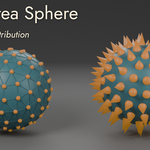
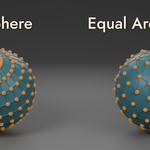
Stop fighting uneven vertex distribution. Whether you're scattering objects across a sphere with Geometry Nodes, running particle simulations, or building stylized planets, Blender's default UV Sphere gives you tight clusters at the poles and sparse gaps at the equator. Equal Area Sphere fixes this in one click.
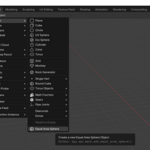
This Addon adds a new mesh primitive Add > Mesh > Equal Area Sphere that distributes vertices so every face covers roughly the same surface area. No more polar pinching. No manual cleanup. Just clean, uniform geometry ready for whatever you throw at it.
The Problem
Blender's built-in UV Sphere concentrates vertices near the poles. If you've ever tried to:
- Instance objects on sphere vertices with Geometry Nodes
- Create even surface patterns or textures
- Run simulations that need uniform sampling
- Build low-poly stylized spheres that don't look "squished" at the top
...you've hit this limitation. The standard workaround is an Ico Sphere, but those give you fixed subdivision levels with no fine control over vertex count, and they produce triangles instead of mixed quads.
I was inspired to make this Addon while attempting to use a knitting pattern on a sphere, and the stitches were bunching at the top. The design looked uneven and I had to rotate the object to attempt to hide the imperfections.
The Solution
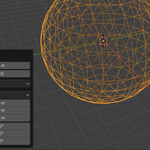
Equal Area Sphere uses a proven algorithm (based on the Deserno equal-area distribution method) to place vertices in rings of latitude where both the spacing between rings and the spacing along each ring are approximately equal. The result: faces that are close to the same size everywhere on the sphere.
Features
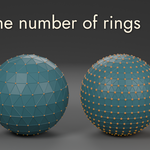
- Adjustable ring count Control the density from sparse (3 rings) to dense (100+ rings). Each ring automatically calculates the right number of vertices for uniform spacing.
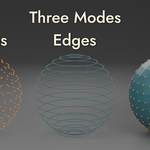
- Three output modes Generate vertices only (for point clouds and Geometry Nodes), vertices + edges (for wireframe looks), or full faces (quads and triangles stitched together cleanly).
- Adjustable radius Works at any scale, from tiny particle emitters to planetary surfaces.
- Object & Edit mode Add spheres as new objects or merge directly into your current mesh.
- Undo support Full integration with Blender's undo system.
- Lightweight Pure Python, no dependencies. Installs in seconds.
Use Cases
Geometry Nodes artists: Instance cones, spikes, trees, or any object evenly across a sphere surface — no more clumping at the poles.
Simulation / VFX: Seed particles or sample points uniformly on a spherical surface for physically accurate results.
Low-poly & stylized art: Create clean, balanced low-poly spheres where every face reads clearly at a distance.
Procedural modeling: Use as a base mesh for procedural deformation, displacement, or sculpting where even topology matters.
Educational / scientific visualization: Represent data points distributed evenly on a globe or spherical coordinate system.
Compatibility
- Works on Windows, macOS, and Linux
- No external dependencies
What's Included
- The Equal Area Sphere Addon (.zip, ready to install)
- Sample blend file used to generate the feature image
Support
For questions, bug reports, or feature requests, please use the Contact Creator button on the SuperHive product page.
License
This Addon is released under the GNU General Public License v3.0 (GPL-3.0). Full license text is included with the Addon.
Version History
v1.0.0 (April 2026)
- Initial release
- Three mesh types: Vertices, Edges, Faces
- Object and Edit mode support
- Compatible with Blender 2.80+
