 Tuzhin





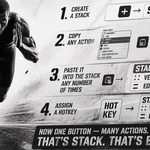





Evolution Stack Panel
Turn repetitive Blender actions into a single click.
Evolution Stack Panel lets you build your own quick-access panels where each button runs an entire sequence of Blender commands (bpy.ops) with one press or hotkey.
What it does
Command stacks. Chain together any sequence of Blender operators — from simple actions to complex multi-step sequences — and bind it to a single button or hotkey. No more repeating the same clicks over and over.
Capture commands on the fly. The Copy for Stack feature lets you capture commands directly from Blender's UI — click any button or menu item and it's automatically added to your stack, no need to hunt down operator IDs manually.
Groups and folders. Organize your stacks into a hierarchy — groups collect related commands into a popup panel, folders help structure long lists. Group panels can be opened with a hotkey, held down to auto-repeat the action (Hold-to-Repeat), and scoped to a specific context.
Flexible hotkeys. Assign key combinations (Ctrl/Shift/Alt/Cmd) separately for each Blender editor — 3D Viewport, Node Editors (Geometry/Shader/Compositor), UV Editor, Sequencer, Dope Sheet, Outliner, File Browser, and more — or make a command global so it works everywhere.
Customizable look. Pick icons from Blender's full icon set (16/24/32 px, light and dark variants), theme your panels' colors, adjust corner radius, and optionally have the addon auto-switch between dark and light themes to match Blender's own appearance.
Built-in examples. A library of ready-made example stacks helps you understand the workflow quickly and gives you a starting point for your own setups.
Who it's for
Anyone who repeats the same sequence of actions in Blender: modelers, riggers, animators, technical artists — anywhere a routine chain of clicks can be replaced with a single button.
Requirements
Blender 5.2 or newer.
Have questions about this product?
Login to message
| Blender Extension Compatible | Yes |
| Published | about 2 months ago |
| Blender Version | 5.2 |
| Extension Type | Add-on |
| License | GPL |
Discover more products like this
stack Workflow shortcuts Macros ui customization automation Hotkeys custom-panel Macross Add-on productivity