Eyedropper Pro
 Hoa Vu


Eyedropper Pro – Documentation
1. Overview
Eyedropper Pro is a Blender add-on designed to improve color workflow and reference management inside the 3D Viewport.
It allows users to:
-
Pick colors from anywhere on the screen (including outside Blender)
-
Paste images directly from the clipboard into the scene
-
Store and reuse recent colors
-
Copy HEX values instantly
The add-on integrates directly into the 3D Viewport Header for quick access.
2. System Requirements
-
Blender 5.0+
-
Windows (recommended for full screen color picking)
-
Optional:
mssPython library for improved screen capture performance
For "Images as Planes" mode:
-
Enable Blender’s built-in addon:
Import-Export: Import Images as Planes
3. Installation
Step 1 – Install the Add-on
-
Open Blender
-
Go to: Edit → Preferences → Add-ons → Install
-
Select the downloaded ZIP file
-
Enable Eyedropper Pro
Step 2 – (Optional but Recommended) Install mss
For better and more reliable full-screen color sampling on Windows:
-
Go to Add-on Preferences
-
Click Install mss
-
Restart Blender
Without mss, the addon will fall back to PIL-based capture.
4. Interface Overview
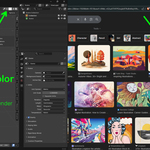
After enabling the addon, new controls appear in:
3D Viewport → Header
Icons available:
-
Eyedropper icon – Pick color inside Blender
-
Screen icon – Pick color from anywhere on screen
-
Color slot – Shows current picked color
-
Copy icon – Copy HEX value
-
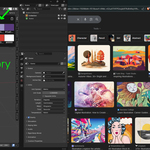
History icon – Open color history popup
5. Features in Detail
5.1 Viewport Color Picker
Purpose: Pick color from inside Blender.
How to use:
-
Click the Eyedropper icon in the header
-
Click on any visible element inside Blender
-
The selected color is stored in
Scene → picked_color
This uses Blender’s native color picking system.
5.2 Screen Color Picker
Purpose: Pick color from anywhere on the screen (browser, other software, reference images).
Shortcut:
Ctrl + Shift + P
How it works:
-
Activating the operator opens a full-screen preview window
-
A live swatch shows the hovered color
-
Left Mouse Button → confirm
-
Right Mouse Button / ESC → cancel
Once confirmed:
-
The picked color is stored in
Scene.picked_color -
It is automatically added to Color History
Important:
-
Currently best supported on Windows
-
Requires screen capture permission
-
Installing
mssimproves accuracy and performance
5.3 Paste Image from Clipboard
Shortcut:
Ctrl + Shift + V
Purpose: Paste image directly from clipboard into the 3D scene.
Workflow:
-
Copy an image (web, screenshot tool, design software, etc.)
-
In Blender 3D Viewport press
Ctrl + Shift + V -
The image appears at the 3D Cursor location
Paste Modes
Configured in Add-on Preferences:
Mode 1 – Empty Image
-
Creates an Image Empty object
-
Lightweight
-
Ideal for modeling references
Mode 2 – Images as Planes
-
Uses Blender’s built-in mesh plane importer
-
Automatically creates a textured plane
-
Requires Blender 5.0+
-
Requires “Import Images as Planes” enabled
5.4 Color History
The addon stores up to 10 most recent colors.
Features:
-
Displayed in popup grid
-
Click to reuse
-
Copy HEX directly from history
-
Clear all history option
Behavior:
-
Duplicate consecutive colors are ignored
-
Oldest colors are overwritten once limit is reached
5.5 HEX Copy
You can copy HEX from:
-
Current picked color
-
Any color in history
Format:
Copied value is placed into system clipboard.
6. Add-on Preferences
Location:
Edit → Preferences → Add-ons → Eyedropper Pro
Options available:
Paste Image Mode
-
Empty Image
-
Images as Planes
Install mss
-
Installs Python library directly into Blender environment
-
Recommended for Windows users
7. Keymaps
Default key bindings:
-
Ctrl + Shift + V→ Paste Image -
Ctrl + Shift + P→ Screen Color Picker
Have questions about this product?
Login to message
| Blender Extension Compatible | Yes |
| Sales | 30+ |
| Published | 7 months ago |
| Blender Version | 5.0 |
| Extension Type | Add-on |
| Render Engine Used | Blender-Internal |
| License | GPL |