Overview
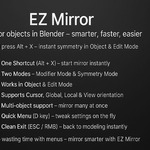
EZ Mirror is a lightweight, production-ready Blender add-on that turns mirroring into a fast, interactive step in your modeling flow. Launch it with Alt + X, choose the axis, and mirror instantly. It supports both non-destructive workflows (Mirror Modifier) and destructive workflows (mesh Symmetry), plus advanced orientation and pivot controls for precise results.
Installation
-
Download the .zip file.
-
In Blender: Edit → Preferences → Add-ons → Install…
-
Select the .zip, then enable EZ Mirror.
-
You’re ready to go: open a 3D Viewport and press Alt + X.
Default shortcut: Alt + X (registered for Object Mode and Edit Mode).
If another add-on uses the same shortcut, remap it in Edit → Preferences → Keymap (search for “EZ Mirror”).
Quick Start
-
Select an object (Mesh or Curve).
-
Press Alt + X to enter EZ Mirror mode.
-
Choose your axis (X / Y / Z) and direction to perform the mirror.
-
Optional: use the header controls to switch Mode (Modifier / Symmetry), Orientation, and Pivot.
-
Exit with ESC or Right-Mouse Button to return to your current tool.
Controls & Shortcuts
-
Alt + X — Start EZ Mirror mode (3D View).
-
D — Open the Quick Menu for instant access to settings.
-
ESC or RMB — Clean exit from EZ Mirror mode.
-
MMB / Mouse Wheel — View navigation passes through normally while EZ Mirror is active.
Modes
1) Modifier Mode (Non-destructive)
-
Adds a Mirror Modifier to your object.
-
Clip is enabled by default to keep the seam clean.
-
Auto-configures Bisect and Flip depending on the direction you choose.
-
Ideal for iterative modeling where you want to keep full editability.
2) Symmetry Mode (Destructive)
-
Applies Blender’s Symmetrize directly to the mesh.
-
Fast way to enforce symmetry during block-out or cleanup phases.
-
Best when you’re confident you don’t need to edit the pre-symmetry topology.
Curves:
Advanced Settings (Header)
-
Orientation: Local, Global, View, Cursor
Choose how directions are interpreted. For example, Local respects the object’s own rotation, while View follows your camera view.
-
Pivot Point: Active, Median, Cursor, Individual
Define the center of the mirror operation.
Toggle Advanced from the header to reveal Orientation & Pivot controls.
Multi-Object Support
-
Modifier Mode:
Select multiple objects and run EZ Mirror. The active object (or the 3D Cursor when using Cursor Pivot) is used as the reference; pre-configured Mirror Modifiers are added to the other selected objects.
-
Symmetry Mode:
Symmetry is applied individually to each selected object, one by one.
Recommended Workflow Tips
-
Apply Scale (Ctrl + A → Scale) before mirroring for consistent, predictable results.
-
Keep Clip enabled (default) to prevent gaps along the centerline.
-
Choose Local orientation when your object has rotations you want respected.
-
Use Cursor Pivot to mirror around any custom point in space.
-
For cleanup, Symmetry Mode can quickly fix small asymmetries in a mesh.
Troubleshooting
-
Nothing happens when pressing Alt + X:
-
Unexpected mirror plane / direction:
-
Mirroring multiple objects looks offset:
Compatibility
Uninstallation / Cleanup
-
Disable or remove the add-on from Edit → Preferences → Add-ons.
-
Any temporary helper Empties created for Cursor Pivot are handled automatically.
-
Mirror Modifiers you’ve added remain on your objects until you remove them—non-destructive by design.
Support & Updates
-
Free lifetime updates.
-
If you run into an issue or want a feature, reach out via the product page.
-
Clear steps to reproduce help us resolve things faster.
Mirror smarter. Model faster.
Launch EZ Mirror with Alt + X and keep your focus where it belongs—on the art.
 3Z Axis