 3Z Axis


Which Blender versions does EZ Mirror support
EZ Mirror works with Blender 3.0 and above, including Blender 4.0+
Can I use EZ Mirror in both Object and Edit Mode
Yes, the add-on works seamlessly in both modes for meshes, and it also supports curves (curves convert to mesh automatically when using Symmetry mode).
What is the difference between Modifier Mode and Symmetry Mode
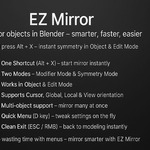
Modifier Mode: Adds a non-destructive Mirror Modifier that you can tweak at any time.
Symmetry Mode: Applies destructive mesh symmetry directly, great for cleanup or when you don’t need the modifier stack.
Can I mirror multiple objects at once
Yes. In Modifier Mode, all selected objects will receive their own mirror modifiers, using the active object (or 3D cursor) as the reference. In Symmetry Mode, each selected mesh is symmetrized individually.
Does EZ Mirror support custom pivot points and orientations
Yes. You can mirror using Active, Median, Cursor, or Individual pivots, and orientations can be set to Local, Global, View, or Cursor.
What shortcut activates EZ Mirror
By default, press Alt + X in the 3D View to start EZ Mirror. You can change this shortcut in Edit → Preferences → Keymap if needed.
How do I quickly exit EZ Mirror mode
Simply press ESC or Right Mouse Button (RMB) to return to your workflow instantly.
Will EZ Mirror leave extra objects in my scene
If you use Cursor Pivot in Modifier Mode, EZ Mirror creates a temporary helper Empty at the cursor location. These are cleaned up automatically when unregistering the add-on.
Can I get updates for free
Yes. Once purchased, you receive lifetime free updates
What if I find a bug or need support
You can reach out via the Blender Market support section on the product page. Include steps to reproduce the issue for faster assistance.
$3
Have questions about this product?
Login to message
| Published | about 1 year ago |
| Blender Version | 3.0 - 4.5 |
| Extension Type | N/A |
| License | GPL |

Discover more products like this
#Character Modeling game asset creation 3d modeling Mirror Tool blender addon hard surface modeling Blender Geometry procedural modeling EZ Mirror mirror blender toolkit