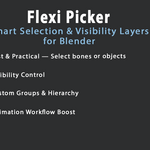
Flexi Picker – Smart Selection & Visibility Layers For Blender
 raha realistis studio


📘 Flexi Picker Documentation
🧩 Installation
-
Download the ZIP file from your Blender Market account.
-
In Blender, go to Edit → Preferences → Add-ons → Install.
-
Select the downloaded ZIP file and click Install Add-on.
-
Enable Flexi Picker in the add-ons list.
-
The tool will appear in the 3D Viewport > N-Panel > Flexi Picker tab.
🎯 Getting Started
-
Open Flexi Picker Panel in the N-Panel.
-
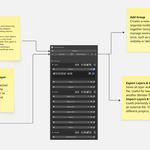
Click Create Picker Layout to start building your custom UI.
-
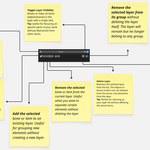
Add Buttons or Groups and link them to bones or objects in your rig.
-
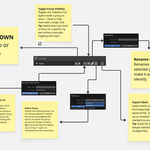
Use Visibility Control to show or hide control groups easily.
-
Save your layout for reuse across different scenes or rigs.
⚙️ Main Features
-
Fast bone and object selection
-
Customizable picker layout
-
Group-based visibility management
-
“Mark for Export” option
-
Lightweight and stable performance
-
Works with any rig type (character, props, mechanical)
🧠 Tips
-
For best results, organize your bones in meaningful groups before creating the picker.
-
Use consistent naming in rigs to speed up setup.
-
You can duplicate or share layouts between projects for consistent workflow.
🆘 Support
If you encounter issues or have questions, please reach out through the Blender Market message system or contact the developer directly.
Updates and bug fixes are provided regularly.
-
$11.99
🔹 Personal License (1–2 Seats) Blender 4.xx
-
$12.99
🔹 Personal License (1–2 Seats) Blender 5.2xx
-
$39.99
🔸 Studio License (5–30 Seats) Blender 4.xx + blender 5.2 xx
Have questions about this product?
Login to message
| Published | 12 months ago |
| Blender Version | 4.0 - 5.2 |
| Extension Type | N/A |
| Render Engine Used | Cycles, Eevee |
| License | GPL |
Discover more products like this
character rig blender rig ui Blender Workflow Rigging Tools blender addon picker ui pose picker bone selector Animator Tools animation tools flexi picker rig picker