 MeshMind


FlowPen
Draw clean retopology directly on a high-resolution surface. Stroke the flow you want, watch the quads appear, press Enter.
FlowPen is a drawing-based retopology toolkit. You stroke across a sculpt or scan, a live quad-grid preview follows your cursor, and one keypress commits it. Projection, snapping, spacing, continuity, symmetry, and cleanup are handled for you, so you can think about edge flow instead of vertex placement.
Why FlowPen
Manual retopology is slow because every vertex is a decision. FlowPen collapses those decisions into strokes.
The Toolset
| Tool | What it does |
|---|---|
| Precise Draw | Click to place vertices and edges. Closing a 4-vertex loop creates a quad. Esc undoes the last uncommitted point and restores the exact topology. Press G to build a strip grid along the chain. |
| Draw | Drag a stroke for a live quad-grid preview. Mouse wheel adjusts strip width, Shift + wheel adjusts density. Enter commits, Esc discards. |
| Edge Flow | Drag along the flow direction. Near an open boundary, the strip continues that boundary with a matched vertex count. |
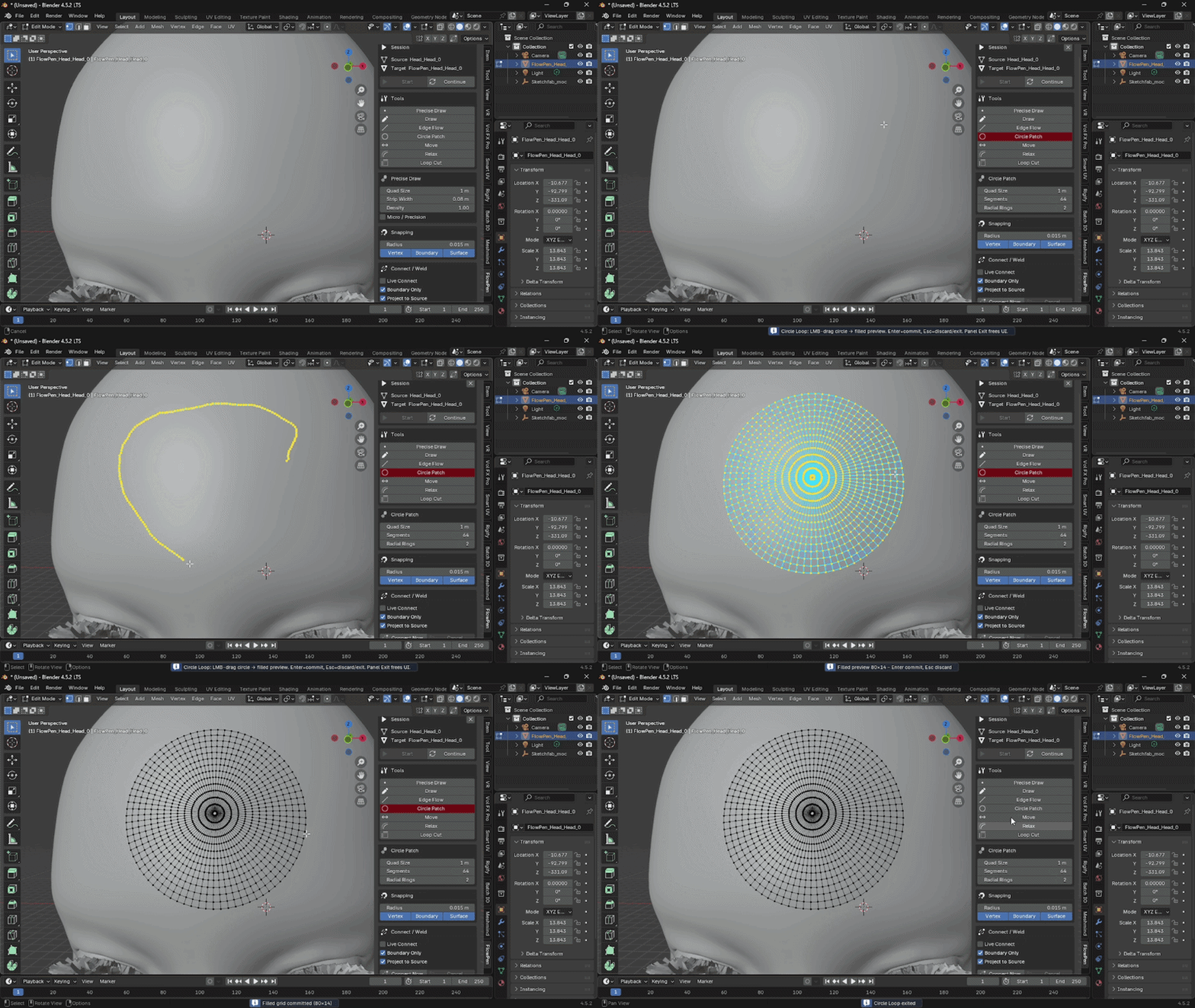
| Circle Patch | Drag a radius to get a filled, concentric all-quad patch with no pole vertex. Good for eyes, mouths, joints, and cylindrical ends. |
| Move | Select vertices and drag. Movement is projected back onto the source surface, with optional falloff and boundary preservation. |
| Relax | Evens out edge lengths while staying on the surface. Boundaries and feature edges can be preserved. |
| Loop Cut | Hover quads to preview a continuous cut path, then click to apply. Works on open and closed loops. |
Switch tools instantly with the Shift + Q pie menu.
Built for Speed and Control
Adjustable strip width and density
Tune quad size, strip width, and density per tool, live, with the mouse wheel while you draw. Micro / Precision mode gives you a smaller quad size for detail areas like ears, fingers, and facial features.
Unified snapping
One snap system covers existing target vertices, boundary vertices, the source surface, and the symmetry seam. The active snap type shows as a colored marker in the viewport, so you always know what you’re about to hit.
Smart Connect / Weld
Vertices closer than your snap radius are merged, but only when it’s safe:
- Measured in world space, so non-uniform scale is handled correctly
- Normal-compatibility check, so folded or thin layers don’t get welded together
- Spacing guard that prevents over-collapsing tight geometry
- Boundary-only mode (default) never collapses interior quads
- Degenerate faces are cleaned up after welding
Live Connect
Drag the radius slider and watch the weld preview update on the mesh. Cancel restores the exact baseline topology.
Symmetry
Work on X, Y, or Z. Mirrored geometry is created on commit for Draw, Edge Flow, and Circle Patch, and seam vertices are not duplicated.
Live topology stats
The N-panel shows vertex, quad, tri, and n-gon counts, a non-manifold count, and a quality label, so you can catch problems while you work.
Safe by Design
- Source mesh is never touched. All retopology geometry lives on a separate target object.
- Transaction-based editing. Every topology-changing tool previews, then commits or cancels as a single unit.
- Clean undo. Ctrl + Z undoes a committed operation as one logical Blender undo step.
- Safe tool switching. Changing tools cancels any uncommitted preview and restores the baseline.
- Fast on dense meshes. Cached BVH surface queries (rebuilt automatically when mesh data, transforms, or modifiers change) and incremental stroke resampling keep long strokes responsive.
Quick Start
- Select your high-resolution source mesh.
- Open the FlowPen tab in the 3D Viewport sidebar (press
N). - Click Start. A new empty target is created and you enter Edit Mode. Use Continue to resume an existing target.
- Pick a tool and drag on the surface. The cyan preview follows your cursor.
-
Entercommits,Esccancels.
Controls at a glance
| Input | Action |
|---|---|
| LMB | Draw / place / drag |
| Enter / Space | Commit the current preview |
| Esc | Cancel, undo last uncommitted step, or exit tool |
| Right-click | Cancel / exit tool |
| Mouse wheel | Adjust active parameter (width, density, segments) |
| Shift + wheel | Alternate parameter |
| Shift + LMB | Start a new chain (Precise Draw) |
| Shift + Q | Tool pie menu |
Installation
FlowPen is packaged as a Blender Extension.
- Download
flowpen-1.3.1.zip. Do not unzip it. - Drag the zip onto Blender, or go to Edit → Preferences → Get Extensions → Install from Disk…
- Enable FlowPen if needed, then open the FlowPen tab in the sidebar.
If you bought FlowPen on Superhive and connected it as a remote repository, you can install and update it directly from Get Extensions. Legacy install via Preferences → Add-ons → Install also works.
Requirements
- Blender 4.2 or newer (4.5+ recommended)
- A mesh object to use as the source (works best with sculpts, scans, and other dense meshes)
Good to know
Circle Patch uses a small inner ring instead of a single pole so every face stays a quad. Very small radii relative to Quad Size may produce fewer rings than requested.
Live Connect baselines are discarded when another tool edits the mesh, which keeps Blender’s undo stack consistent.
What’s New in 1.3.x
- Transaction system for all topology-changing tools
- Central controller: one active tool, reliable viewport capture from the N-panel
- Unified snap system with viewport markers
- Topology validator with live quality metrics
- Draw width and density adjustable with the mouse wheel
- Topology-aware welding with normal compatibility checks
- Live Connect as a true cancelable preview
- Continuity-aware surface projection and improved BVH cache invalidation
- Contextual N-panel UI and viewport HUD
- Precise Draw: Esc now truly undoes uncommitted points, even after face creation
