Flux Particle Engine
 R Animation Studios




Is Flux free to use?
Yes, Flux Particle Studio is free to try. You can simulate and explore all features in the browser without purchasing. Export to Blender is a paid feature, available to customers only.
Where do I get the license key after purchasing?
If you purchased from Superhive, click the Claim License button in the Flux header and follow the steps — your key will be emailed to you instantly.
Why does Flux show "Session Required" when I open it in the browser?
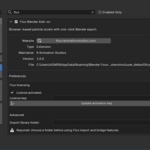
Flux must be launched from inside Blender using the Launch Flux button in the N-Panel. Opening the URL directly in your browser won't activate the session or enable export.
How long does export/baking take?
It depends on the number of particles and frames. Simple effects can bake in a few seconds, while heavier simulations with high particle counts may take up to 2–3 minutes.
Can I use Flux without an internet connection?
No, an internet connection is required as Flux runs in the browser.
Which Blender version is required?
Blender 4.5 or newer.
Can I have multiple particle effects in the same Blender scene?
Yes. You can import multiple effects and they will each appear as separate entries in the dropdown inside the Flux panel.
My Superhive license claim isn't working. What do I do?
Make sure you're entering the exact Order ID and purchase date. Also note that it can take up to 5 minutes after purchase for your order to appear in our system. If the issue persists, contact us and we'll sort it out immediately.
Will Flux support more features in future updates?
Absolutely. More emitter shapes, additional forces, improved colliders, better color ramp controls and interpolation methods are already planned. Purchasing now gets you access to all future updates.
Have questions about this product?
Login to message
| Blender Extension Compatible | Yes |
| Published | 5 months ago |
| Blender Version | 4.5 - 5.1 |
| Extension Type | Add-on |
| Render Engine Used | Cycles, Eevee |
| License | GPL |

Discover more products like this
particle system geometry nodes simulation flux effects particles forces fire FX motion graphics VFX real-time