Forestation - High Quality 3D Scanned Trees
 Bproduction








Tutorial
To obtain the micro displacement, switch cycles to "experimental" mode.
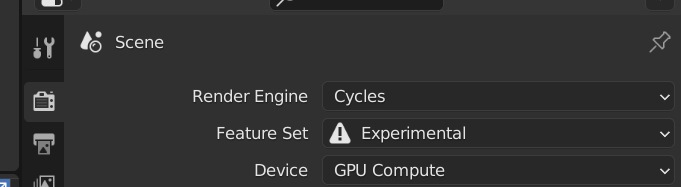
Make sure the "adaptive subdivision" button is checked in the trunk modifier.


Asset Browser
step 1
Unzip the file Forestation_asset
step 2
Go to edit/preference/file path. Add the patch and the name of your library.

Step 3
Open the window "asset browser" (shift+f1) and Select "Forestation" in the list.

Step 4
Drag and drop !
*for HD models, after import your model if you want to edit or modify the tree,press Ctrl+A in the 3D viewport and click on "make real instance".

With Asset browser note that the functionalities of the addon will no longer be accessible (animation or change of season) you will have to do it manually.
Have questions about this product?
Login to message
| Sales | 1500+ |
| Rating | 14 ratings |
| Dev Fund Contributor | |
| Published | over 4 years ago |
| Blender Version | 3.4 - 5.2 |
| Render Engine Used | Cycles, Eevee |
| Misc Data | Uvs-Unwrapped, Animated, Low-High-Resolution, Normal-Mapped, Textured |
| License | Royalty Free |
Discover more products like this
bcon22 summer23 photoscanned 3d photoscanned bfcm22 spring24 summer22 spring23 geoscatter plant 3D Photorealism tree 3D Trees bfcm23 spring22 loveblender winter24