French Keyboard Shortcuts - HotkeyBoard Azerty
 Salman Naseem


Overview
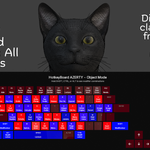
HotkeyBoard AZERTY is a professional Blender addon providing an interactive, real-time keyboard overlay specifically designed for AZERTY keyboard users. It displays all Blender shortcuts color-coded by importance, with bilingual support (English/French) and instant key highlighting.
Purpose: Help AZERTY users learn and reference Blender shortcuts without QWERTY translation.
Target Users: French, Belgian, Swiss, Quebec, and North African Blender users with AZERTY keyboards.
Key Features
Core Functionality
Complete AZERTY Layout Support
- Mac AZERTY: @ 1-9-0 ) - layout with CMD/OPT keys
- Windows AZERTY: ² 1-9-0 ° + layout with CTRL/ALT/ALTGR keys
- Automatic platform detection (no configuration needed)
- Correct special characters for each platform
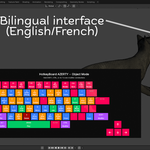
Bilingual Interface
- English and French language support
- 150+ shortcuts fully translated
- One-click language switching
- Key labels stay alphabetic (A, Z, E, R, T, Y)
- Only shortcut descriptions translate
Real-Time Key Highlighting
- Yellow highlight when keys pressed
- Instant visual confirmation (< 1ms)
- Helps locate keys quickly
- Great for learning and demonstrations
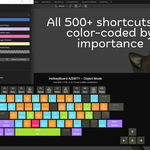
500+ Shortcuts Covered
- Object Mode: 200+ shortcuts
- Edit Mode: 200+ shortcuts
- Sculpt Mode: 50+ shortcuts
- Paint Modes: 30+ shortcuts each
- All essential Blender operations
Color-Coded Priority System
- Blue: Primary shortcuts (Move, Rotate, Scale)
- Green: Secondary shortcuts (Duplicate, Play)
- Orange: Tertiary shortcuts (Advanced features)
- Purple: Modifier keys (Shift, Ctrl, Alt)
- Red: Danger operations (Delete)
- Yellow: Active/pressed keys
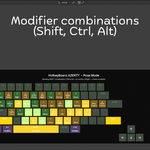
Modifier Combinations
- Hold Shift to see Shift+Key shortcuts
- Hold Ctrl/Cmd to see Ctrl+Key shortcuts
- Hold Alt/Opt to see Alt+Key shortcuts
- Multiple modifiers supported
- 300+ combination shortcuts
Full Customization
- All 7 colors customizable
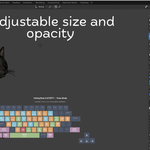
- Scale: 50-150% (fits any screen)
- Opacity: 0-100% (subtle or prominent)
- Font sizes adjustable
- Multi-line text wrapping
- Settings save automatically
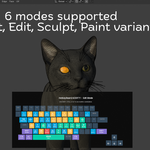
Multi-Mode Support
- Automatically updates for each mode
- Object, Edit, Sculpt, Paint modes
- Shows mode-specific shortcuts
- No lag when switching modes
Technical Specifications
System Requirements
Minimum:
- Blender 4.2 or newer
- 64-bit operating system
- 4 GB RAM
- 50 MB disk space
- AZERTY keyboard
Recommended:
- Blender 4.3 or newer
- 8 GB RAM
- 1920x1080 display or higher
- Physical AZERTY keyboard
Supported Platforms:
- macOS 11+ (Big Sur and newer)
- Windows 10/11
- Linux (Ubuntu 20.04+, Fedora, Debian, Arch)
Supported Processors:
- Intel x86_64
- AMD x86_64
- Apple Silicon (M1/M2/M3)
Performance
Resource Usage:
- Addon size: 44 KB (compressed)
- RAM usage: < 5 MB during operation
- FPS impact: < 1% (typically 0.3-0.5%)
- CPU usage: < 0.1% continuous
- No rendering slowdown
Response Time:
- Key press detection: < 1ms
- Highlight display: Instant
- Mode switching: < 10ms
- Language switching: Instant
Optimization:
- Batch rendering for efficiency
- Minimal GPU state changes
- Efficient data structures
- No memory leaks
- Smart caching system
Architecture
File Structure
HotkeyBoard_AZERTY/
├── __init__.py              (3 KB) - Registration
├── keyboard_overlay.py     (26 KB) - Rendering engine
├── keyboard_data.py        (22 KB) - Layouts & translations
├── preferences.py          (12 KB) - Settings system
├── panel.py                (4 KB) - UI panel
├── color_schemes.py        (5 KB) - Color presets
├── keymap_reader.py        (8 KB) - Shortcut detection
└── blender_manifest.toml   (1 KB) - Metadata
Technologies Used
Rendering:
- Blender GPU module (shader-based)
- OpenGL for graphics
- BLF (Blender Font) for text
- Batch drawing for performance
Language:
- Python 3.10+
- Pure Python (no external dependencies)
- Blender Python API
Storage:
- Settings in Blender preferences
- Persistent across sessions
- Automatic save
Features in Detail
Platform Intelligence
Automatic Detection:
- Detects macOS, Windows, or Linux
- Shows correct AZERTY variant
- Correct modifier key names
- No user configuration needed
Mac-Specific:
- CMD and OPT keys displayed
- @ ) - special characters
- Apple keyboard layout
- Emulate Numpad ON by default
Windows-Specific:
- CTRL, ALT, ALTGR keys
- ² ° + special characters
- PC keyboard layout
- Wider spacebar layout
Color System
Default Palette:
- Primary Blue: RGB(51, 127, 255)
- Secondary Green: RGB(0, 204, 102)
- Tertiary Orange: RGB(255, 153, 0)
- Modifier Purple: RGB(178, 76, 255)
- Danger Red: RGB(255, 51, 51)
- Pressed Yellow: RGB(255, 204, 0)
- Default Gray: RGB(76, 76, 76)
Accessibility:
- High contrast ratios
- Colorblind-friendly defaults
- Fully customizable for needs
- Clear visual hierarchy
Translation System
Coverage:
- 150+ shortcuts translated
- All modes covered
- Professional French terms
- Abbreviated for space
Examples:
- Move → Déplacer
- Rotate → Rotation
- Scale → Échelle
- Duplicate → Dupliquer
- Select All → Tout Sélect
Implementation:
- Dictionary-based translation
- Zero performance impact
- Instant switching
- Extensible for future languages
Keyboard Layouts
Mac AZERTY
Row 1: ESC [gap] F1-F4 [gap] F5-F8 [gap] F9-F12
Row 2: @ 1 2 3 4 5 6 7 8 9 0 ) - BKSP
Row 3: TAB A Z E R T Y U I O P ^ $ ENTER
Row 4: CAPS Q S D F G H J K L M ù `
Row 5: SHIFT < W X C V B N , ; : = SHIFT
Row 6: CTRL OPT CMD SPACE CMD OPT CTRL
Special:
- Arrow keys (↑ ↓ ← →) on right
- Numpad optional (emulated by default)
Windows AZERTY
Row 1: ESC [gap] F1-F4 [gap] F5-F8 [gap] F9-F12
Row 2: ² 1 2 3 4 5 6 7 8 9 0 ° + BKSP
Row 3: TAB A Z E R T Y U I O P ^ $ ENTER
Row 4: CAPS Q S D F G H J K L M ù *
Row 5: SHIFT < W X C V B N , ; : ! SHIFT
Row 6: CTRL ALT SPACE ALTGR CTRL
Special:
- Arrow keys (↑ ↓ ← →) on right
- Numpad optional (emulated by default)
- ALTGR key for special characters
Shortcut Coverage
By Mode
Object Mode (200+ shortcuts):
- Transform: G, R, S, Alt+G/R/S
- Selection: A, B, C, L, Alt+A
- Editing: D, X, Shift+D, Alt+D
- Organization: M, P, Alt+P, Ctrl+J
- Views: 1, 3, 7, 0, ° or ), +
- Animation: I, Alt+I, Space
Edit Mode (200+ shortcuts):
- Transform: G, R, S, E, I, Ctrl+B
- Selection: A, B, C, L, Ctrl+I
- Mesh: X, F, K, Ctrl+R, M, P, V
- View: Same as Object mode
Sculpt Mode (50+ shortcuts):
- Basic: G, R, S, X, A
- Views: 1, 3, 7, 0
- Tools: F, Shift+F
- Mask operations
Paint Modes (30+ each):
- Basic transform and view shortcuts
- Mode-specific tools
By Category
Transform (15 shortcuts): Move, Rotate, Scale, Clear transforms, Constrained movement
Selection (20 shortcuts): Select All, Box, Circle, Lasso, Linked, Invert
Editing (30 shortcuts): Duplicate, Delete, Extrude, Merge, Separate, Join
View (25 shortcuts): Front, Right, Top, Camera, Opposite, Pan, Zoom
Tools (25 shortcuts): Hide, Shading, Toolbar, Properties, Quick Favorites
F-Keys (12 shortcuts): Help, Rename, Search, File Menu, Render, Save
Navigation (15 shortcuts): Frame Selected, Local View, Transform Orientation
Compatibility
Blender Versions
Tested:
- Blender 4.2 LTS ✓
- Blender 4.3 ✓
- Blender 4.4 ✓
- Blender 5.0 ✓
Expected:
- Future Blender versions (forward compatible design)
- Manifests for Blender 5.0+ extension system
Operating Systems
macOS:
- macOS 11 Big Sur and newer
- Intel x86_64 processors
- Apple Silicon M1/M2/M3/M4
Windows:
- Windows 10 (64-bit)
- Windows 11
- Intel and AMD processors
Linux:
- Ubuntu 20.04+
- Fedora 32+
- Debian 10+
- Arch Linux
- Other distributions (should work)
Known Limitations
Keys That Don't Work:
- First key (² or @) - No Blender shortcut
- Second-to-last key (° or )) - No Blender shortcut
- These show gray (unused) correctly
Emulate Numpad Required:
- Laptops need Emulate Numpad ON
- Number row acts as view switching
- This is Blender's design, not addon limitation
Development
Version History
v1.1.0 (December 2025):
- Added English/French translation
- Language selector in N panel
- 150+ shortcuts translated
- Status: Current release
v1.0.1 (December 2025):
- Fixed unused keys (² @ ° ))
- Changed to gray color
- Accurate representation
v1.0.0 (December 2025):
- Initial release
- AZERTY layout support
- Mac/Windows detection
- Color customization
- 500+ shortcuts
Development (v2.x - November 2025):
- Multiple iterations during development
- Platform detection refined
- Key highlighting perfected
- Layout corrections
License
GNU General Public License v3.0
You can:
- Use commercially
- Modify the code
- Distribute copies
- Use privately
You must:
- Keep license
- State changes
- Disclose source
- Use same license
Support
Getting Help
Email: [email protected]
Response Time: 24-48 hours
Include: Blender version, OS, description, screenshots
Documentation
User Manual:
- Installation guide
- Feature explanations
- Troubleshooting
- FAQ section
Technical Documentation:
- This document
- Architecture details
- API information
Community
Forums:
- BlenderArtists.org
- Reddit r/blender
Social Media:
- YouTube: BeingAnimator
- Website: salmannaseem.com
Future Plans
Planned Features
Additional Languages:
- Dutch (for Belgian users)
- German (for Swiss users)
- Spanish, Italian
Advanced Features:
- Custom shortcut display
- Learning progress tracking
- Training mode
- More color themes
Integration:
- Export layout as image
- Print-friendly version
- Tutorial recording mode
Update Policy
Included:
- Bug fixes (always free)
- Blender compatibility updates
- Minor improvements
Ongoing Development:
- Active maintenance
- Community feedback
- Feature requests considered
Credits
Developer: Salman Naseem
Website: https://salmannaseem.com
YouTube: https://youtube.com/BeingAnimator
Email: [email protected]
Tools Used:
- Python 3.10+
- Blender 4.2+ API
- VS Code
- Git
Special Thanks:
- Blender community for feedback
- AZERTY users for testing
- French speakers for translation verification
Statistics
Addon Size: 44 KB (compressed)
Languages: 2 (English + French)
Shortcuts Covered: 500+
Translations: 150+
Colors: 7 customizable
Platforms: 3 (Mac, Windows, Linux)
Modes Supported: 6
Performance Impact: < 1%
Technical Documentation Version: 1.1.0
Last Updated: December 2025
Addon Version: HotkeyBoard AZERTY v1.1.0
Status: Production Ready ✓
Built with ❤️ for AZERTY Blender users worldwide
Have questions about this product?
Login to message
| Blender Extension Compatible | Yes |
| Published | 11 months ago |
| Blender Version | 4.0 - 5.0 |
| Extension Type | Add-on |
| Render Engine Used | Cycles, Eevee |
| License | GPL |
