 Skava
Skava


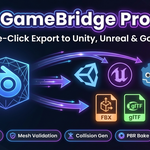
GameBridge Pro — Documentation
v1.0.0 · Blender 3.2 + · Unity (Built-in / URP / HDRP) / Unreal 4-5 / Godot 4 · Windows / macOS / Linux
Table of Contents
- 1. Install
- 2. Quick Start
- 3. Features
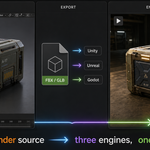
- 4. Engine targets
- 5. Naming convention enforcement
- 6. Collision generation
- 7. Validation
- 8. PBR baking and channel packing
- 9. Apply transforms
- 10. Animations
- 11. Custom properties
- 12. Tips
- 13. Troubleshooting
- 14. FAQ
- 15. Limitations
- 16. Support & License
1. Install
- Download
the archive from your purchase page(do not unpack). - In Blender:
Edit → Preferences → Add-ons → Install... - Pick the ZIP, then enable GameBridge Pro in the list.
- Press
Nin the 3D Viewport — the GameBridge tab appears.
2. Quick Start
- Select the objects you want to export.
- Open
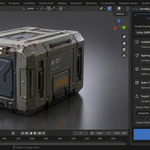
Sidebar → GameBridge. - Pick the target engine (Unity / Unreal / Godot) and, for Unity, the render pipeline (Built-in / URP / HDRP).
- Set the export folder.
- Press Export.
GameBridge runs validation, applies the engine's naming rules, generates the configured collision meshes, and writes an FBX (Unity / Unreal) or .glb (Godot) with the correct axes and units.
3. Features
- Engine-specific FBX / GLB export with correct axes, units, and FBX
object_types(no stray cameras / lights). - Custom properties preserved as FBX
user_properties. - Naming convention enforcement — PascalCase, illegal-character stripping, prefix application.
- Collision generation — box, convex hull, decimated mesh; correctly parented and offset.
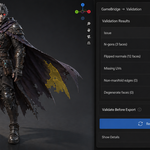
- Validation — non-manifold, n-gons, flipped normals, missing UVs flagged before export.
- PBR baking with engine-specific channel packing (Unity Metallic+Smoothness, ORM for UE / Godot).
- Apply transforms option for clean Unity / Unreal scale and rotation.
4. Engine targets
| Engine | Format | Axes | Notes |
|---|---|---|---|
| Unity Built-in / URP / HDRP | FBX | Y up / -Z forward | Pipeline-aware channel packing |
| Unreal Engine 4 / 5 | FBX | Z up / X forward | SM_ / UCX_ prefixes, user properties |
| Godot 4 | GLB | Y up (via glTF) | Tangents on, snake_case names |
5. Naming convention enforcement
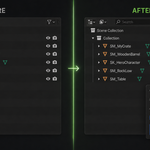
With Enforce Naming on, every exported object is renamed per engine convention before the FBX / GLB is written.
-
Unreal: static meshes get the
SM_prefix; PascalCase; non-alphanumeric characters stripped. - Unity: object names preserved; characters Unity cannot import (slashes, colons) stripped.
- Godot 4: snake_case; cyrillic transliterated, not stripped.
6. Collision generation
Choose between Box, Convex Hull, or Decimated Mesh in the Collision panel. Each generated collider:
- Is parented to the source mesh with
matrix_parent_inverseso it stays glued in place when the source moves. - Gets the engine-correct name (Unreal:
UCX_; Unity:_col; Godot:-col). - Is automatically included in the FBX / GLB export so the engine picks it up on import.
7. Validation
Before each export, GameBridge runs a pre-flight check:
- Non-manifold edges and vertices.
- N-gons (faces with more than 4 vertices).
- Flipped face normals.
- Missing or empty UV layers.
- Missing material slots on meshes that reference textures.
Issues are surfaced as warnings; you can choose to abort or continue.
8. PBR baking and channel packing
| Pipeline | Pack | Channels |
|---|---|---|
| Unity Built-in / URP | Metallic + Smoothness | RGB = Metallic, A = 1 − Roughness |
| Unity HDRP | MaskMap | R = Metallic, G = AO, B = Detail, A = 1 − Roughness |
| Unreal / Godot 4 | ORM | R = AO, G = Roughness, B = Metallic |
9. Apply transforms
Non-identity scale on the source mesh confuses the Unity / Unreal FBX importers. With Apply Transforms on, GameBridge duplicates the mesh, applies location / rotation / scale on the duplicate, exports the duplicate, then removes it. Your scene stays untouched.
10. Animations
With Export Animations on, armature actions are baked into the FBX / GLB. Without this flag the exported file contains zero animation data even if your armature has multiple actions assigned.
11. Custom properties
Blender custom properties on exported objects are written into the FBX as user_properties. Unity does not read these by default — you need a small AssetPostprocessor script in the project. Unreal Engine 5 reads them via a Python build hook.
12. Tips
- Always apply transforms before export for Unity / Unreal.
- For Unreal, leave Enforce Naming on to get
SM_prefixes the engine expects. - Collision in Unreal:
UCX_meshes are auto-detected as convex hulls on FBX import. - Enable Export Animations explicitly; otherwise the FBX has no animation data.
13. Troubleshooting
"Export silently fails / nothing appears" — set the export path; the operator returns early if it's empty.
"Collisions are floating away from the source" — fixed in v1.0.0: collision objects use matrix_parent_inverse so they stay glued.
"FBX contains my camera / light" — fixed in v1.0.0: the FBX exporter is restricted to mesh, armature, and empty types.
"Custom properties don't reach Unity / Unreal" — Unity needs an AssetPostprocessor; Unreal reads them via a Python build hook.
14. FAQ
Q: How do I install GameBridge Pro?
A: See section 1 above.
Q: Which Blender versions are supported?
A: Blender 3.2 and later (4.2 LTS recommended).
Q: Why FBX / GLB and not USD?
A: Unity and Unreal still prefer FBX in practice; Godot prefers glTF. USD support can be added in a future version if there is demand.
Q: Can I use the result commercially?
A: Yes — without restriction. GPL-3.0 applies to the addon code only; what you export is yours.
15. Limitations
- Unity needs an AssetPostprocessor to read FBX user properties.
- USD format not supported (FBX / GLB only).
- Validation flags issues but does not auto-fix them.
16. Support & License
For questions, bug reports, or feature requests please contact the seller through the marketplace messaging where you bought this add-on.
GPL-3.0. The license applies to the addon code only — what you export is yours to ship in any commercial project.
Have questions about this product?
Login to message
| Published | 5 months ago |
| Blender Version | 3.1 - 5.1 |
| Extension Type | N/A |
| Render Engine Used | Arnold, Blender-Internal, Blender-Game-Engine, Cycles, Eevee, Freestyle, Luxrender, Mental-Ray, Octane, Vray, Yafaray |
| License | Mit |
Discover more products like this
naming-conventions gltf blender-to-engine Unreal Engine mesh-validation collision mesh PBR Bake unity game-dev godot fbx game-export