GameDev Batch Render & Export
 Artifact3DStudio


GAME DEV BATCH RENDER & EXPORT
User Guide & Documentation
Version: 4.2
Compatibility: Blender 3.0+ (Tested up to Blender 4.5+)
License: GPL-2.0-or-later
1. OVERVIEW
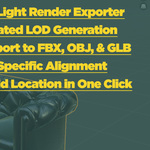
GameDev Batch Render & Export is a streamlined pipeline tool designed for 3D Artists, Technical Artists, and Game Developers. It eliminates repetitive manual tasks by automating studio-quality transparent PNG thumbnail rendering, batch multi-format exporting with engine-specific coordinate presets, automated LOD chain generation, and batch origin alignment.
2. INSTALLATION
Open Blender and navigate to Edit > Preferences.
Select the Add-ons tab on the left menu.
Click the Install... button at the top right.
Locate and select the gamedev_batch_render_export.py file.
Check the box next to Import-Export: GameDev Batch Render & Export to enable it.
Press the N key in the 3D Viewport to reveal the Sidebar panel. Click on the GameDev Suite tab.
3. FEATURES & HOW TO USE
Module 1: Batch PNG Render (Studio Light)
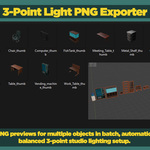
Renders individual transparent .png thumbnails for each selected mesh asset with automated framing and dynamic 3-point studio lighting (Key, Fill, and Rim lights).
Resolution (px): Sets the output thumbnail resolution (default: 512px).
Batch Render PNG Studio Shots: Opens a folder dialog. Select a target directory to automatically render and save all selected meshes as _thumb.png.
Module 2: Batch Export Engine
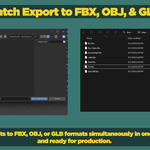
Exports selected assets into separate files using preset coordinate systems tailored for major game engines.
Target Engine:
Unreal Engine: Configures export axes to Z-Up / Y-Forward with Unit Scale 1.0.
Unity: Configures export axes to Y-Up / Z-Forward.
Custom: Uses default Blender coordinate orientation settings.
Format: Choose between .fbx, .obj, or .glb (GLTF).
Collection Folders: When enabled, automatically creates subfolders named after the Blender Collection each object belongs to.
Export Selected Assets: Opens a folder picker to execute the batch export process.
Module 3: LOD Generator
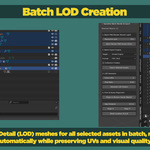
Generates non-destructive Level of Detail (LOD) chains using Blender's Decimate modifier.
Extra LODs: Number of lower-detail mesh copies to generate (1 to 4).
Poly Ratio: Reduction factor per LOD step (e.g., 0.5 reduces polycount by 50% per level).
Generate LOD Chains: Renames the base object to _LOD0 and generates _LOD1, _LOD2, etc., in place.
Module 4: Pivot & Scene Alignment
Tools to quickly sanitize transform data and organize scene layouts prior to export.
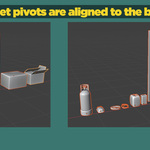
Origin to Bottom Center (Batch): Relocates the pivot point (origin) of all selected objects individually to the exact bottom-center of their respective bounding boxes.
Gap Distance: Spacing distance (in meters) applied between objects during alignment.
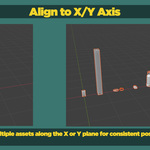
Align X / Align Y: Sorts selected objects and places them sequentially along the X or Y axis without geometry overlap.
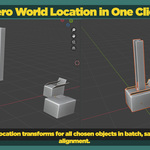
Reset Location (0,0,0): Moves all selected objects back to the world center origin (0,0,0).
4. SUPPORT & CONTACT
For bugs, feature requests, or questions regarding this add-on, please contact via the official BlenderMarket product page support portal.
Have questions about this product?
Login to message
| Published | about 2 months ago |
| Blender Version | 3.0 - 5.2 |
| Extension Type | N/A |
| Render Engine Used | Blender-Internal, Cycles, Eevee |
| License | GPL |
Discover more products like this
1-click-export Center Pivot blender LOD addon LOD 3D alignment tools location Render 3D export asset thumbnails 3d asset export 3d-game-ready