 Skava
Skava


Godot Pipeline — Documentation
v1.0.1 · Blender 3.2 + · Godot 4.0 + (4.2 / 4.3 tested) · Windows / macOS / Linux
1. Install
- Download
the archive from your purchase page(do not unpack). -
Edit → Preferences → Add-ons → Install..., pick the ZIP, enable Godot Pipeline. - Press
Nin the 3D Viewport → Godot tab.
2. Quick start
- Set Export Path (your Godot
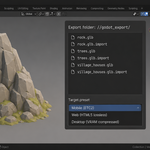
res://assets folder). - Pick Target preset: Desktop / Mobile (ETC2) / Web (HTML5).
- (Optional) toggle snake_case, .import sidecars, Lightmap UV, MultiMesh folding.
- Click Export Scene.
3. Scene export
Writes a top-level .tscn + per-mesh .glb via Blender's glTF exporter with the full Godot 4 arg set: export_tangents (correct Normal Map shading), export_extras (Blender custom props → Godot metadata), export_morph, export_skins, export_animations, export_cameras, export_lights, plus use_visible and use_renderable filtering.
4. .import sidecars
For each .glb, writes a Godot 4 .import file pre-configured: tangents on, mesh shadow generation on, light baking mode per target preset, compress mode per target preset. Without these Godot uses defaults that often disable LODs, mipmaps, lightmap UVs.
5. Target presets
| Preset | Compress | Light baking |
|---|---|---|
| Desktop | VRAM (BC7) | Static |
| Mobile | VRAM (ETC2) | Static |
| Web (HTML5) | Lossless | Disabled |
6. MultiMeshInstance3D folding
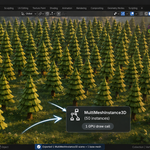
Groups of ≥3 objects sharing the same mesh.data + identical materials + no children + no Armature modifier are exported as a single _multimesh.tscn with a packed PackedByteArray of Transform3Ds (12 little-endian floats per instance: 3×3 basis column-major + origin). Blender Z-up is rotated to Godot Y-up before packing.
7. Cyrillic-safe naming
to_godot_name transliterates non-ASCII to Latin (а→a, ш→sh, ё→yo, ...) instead of stripping. Empty results fall back to unnamed.
8. Lightmap UV channel 2
If enabled, generates a second UV layer via Lightmap Pack (Smart UV Project fallback) for any mesh missing one. Godot 4 reads channel 2 as the lightmap UV automatically with LightmapGI.
9. Batch export by collection
Walks every top-level visible collection. Each collection writes a sub-folder with its own .glb + .import set. Useful for modular asset libraries.
10. Collision shapes
| Suffix | Godot result |
|---|---|
-col |
StaticBody3D + CollisionShape3D |
-colonly |
CollisionShape3D, no visible mesh |
-rigid |
RigidBody3D |
-area |
Area3D (trigger) |
Hidden / not-renderable objects skipped at collision-generation time.
11. Material conversion
Every material referenced by exported meshes is converted to a Godot 4 StandardMaterial3D resource written to materials/.tres. Mapped: Base Color, Metallic, Roughness, Normal, Emission, Alpha.
12. Animation export
Bone tracks (position_3d / rotation_3d / scale_3d) baked into the .glb or exported as separate .tres resources. Split by NLA clips walks armature NLA tracks; overlapping clip ranges trigger a popup warning.
13. GridMap MeshLibrary
Tile meshes auto-centred to cell-size origin, validated against chosen cell size. Imports straight into a GridMap node's MeshLibrary slot.
14. Troubleshooting
Normal maps look wrong in Godot — check .glb includes tangents (v1.0 sets export_tangents=True). Verify .import wasn't overwritten to disable tangents.
Russian bone names became 'unnamed' — transliteration covers Cyrillic. Stripped chars: punctuation only.
MultiMeshInstance3D shows only one instance — Transform3D packing format may not match your Godot version. Tested against 4.2 / 4.3.
Hidden objects still in export — check hide_render is on, not just hide_viewport. Collection-level hide_render also respected.
15. Limitations
- MultiMesh format tested against Godot 4.2 / 4.3 — earlier versions may need verification.
- Material conversion covers StandardMaterial3D basics — Anisotropic, SSS, procedural shaders not preserved.
- NLA animation split requires each clip on a separate Action.
16. Support & License
Through marketplace messaging. GPL-3.0. Assets you export are yours to ship in any commercial project.
Have questions about this product?
Login to message
| Published | 4 months ago |
| Blender Version | 3.1 - 5.1 |
| Extension Type | N/A |
| Render Engine Used | Arnold, Blender-Internal, Blender-Game-Engine, Cycles, Eevee, Freestyle, Luxrender, Mental-Ray, Octane, Vray, Yafaray |
| License | GPL |