 Skava


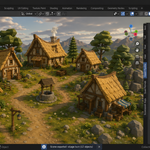
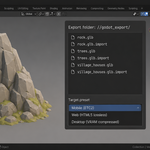
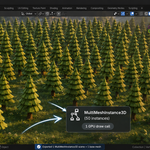
Download the zip and do not unpack it. In Blender open Edit > Preferences > Add-ons, click the drop-down arrow in the top-right corner and choose Install from Disk, then pick the zip. Tick the checkbox next to Godot Pipeline. Press N in the 3D Viewport and open the Godot tab.
Blender 4.2 LTS and newer; the README inside the zip records tests on 4.2.9 and 5.2.0. The files it writes target Godot 4. The add-on is pure Python with no compiled binaries and no external packages.
Set Export Path to a folder in your Godot project, pick the Target (Desktop, Mobile or Web) and press Export Scene. You get a .tscn scene plus one .glb per mesh, written with Blender's own glTF exporter with tangents, skins, shape keys, animations, cameras, lights and custom properties included, and only visible, renderable objects exported. With Export Materials on, materials are converted to Godot StandardMaterial3D .tres files (base colour, metallic, roughness, normal strength and emission). File names are made Godot-safe, with Cyrillic letters transliterated to Latin instead of being dropped; Convert to snake_case decides whether object node names are converted the same way.
With Write .import sidecars on, each .glb gets a Godot 4 .import file written beside it with these settings: tangents on, LOD generation on, shadow meshes on, and the light baking mode for your Target (Static for Desktop and Mobile, Disabled for Web).
Every file is first written to a temporary file next to its destination and then moved into place in one step, so an interrupted export cannot leave a half-written file where a good one was. If an export fails partway, the clean-up removes only the files that run created; files that were already in the folder are left where they are.
Generate Collision in the Collision Shapes panel adds a collision mesh as a child of the selected object, named with the Godot import suffix for the chosen Collision Type (-col, -colonly, -rigid, -area, -vehicle or -navmesh); hidden and non-renderable objects are skipped. With Lightmap UV (channel 2) on, a second UV layer is created with Lightmap Pack (Smart UV Project as fallback) for every mesh that does not already have two. Batch Export by Collection exports each top-level collection into its own subfolder of the export path.
No. The add-on contains no network code; it only writes files into the export folder you choose.
Yes. The add-on is GPL-3.0 (full text in the LICENSE file inside the zip). The license covers the add-on code; the assets you export are yours. The full guide is in the Documentation & FAQ tab on this product page, and README.md inside the zip covers install and quick start.
Have questions about this product?
Login to message
| Published | 5 months ago |
| Blender Version | 3.1 - 5.1 |
| Extension Type | N/A |
| Render Engine Used | Arnold, Blender-Internal, Blender-Game-Engine, Cycles, Eevee, Freestyle, Luxrender, Mental-Ray, Octane, Vray, Yafaray |
| License | GPL |