 Curb Industries


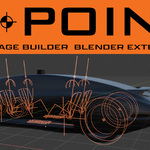
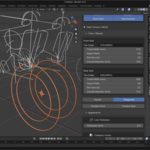
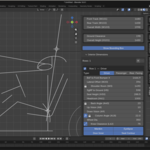
Automotive packaging for Blender. Start from the framework every real car is designed around, live in the viewport.
Referencing SAE J1100, the dimensional system every major automaker measures by.
Every real car, from a Fiat 500 to a Bugatti Chiron, starts from a package: a measured framework of hardpoints, dimensions, relationships and ergonomic constraints that the body wraps around. Vehicles are designed around the driver. How they get in and out, how they see the road, how they reach the controls, how safely and comfortably they can drive.
Without a package there is nothing underneath the model. The scene opens empty, the work starts anyway, and the foundation is the one part of a build you cannot fix later. You do not find out it was wrong until the body is already over the top of it, and then everything that sat on it gets built twice.
H-Point: Package Builder gives you the foundation instead, inside Blender. Think of it as a brief written in dimensions. You already know how to work to a brief; this one is made of hardpoints instead of adjectives, and it arrives before the meeting rather than after it.
What it does
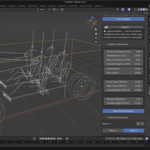
Package Builder generates the 3D reference geometry vehicle design is measured from. Tire and wheel geometry, ground planes, H-point markers, ergonomic manikins, eyellipses, and a full set of dimensional controls. Every measurement is exposed as a control, and they are linked by the relationships that define a real vehicle: the seat at the right distance from the steering wheel, the pedals under the driver's foot, the eye-line clearing the cowl.
Change one, and the rest stay coherent. Move the tire diameter, and the ground plane, ground clearance, H-point height and overall vehicle height all update in real time.
The Package Method
1. Benchmark. Start from a real vehicle, with real numbers, carrying real SAE codes. 2. Tweak. Push the dimensions where your concept needs to go. The relationships hold. 3. Build. Design the car around a foundation that is already true.
Inside
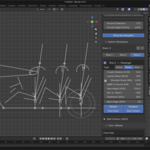
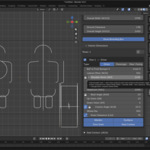
- Ergonomic manikins. 95th percentile anthropomorphic templates referencing SAE J826. Driver, passenger and rear-facing modes, up to four rows, with a planted-foot leg solve. A reclined competition driver mode for race packages. Place a real person, then design the seat around them.
- Eyellipse and sightlines. Full J941 eyellipse construction, package-fixed. Headroom, accommodation curve, and the geometry that decides whether your driver can see over the cowl before you commit to the cowl.
- Tire module. Fully parametric tire and wheel geometry. Stagger front and rear independently. Wheels stay grounded as the package scales. Single or tandem axle layouts, with midpoint anchoring per SAE convention.
- Linked dimensions. Wheelbase, overall length, overhangs, track, ride height, cabin height, beltline, ground clearance, sightlines. The relationships hold automatically.
- Left and right hand drive. Driver station side as a single switch, with the steering, pedals and occupant solve following it.
- Industry-standard labels. Every landmark and dimension carries its SAE J1100 code, and a tooltip explains what it means. Check any value against any spec sheet in the world.
- Packages as data. Save a package as a .pkg.json or .pkg.csv file: about a hundred numbers you can read, email or compare, and import again. It also reads the spreadsheet someone else already wrote, in their own column names.
- Live and interactive. Every control is realtime. Drag a value and the whole package answers in the viewport as you drag it. Packaging becomes something you explore rather than something you specify and wait on.
- Blender-native. Not an export target and not a plugin bolted onto a CAD workflow. Packages use Blender's own materials, lighting and animation, so the package becomes part of your presentation rather than scaffolding you hide before the render. You are already in the software you like working in.
Where it earns its keep
Sketching a new concept? Build a package first and start the body around real proportions. Modeling a vintage car? Set the dimensions from the spec sheet, and the package will show you why the original designers made the choices they did. Building a portfolio piece? Your renders will read as a real car, because the car is real.
Why this exists
H-Point: Package Builder is the latest tool in the Curb Industries H-Point family, referencing the principles of H-Point: The Fundamentals of Car Design and Packaging by Stuart Macey, the textbook developed at ArtCenter College of Design and used at CCS, RCA, Pforzheim and Coventry University, among other transportation design programs.
What shaped this tool most was teaching at ArtCenter, working with students on hundreds of experimental vehicle concepts: hypercars, autonomous pods, EV trucks, kei-class commuters, and vehicles that fit no existing template. A framework has to hold the rules of vehicle design while leaving room for maximum creativity. That is a harder problem than it sounds, and it is the problem this tool is designed around.
Until now, tools like this cost tens of thousands of dollars per seat, run on software that takes years to learn, and live behind doors most aspiring designers cannot get through.
None of that was ever about the knowledge. The standards are published, the methods are taught, and none of it is secret. What has been scarce is the software, and that is what decided who got to work this way. Not talent. Not curiosity. The gate was never the knowledge. It was the software.
Not done yet
Package Builder ships as a fully functional tool. It is solid, and it works. The roadmap goes further, and we are committed to developing and supporting the base tool, with updates and support included in your purchase.
As the work grows, new capability will arrive as separate add-ons and asset libraries that plug into Package Builder rather than being bolted inside it. That keeps the tool you bought focused, and it means you take only the parts you actually need.
What designers are saying
"Love it Alan." Xitij Mistry, Creative Design Manager at Lincoln and Ford Design
"Packaging is surprisingly hard to do quickly and to iterate on. Super cool tool!" Shad Woodland
"Awesome! Been doing this quasi-manually for a decade. Love to see the interactivity!" @scafoto
"Well done. I tried to develop this very idea a few years ago, but AI wasn't sufficiently advanced back then." @lou_gasevski
"This is perfect for automotive design college, I need this." @calcium_pvt
"Now I can stop my version development." @gpravin1234 · "This looks incredible. How do I get it!!!!" @dave_clark_designs · "This is the best news I've heard in 2026." @romzes_01 · "Tried it. Beautiful." @halawadj · "Game changer." @ianshotwheels · "Brilliant." @al.yasid.arte · "This is dope." @wilbursupermachines
What you own
$49.99, once. No subscription, no activation, no license server. Install it on every machine you work on. Your packages outlive the add-on: a .blend built with Package Builder opens and holds its geometry in a Blender install that has never seen it, so you can hand the file to anyone. Updates and support are included, and we are committed to developing and supporting the base tool.
Educational pricing is $9.99. Contact [email protected] for educational pricing.
Blender 4.2 and up, on the Extensions platform. Works with all standard Blender shading and rendering workflows. Licensed GPL-2.0-or-later.
Get it right at the start
The tools real studios use cost hundreds of times more. We thought you should have one too.
Anyone can design a car. It just takes the right framework to start.
