Hdri Blur Background & Reflections
 César Moncloa






How can I get support?
Please contact me through the Superhive message system if you have questions, compatibility issues, or suggestions for future versions.
Where do I find the add-on?
3D Viewport > Sidebar > Cesar HDRI
Does World Opacity remove the HDRI lighting?
No. World Opacity is designed to control the visible background while keeping the HDRI useful for lighting and reflections.
Can I use values above 2 for Strength?
Yes. The slider is designed around 0 to 2, but you can manually type higher values if needed.
Is this the same as Blender’s viewport blur?
No. Blender’s viewport blur is a viewport display feature. This add-on creates a blurred HDRI source and applies it to the World so the background and reflections can stay visually consistent.
Why do I need to enable Scene World?
Scene World lets the viewport display the World environment from the scene instead of only using the default viewport HDRI preview.
Can I use Blender’s default HDRI environments?
Yes. But not directly, If you save or locate the HDRI file used by Blender’s viewport lighting, you can load it into the add-on like any other .hdr or .exr file. This allows you to create a look similar to Blender’s Viewport Shading, but with a blurred World environment that can also affect reflections.
Can I still use the original HDRI?
Yes. Use Apply Original HDRI to apply the selected HDRI without blur.
Does the blur affect reflections?
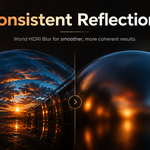
Yes. The blurred HDRI is applied to the World, so the environment used by the scene is blurred as well.
Does this add-on include HDRI files?
No. This add-on is designed to work with your own .hdr or .exr files.
$10
Have questions about this product?
Login to message
| Published | 4 months ago |
| Blender Version | 4.0 - 5.0 |
| Extension Type | N/A |
| Render Engine Used | Cycles, Eevee |
| License | GPL |
Discover more products like this
3d tools viewport hdri product rendering reflections look development artist-tools Add-on background environment rendering Lighting