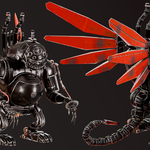
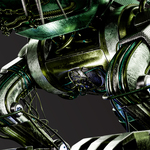
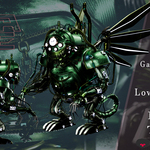
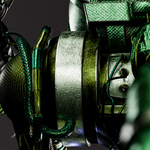
Infernal Clockwork Leviathan | Aaa Game-Ready Creature & 20H+ Tutorial
 reyhane_3d







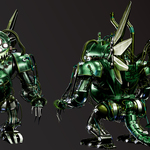
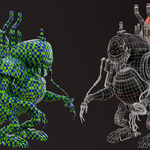
# 📖 Product Documentation & Setup Guide
Thank you for purchasing the **Infernal Clockwork Leviathan** asset pack and tutorial! Below is the guide for file organization, texture pipelines, and engine setup.
---
### 📁 Directory Structure
* `01_Blender_Scene/` : Main `.blend` scene with pre-configured PBR materials, nodes, and lighting setups for Cycles & Eevee.
* `02_GameReady_LowPoly/` : Optimized low-poly FBX & OBJ models (66,000 Tris) ready for game engines.
* `03_HighPoly_Source/` : High-poly sculpt (13M+ Tris) for high-end cinematic rendering or baking customized maps.
* `04_Substance_Painter/` : Full `.spp` project source file with complete layer hierarchy and masks.
* `05_UDIM_Textures/` :
* `/8K_Cinematic_Set/` : Ultra-high resolution UDIM maps for cinematic projects.
* `/4K_Realtime_Set/` : Performance-optimized UDIM maps for real-time engines.
* `06_References/` : Curated reference images used during design.
---
### 🎨 Texture & Engine Integration
1. **Blender:** Open the provided `.blend` file. All UDIM texture sets are pre-linked to Shader Nodes.
2. **Unreal Engine 5:** Import the FBX from `02_GameReady_LowPoly`. Enable Virtual Texturing / UDIM support in UE5 and assign the maps from `05_UDIM_Textures/4K_Realtime_Set`.
3. **Substance Painter:** Open the `.spp` source file to edit wear, change colors, or re-export custom texture resolutions.
---
### 🎓 Tutorial Overview
* **Format:** Step-by-step silent video recording with visible shortcut keypresses and mouse clicks.
* **Runtime:** 20+ hours covering Highpoly Modeling, UDIM Unwrapping, Retopology, Baking, Texturing, and Presentation.
-
$9.99
This variant “Game-ready | Optimized topology | PBR 4K”
-
$12.99
This variant contains Highpoly 3d model and 4k textures.
-
$17.99
This variant contains Highpoly 3d model and 4k textures. This variant contains Lowpoly and Highpoly 3d model and 4k textures.
-
$19.99
this variant contains tutorial videos and refrences
-
$29.99
“Best value – Save more than 40%”
 Included
Includes 12 months of
- Support from reyhane_3d
- Product updates
Extend this product’s Support Period +12 months: 50% of product price
Have questions before purchasing?
Login to message
| Published | about 2 months ago |
| Blender Version | 4.2 - 5.0 |
| Render Engine Used | Cycles, Eevee |
| Misc Data | Uvs-Unwrapped, Animated, Low-High-Resolution, Normal-Mapped, Textured |
| License | Royalty Free |
Discover more products like this
mechanical Steampunk udim clockwork PBR monster 3d model game ready tutorial hard surface leviathan creature