 Tessermind LTD


InstanceMaster: Intelligent Instancing for Blender Scene Optimization
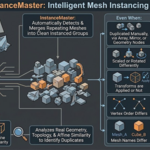
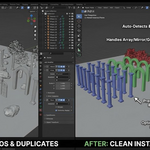
InstanceMaster is the essential tool for automatically detecting and merging repeating meshes in Blender into clean, instanced groups. It is perfectly suited for preparing large scenes for export, especially to Unreal Engine, where it delivers significant performance gains.
Key Capabilities and Value:
-
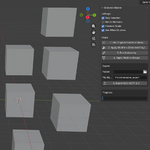
Detailed Identification: Analyzes real geometry, topology, and affine similarity to find duplicates, even if they:
Have applied or unapplied transforms.
Were duplicated manually, via Array, Mirror, or Geometry Nodes.
Have differing vertex order.
Real-World Scale Preservation: The accurate real-world scale of your objects is always maintained.
Optimized Workflow: Creates new instance groups only when the geometry genuinely differs, ensuring maximum efficiency.
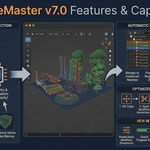
Key Features of InstanceMaster 7.0
With InstanceMaster, you don't just export; you optimize: drastically reduce file size and accelerate scene loading in Unreal Engine by orders of magnitude.
Automatic Performance Optimization: Instantly converts hundreds of duplicated meshes into lightweight instanced groups.
Intelligent Duplicate Detection: Recognizes and merges objects that have been scaled, rotated, or created via Array/Mirror/Geometry Nodes, ignoring differences in names and vertex order.
Simplified 1-Panel Workflow: The entire optimization process (Origin, Modifiers, Instancing, Export) is now accessible within a single, convenient tab.
Responsive Blender: New modal modifier application and progress bars allow you to keep working in Blender while large scenes are being processed.
Single GLB Export: Built-in tool for exporting the entire optimized scene into one single
.glbfile, ready for game engine import.
Recommended Workflow (5-Step Optimization):
Set Origin: Stabilizes object origins.
Apply Modifiers: Batch application of modifiers.
Run Instancing: Generates instanced groups.
Apply Mesh to Groups: Resyncs if needed.
Export GLB: Exports the scene to a single
.glbfile.
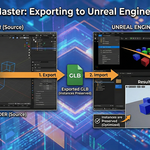
Exporting to Unreal Engine:
Simply use Import → Import To Level in Unreal Engine. Instances will be preserved and can easily be converted to ISM/HISM for further optimization if needed.