Instant Calamari - Faster Playback for Animation!
 CBaileyFilm



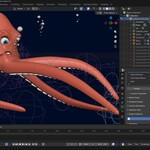
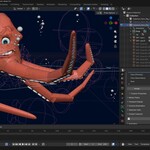
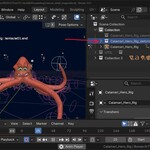
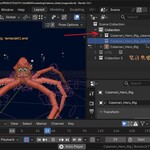
Instant Calamari
A Blender addon that automatically generates a calamari rig. The tool splits a skinned mesh into smaller mesh objects based on vertex group weights. It then parents those meshes to the bones of the armature for faster interactions and improved viewport playback speeds.Version: 1.0.0
Blender: 2.90+
License: GPL-2.0-or-later
Author: CBaileyFilm
Why Use It?
Skinned meshes with Armature modifiers are flexible, but they come at a cost. For every frame, Blender has to evaluate the deformation for every vertex on every skinned object. In complex scenes with high-poly characters or many rigged props, this can make viewport playback slow and choppy, making it difficult to judge timing and motion feel during animation.A calamari rig sidesteps this issue entirely. Because each mesh piece is a rigid object parented directly to a bone, there is no deformation to compute. The result is dramatically faster viewport playback, often approaching or hitting real-time even on dense meshes.
This makes Instant Calamari particularly useful for:
- Animating in the viewport - smooth, responsive playback lets you evaluate motion without constantly scrubbing or doing render previews.
- Game asset workflows - many game engines use sprite-based or rigid-body rigs anyway; a calamari rig maps naturally to that pipeline.
- Background characters and crowds - where full skinning quality isn't needed but performance is critical.
- Low-powered hardware - get workable playback speeds on machines that struggle with complex skin deformers.
What It Does
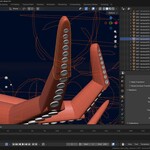
Instant Calamari takes an armature with one or more skinned child meshes and produces a set of rigid, per-bone mesh pieces - a technique sometimes called a "calamari rig" or "paper doll rig". Each piece is parented directly to its corresponding bone, so it follows the animation without needing a skin deformer.The process:
- Generates Temporary Duplicates - each child mesh object deformed by the armature is duplicated to preserve your original weight painting.
- Floods vertex weights - each vertex is assigned 100% to its strongest bone group, removing all blending.
- Splits the mesh - one new mesh object is created per vertex group, containing only the faces that belong to that bone.
- Boundary verts are cleared - vertices on the seam between pieces have their weights removed to avoid visual overlap artifacts.
- Reparents to bones - each piece is reparented to its matching bone using 'BONE' parent type, preserving world-space position.
- Organizes into collections - output pieces go into '_calamari'. Original meshes move to ''_deform'.
- Clean up - any left-over pieces are removed.
Installation
For Blender 2.9 - 4.1
1. Download `instant-calamari.zip`.
2. In Blender, go to Edit → Preferences → Add-ons → Install.
3. Select the downloaded file and click Install Add-on.
4. Enable the addon by ticking the checkbox next to Instant Calamari
For Blender 4.2+
1. Download 'instant-calamari_v01-0-0.zip'.
2. Drag and drop the zip file into your open blender window.
Usage
- Select the Armature you would like to generate a calamari mesh for.
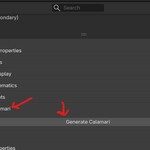
- Open the Properties panel and go to the Data (Armature) tab.
- Expand the Instant Calamari section. Click Generate Calamari.
- The addon will switch the armature to Rest Position, run the generation process, then restore the original pose position. A status message confirms completion. Existing keyframes and actions will be preserved.
- Re-running the tool on the same armature will remove and recreate all objects in the existing _calamari collection, so it is safe to iterate.
Requirements
- The active object must be an Armature
- The armature must have at least one child mesh object.
- Child meshes should have vertex groups matching bone names, as set up by a standard Armature modifier.
Output Collections
Collection |
Contents |
_calamari |
The split, bone-parented mesh pieces |
_deform |
The original source meshes |
Website
https://superhivemarket.com/products/instant-calamari
Bug Reports
Use the bug report form linked below to report any bugs you encounter.
Have questions about this product?
Login to message
| Blender Extension Compatible | Yes |
| Dev Fund Contributor | |
| Published | 5 months ago |
| Blender Version | 2.9 - 5.2 |
| Extension Type | Add-on |
| License | GPL |

Discover more products like this
Character rigging rigging one-click animation tools weight painting bone-parenting armature mesh-splitting auto-rig collections vertex weights geometry tools