Ironclad Courier Bot – AAA Game-Ready 3D Asset
 reyhane_3d


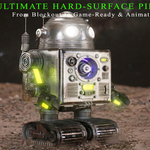
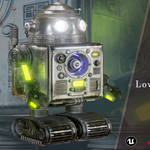
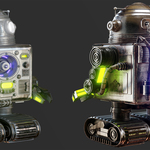
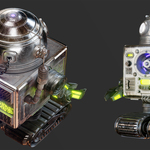
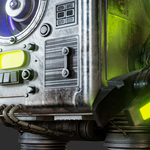
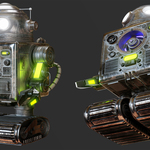
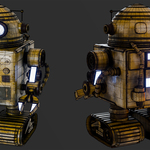
# Ironclad Courier Bot - Documentation & Usage Guide
Thank you for purchasing the Ironclad Courier Bot! This document provides an overview of the included files, asset specs, and instructions for integrating the model into your pipeline or game engine.
---
### 1. File Structure Overview
Upon extraction, you will find the following organized directory:
* **01_Blender_Scene/**: Contains the main `.blend` file with pre-configured lighting, materials, and rendering setups (Cycles & Eevee).
* **02_GameReady_Meshes/**: Contains `.fbx` and `.obj` formats for the optimized low-poly model (70,474 Tris).
* **03_HighPoly_Source/**: High-poly reference mesh (5.2M+ Tris) in `.fbx` format for custom bakes or detailed studying.
* **04_Textures_4K/**: Industry-standard 4K PBR texture maps (BaseColor, Roughness, Metallic, Normal, AO).
* **05_Tutorial_Videos/**: (Full Pack) Complete 11+ hour screen-recorded workflow tutorial.
---
### 2. Model Specifications & Scale
* **Polygon Count:** 70,474 Triangles (36,892 Faces).
* **High-Poly Mesh:** 5,233,548 Triangles.
* **Scale:** Real-world scale, calibrated for Unreal Engine 5 Third-Person / First-Person standards.
* **Pivot Points:** Centered at `(0,0,0)` origin for seamless placement and scene manipulation.
* **Mesh Hierarchy:** Logically grouped and named parts (e.g., treads, torso, head, limbs) for quick rigging or mechanical animation setup.
---
### 3. PBR Texture Setup
Textures are generated in Substance Painter at 4K resolution using standard Metallic-Roughness PBR workflow:
* **BaseColor.png** (8-bit)
* **Roughness.png** (8-bit)
* **Metallic.png** (8-bit)
* **Normal.png** (16-bit DirectX/OpenGL compatible)
* **AmbientOcclusion.png** (8-bit)
*Note for Unreal Engine 5 Users:* You can easily combine Roughness, Metallic, and AO into an ORM packed map if required by your pipeline.
---
### 4. Integration Instructions
**Blender (4.0+):**
Simply open the `.blend` file. Textures are pre-linked and materials are set up for both Cycles and Eevee render engines.
**Unreal Engine 5:**
1. Import the low-poly FBX into your Content Browser (ensure "Import Normals and Tangents" is selected).
2. Drag and drop the 4K texture maps.
3. Create a standard PBR Material, connect BaseColor, Roughness, Metallic, AO, and Normal maps, and apply it to the mesh.
---
### 5. Tutorial Access (Full Pack)
The included 11+ hour video series is a high-resolution, silent screen-recorded workflow showing keypresses and mouse inputs, covering:
* High-poly modeling & mechanical detailing
* Low-poly retopology & optimization
* Efficient UV unwrapping
* Baking & PBR texturing in Substance Painter
Have questions about this product?
Login to message
| Published | about 2 months ago |
| Blender Version | 2.8 - 5.2 |
| Render Engine Used | Cycles, Eevee |
| Misc Data | Uvs-Unwrapped, Animated, Low-High-Resolution, Normal-Mapped, Textured |
| License | Royalty Free |
Discover more products like this
mecha low poly game ready sci fi mechanical blender PBR Robot hard surface tutorial Unreal Engine 3d model