Ivy Generator (30+ Animated Assets)
 Casey_Sheep






🌿 Ivy Generator (Blender 4.5+)
Version 1.0.0
A Geometry Nodes add-on for quickly creating and customizing ivy inside Blender — with a visual asset browser, snap-to features, and categorized controls for realistic or stylized results.
📦 Installation
- Download the .zip package.
- In Blender: Edit → Preferences → Add-ons → Install… and select the .zip file.
- Enable Ivy Generator in the add-on list.
- Open the 3D Viewport and find the new panel under N-Panel → Ivy_Generator.
🧭 Panel Overview
Open the right-side N-Panel in the 3D Viewport and navigate to the Ivy_Generator tab. You’ll see these sections:
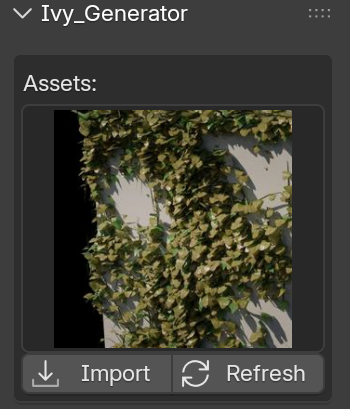
Assets Browser
- Choose an Ivy Preset: Select a thumbnail to preview different ivy styles.
- Import: Click Import to bring the selected ivy into your scene.
- Refresh: If thumbnails don’t appear, click Refresh to reload the asset library.
Tip: Select a target object first — the add-on will snap ivy to that surface automatically.
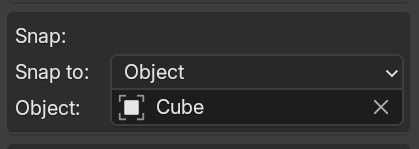
🌱 Snap to (Object / Collection)
- None: Ivy appears at the 3D cursor.
- Object: Snaps ivy growth onto the selected object’s surface.
- Collection: Uses all objects in the chosen collection as growth surfaces.
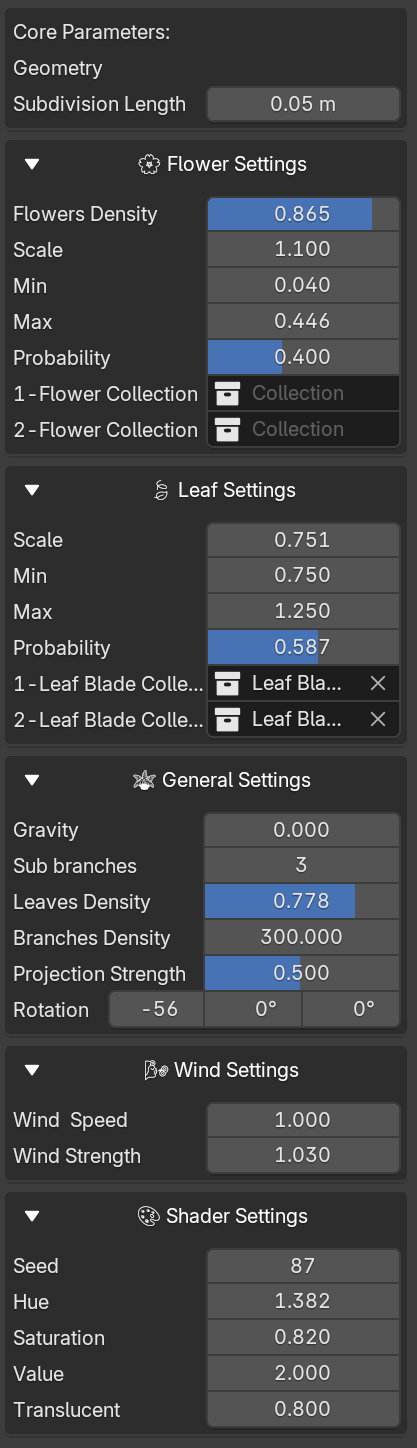
⚙️ Parameter Sections
Each ivy curve includes categorized settings in collapsible boxes. Click the arrow beside a section to open or close.
- Flower Settings: Color, density, randomness, scale variation.
- Leaf Settings: Density, distribution randomness, growth variation.
- General Settings: Branch density, sub-branches, gravity, projection strength.
- Wind Settings: Direction, strength, animation parameters.
- Shader Settings: Material color and shading tweaks.
🧰 Tips
- Keep your ivy assets organized within the “Ivies” collection.
- In heavy scenes, temporarily disable viewport visibility to improve performance.
- To add custom ivy types, add new objects in assets/Ivy Gen.blend under the “Object” folder and provide matching preview icons.
🔧 Compatibility
- Blender Version: 4.5 or newer
- Supported Object Types: Curves and Meshes
- Recommended Use: Geometry Nodes-based vegetation workflows
🚀 Quick Start
- Install and enable Ivy Generator (see Installation).
- Select your target object in the scene.
- In Ivy_Generator → Assets Browser, choose a preset and click Import.
- Set Snap to: None, Object, or Collection as needed.
- Adjust Flower, Leaf, General, Wind, and Shader settings.
If you have any questions, feel free to contact us via inbox.
-
$15
Ivy Gen + 33 Ivy Presets · 1 User
Have questions about this product?
Login to message
| Sales | 500+ |
| Rating | 3 ratings |
| Dev Fund Contributor | |
| Published | 12 months ago |
| Blender Version | 4.5 |
| Render Engine Used | Cycles, Eevee |
| License | Royalty Free |