 SkyVFX


Keycap Generator Pro — User Documentation
1. Installation
Blender → Edit → Preferences → Add-ons → Install from Disk → select the ZIP package (or keycap_generator.py) → enable the checkbox. Requires Blender 5.1+. Open the 3D viewport sidebar (N) → Keycap tab. The add-on sets your scene to millimeters automatically (1 unit = 1 mm).
2. Quickstart (60 seconds)
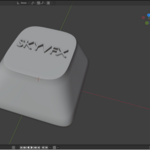
Click "Generate Keycap" — a Cherry Row 3 1U cap appears.
Pick Profile / Row / Size. Everything updates live.
Type a legend in "Legend (Text)".
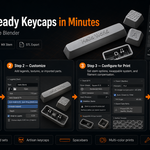
Export (Bambu) → choose your filament → Export STL.
Open the STL in your slicer. It is already manifold, oriented, and scale-compensated.
The add-on manages four objects: Keycap, Keycap_Stem, and Keycap_Legend (locked — edited only through the panel), and hidden KC_Swap* helpers. Regenerating rebuilds them in place.
3. Panel Reference
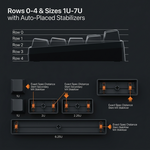
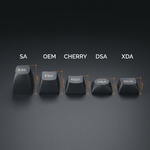
Keycap Generator (main): Profile (Cherry / OEM / SA / DSA / XDA, spec-accurate per row), Row 0–4, Size 1U–2.75U + 6.25U & 7U spacebars (auto stabilizers at 2U+), Edge Bevel (0.05 sharp – 2.5 mm soft), Dish Depth (0 = flat), Wall Thickness (default 1.5 mm, min 0.8), and Save/Load Preset.
Stem & Fit: Outer shape (Circle Ø5.5 / Classic 6.5×4.8, strongest / Square 5.3); Reinforced Stem (for silk/brittle filament); Stem Tolerance (0.000 = proven FDM fit, negative = tighter, slider ±0.05, type up to ±0.3); Stem Rotation 0/90/180/270° for north-facing PCBs (stabs stay fixed).
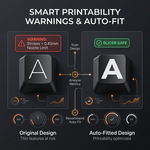
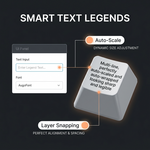
Legend (Text): any system font; Auto-Scale fits the printable top area; Auto-Wrap breaks long text into up to 4 centered lines; Deboss (cut in) or Emboss (raised flat top); Snap to Layers rounds depth to your layer height (0.12/0.16/0.20) so color swaps land on a boundary. Warnings appear when strokes are thinner than a 0.4 nozzle can print, or when a tall thin emboss risks snapping.
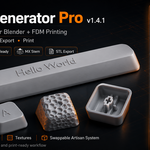
Surface Textures: Top Image (B&W, white = raised, negative strength engraves, real-mm size/offset); Side Texture (tiling relief); Procedural (Crystal / Honeycomb / Stone / Wood via Geometry Nodes, with Strength, Feature Size, Detail, Roughness, Top/Sides toggles).
Import Parts: Import & Snap drops any STL/OBJ centered on the cap top, embedded for solid fusion at export. Parts stay movable; Re-Snap anytime.
Swappable System (Artisan): print a base + interchangeable tops. Magnet mode (Ø3.1 × 1.2 mm pockets in both pieces) or Peg mode (auto-generated male peg, Width/Depth/Tolerance controls, tips chamfered). The dished top is flattened over a solid plug so the hollow interior is never exposed. Exports Base_Keycap.stl + Top_Model.stl.
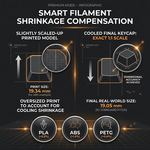
Export (Bambu): Filament Material applies shrinkage compensation after all booleans (PLA +0.2% · PLA+ +0.2% · Silk +0.3% · PETG +0.4% · ABS +0.7%); Auto-Orient for FDM tilts (default 45°) and grounds the model; Export Split Parts writes base / legend / parts as origin-aligned STLs. Every file is unioned, welded, purged of internal shells, manifold-checked and grounded at z = 0.
4. Printing Guide
0.4 mm nozzle, walls ≥ 1.2 mm. Pair the bundled "0.12 mm Keycap Strong" process preset with its matching filament preset. Keep legend strokes above 0.45 mm (the panel warns you). For multi-color: Export Split Parts → import all STLs into one Bambu Studio project (keep positions) → assign filament per object. For silk: enable Reinforced Stem, print slow and hot, dry the spool (55 °C / 8 h).
5. Troubleshooting
Caps stick / fall off switch: Stem Tolerance −0.02 (tighter) or +0.02 (looser); re-print.
Legend invisible in slicer: Strokes below nozzle width — larger size or bolder font.
Swap pocket too shallow: Profile too short — use SA/OEM or a higher row.
Export warns "shells not touching": An imported part doesn't overlap the cap — Re-Snap or move it down.
Tiny mesh repairs on wide spacebars: Cosmetic T-junctions; Bambu Studio repairs them automatically.
Silk caps snap: Reinforced Stem + bundled Silk Strong preset + dry filament.
6. Known Limitations
MX-pattern stems only (no Choc). Rectangular keys only (no ISO Enter yet). Spacebars print with standard concave dish (convex option planned). One keycap per scene (batch mode planned).
7. Support & License
GPL license, as required for Blender add-ons. Purchase funds development and includes support and updates.
Have questions about this product?
Login to message
| Dev Fund Contributor | |
| Published | 3 months ago |
| Blender Version | 5.1 |
| Extension Type | N/A |
| Render Engine Used | Cycles, Eevee |
| License | GPL |
Discover more products like this
fdm blender addon mechanical keyboard mesh-generator keycap artisan 3d printing Bambu Lab keycap generator STL keyboard parametric