 KalthireddyAbhishek




Light Juggler: Master Your Lighting Workflow
Let's be real – managing a bunch of lights in Blender can be a real headache. You're constantly jumping to the Outliner, clicking little eye and camera icons, disabling everything just to see what that one kicker light is doing... It's a workflow killer.
Light Juggler is the tool I always wanted for myself. It’s a simple, clean panel that lives right in your 3D Viewport and puts every light in your scene at your fingertips. No more hunting. Just fast, intuitive control so you can finally focus on the fun part: being creative.
What it Does:
One-Click Solo Mode: This is the feature you'll wonder how you lived without. Instantly isolate any light to see its exact contribution. Want to compare just your key and fill? Just solo them both! It's that easy.
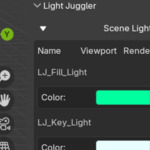
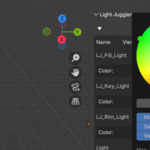
All Your Lights, One List: See and manage every single light from a clean, organized panel. The list is now collapsible, so it won't clutter up your sidebar when you don't need it.
Quick Visibility Toggles: No more guesswork. Big, clear icons let you separately toggle viewport and render visibility right from the panel.
Tweak Power & Color Instantly: Forget selecting a light and navigating to the properties tab. The controls for power and color are right there under each light for immediate adjustments.
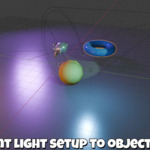
Instant 3-Point Setup: Need a quick, professional lighting setup for your model? Select your object, click one button, and get a perfect key, fill, and rim light, all aimed and ready to go.
This addon is all about speed and staying in the creative flow. You'll find yourself experimenting more, iterating faster, and getting to your final look with way less frustration