Link Manager
 NiklasEkstrom


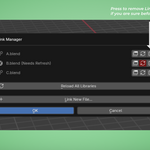
How It Works: The Workflow
Traditional Blender workflows require manual tracking of linked assets and tedious clean-up when removing them. Link Manager automates and centralizes this process into a single, highly intuitive UI panel.
1. Background Monitoring (Out-of-Sync Detection)
The moment you open your project, Link Manager quietly checks the timestamps of all your linked libraries against the actual files on your hard drive or network. If another artist updates a source file, Link Manager instantly detects the discrepancy and flags the asset as "Needs Refresh" in your scene.
2. The Centralized Hub
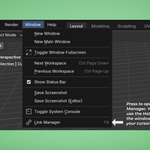
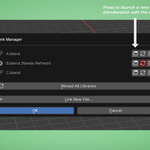
By pressing a single hotkey, you summon the Link Manager dialog. Here, you get a bird's-eye view of every linked file in your project. Instead of hunting through the Outliner, you can manage everything from this single menu.
3. Frictionless Editing & Syncing
From the hub, you can interact with your libraries directly:
Click the Refresh icon to sync an updated file, or hit Reload All to update the entire scene at once.
Click the Window icon to instantly launch the source file in a brand-new Blender instance for quick edits, completely bypassing the file browser.
4. Intelligent Clean-Up
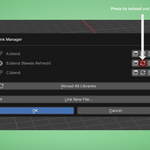
When you remove a linked file natively in Blender, it leaves behind "ghost" empties (collection instances) that clutter your scene. Link Manager's custom Remove tool not only unlinks the library but automatically hunts down and deletes all associated instances, keeping your project spotless.
Feature Summary
Visual Sync Alerts: Clear warnings for files that are missing or modified on disk.
One-Click Reloads: Update individual libraries or bulk-refresh the entire scene.
Direct-Open: Launch source files in a new Blender window directly from the current scene.
Smart Removal: Safely delete libraries and auto-clean instantiated collections.
Smart Linking: An improved file browser that intelligently steps out of internal
.blendfolders when bringing in new assets.
Quick Start Guide
System Requirements: Blender 4.5.0 and above.
Installation:
Go to Edit > Preferences > Add-ons.
Click Install... and select the downloaded
link_manager.zip(do not extract it).Check the box next to System: Link Manager to enable it.
Usage:
Open the Hub: Press
F8in the viewport or navigate to Window > Link Manager in the top menu.Customizing the Hotkey: Go to Edit > Preferences > Keymap, search for
Link Manager(or navigate to the Window section), and rebind thewm.link_managerentry to your preferred shortcut.
Have questions about this product?
Login to message
| Published | 4 months ago |
| Blender Version | 4.5 - 5.2 |
| Extension Type | N/A |
| Render Engine Used | Cycles |
| License | GPL |