 Lukasz Hoffmann


Linker 2.0 - FBX & OBJ Synchronization for Blender
Keep Blender connected to the external files your workflow depends on.
Linker creates persistent links between Blender objects and FBX or OBJ files on disk.
Link an existing asset, or export your current work, and Linker keeps track of the relationship between the Blender objects and their external file. From there, models can be saved, reloaded, synchronized manually, or checked automatically without setting up the import/export process again for every revision.
Linker is designed for workflows that move assets between Blender, other DCC applications, game engines, shared projects, and external asset directories.
Key Strengths
-
Streamlined FBX/OBJ export workflows for:
Unity
Unreal Engine
Godot
Other tools built around standard FBX/OBJ interchange
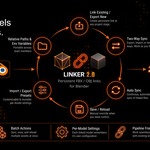
Two-way synchronization for multi-DCC workflows
Per-model Import Only, Export Only, or Two-way synchronization
Batch synchronization across multiple linked assets
Version-control-friendly
.blendprojects through relative paths and environment variablesPortable project paths that can resolve differently on each workstation
Reload options for preserving materials, UVs, and transforms
Link Once. Keep Working.
Import an existing FBX or OBJ using Link Existing, and the objects created by that import are grouped as a single linked model.
If the asset already exists in Blender, select the relevant objects and use Export Selection. Linker exports the selection and establishes the link at the same time.
From then on, Linker stores the model's file path, synchronization direction, import/export configuration, timestamps, and model identity inside the .blend file.
This keeps the connection between a Blender asset and its external representation in one place rather than relying on manual file tracking or repeated export setup.
Flexible Synchronization
Each linked model can have its own synchronization direction.
Two-way
Imports changes when the external file is newer and exports changes when the Blender data is newer.
Import Only
Keeps Blender updated from the external file without automatically writing changes back to it.
Export Only
Keeps the external FBX or OBJ updated from Blender without automatically importing changes from disk.
If both sides have changed between synchronization checks, Linker compares modification timestamps and uses the newer version.
For explicit control, Save immediately exports the linked model, while Reload immediately imports the external version.
Auto Sync
Auto Sync periodically checks linked models for changes.
If an external asset has been updated, Linker can reload it into Blender. If Blender data has changed, Linker can export it according to the model's synchronization direction.
The check interval can be configured in the add-on preferences.
For workflows where automatic synchronization is not needed, Sync can be used on selected linked models, while Sync All processes all valid linked models in the scene.
Built for Multi-Asset Scenes
A linked model can contain multiple Blender objects while still being managed as a single asset.
Multiple linked models can also be selected and processed together using:
Sync
Save
Reload
Make Relative
Unlink
If several selected objects belong to the same linked model, that model is processed only once.
During batch operations, Linker also preserves the original active object, selection, visibility, and selection-lock states. Temporary changes required for import or export are restored afterward.
This makes linked assets easier to manage without requiring a specific scene organization.
Portable Paths for Production Projects
Projects do not always live in the same directory—or on the same machine.
Linker supports several path types.
Absolute paths
D:\Project\Models\chair.fbx
Blender-relative paths
//Models/chair.fbx
Local path variables
%PROJECT_ROOT%/Models/chair.fbx
Relative paths are useful when the external asset lives inside or alongside the Blender project.
Path variables are useful when the same project needs to work across different machines or directory structures.
For example, the .blend file can store:
%PROJECT_ROOT%/Models/chair.fbx
while each artist defines %PROJECT_ROOT% locally on their own workstation.
The project can therefore keep the same stored path without requiring identical drive letters or absolute directories across the team.
Operating-system environment variables are supported as well, and Linker's local preference values can be used when project-specific overrides are needed.
This also makes linked projects easier to maintain in version-controlled environments.
Controlled Reloads
Updating geometry does not always mean that every Blender-side change should be replaced.
Linker provides format settings for preserving selected data during reloads.
Depending on the workflow, you can preserve:
Materials
UVs
Transforms
This is useful when geometry is being revised externally while some parts of the asset continue to be managed inside Blender.
For example, an external model can be updated while Blender-specific materials or object placement remain unchanged.
FBX & OBJ Import / Export Controls
Linked models keep their own format-specific configuration rather than relying on one global import/export setup.
FBX options include
Import controls for:
Scale
Custom normals
Subdivision data
Custom properties
Vertex colors
Animation
Animation offset
Leaf bones
Mesh validation
Material collision behavior
Export controls for:
Forward / up axes
Subdivision
Unit scale
Space transform
Modifiers
Deform bones
Leaf bones
Animation baking
OBJ options include
Scale
Clamp size
Forward / up axes
Split by object
Split by group
Vertex groups
Mesh validation
Material export
Smooth groups
Modifier application
Once configured, these settings remain associated with the linked model.
This is particularly useful when different assets in the same scene require different interchange settings.
See Linked Assets at a Glance
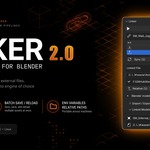
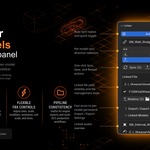
The Linked Models panel provides an overview of the linked models in the current scene, including their paths and synchronization directions.
Selecting an object that belongs to a linked model gives access to the settings for that model.
From the 3D Viewport sidebar you can inspect raw and resolved paths, change synchronization direction, adjust import/export settings, open the source file location, or manage the link.
Upgrading from Linker 1.x
Linker 2.0 includes migration support for projects created using Linker 1.x tracking data.
When an older file is loaded, Linker can read the existing tracking information and create stable model IDs based on the previous link paths.
The original tracking data is left intact during migration.
As with any project migration, keeping a backup before opening and saving an older production file with the new version is recommended.
Who Is Linker For?
Linker is intended for Blender workflows where models regularly move between applications, files, or machines.
Game artists
Maintain FBX or OBJ assets used by game-engine projects while continuing to iterate in Blender.
3D freelancers
Reduce repeated setup when exporting or receiving multiple revisions of the same asset.
Teams and studios
Use relative paths and local variables to keep asset links portable between workstations.
Technical artists
Build more structured file-based interchange workflows without maintaining a separate synchronization script.
Artists working across multiple DCCs
Keep a clearer relationship between Blender assets and the external files used by other applications.
A Simpler Import / Export Loop
A typical manual workflow often looks like:
Edit → Export → Locate File → Import → Restore Settings → Replace Objects → Repeat
With a linked model, the recurring part becomes:
Edit → Sync
Linker keeps the file relationship and model-specific settings attached to the asset, so repeated revisions require less setup.
Link the model once, then synchronize it as the asset evolves.
Compatibility
Linker 2.0
Blender 4.2+
FBX
OBJ
Windows, macOS, and Linux-compatible path handling through Blender, relative paths, and local path variables
Important Synchronization Behavior
Linker is a file synchronization system, not a model-merging system.
Two-way synchronization compares changes using timestamps. If both the Blender model and its external file have changed between checks, the newer timestamp determines which side is used.
When that automatic choice is not appropriate, use Save or Reload to explicitly choose the direction of the update.
This keeps synchronization behavior straightforward while still allowing manual control when needed.
Linker 2.0 keeps Blender assets connected to the FBX and OBJ files around them.
Link once. Iterate normally. Synchronize when needed.
