 FurryMisty3D
Masking in the compositor shouldn't feel like building a machine.
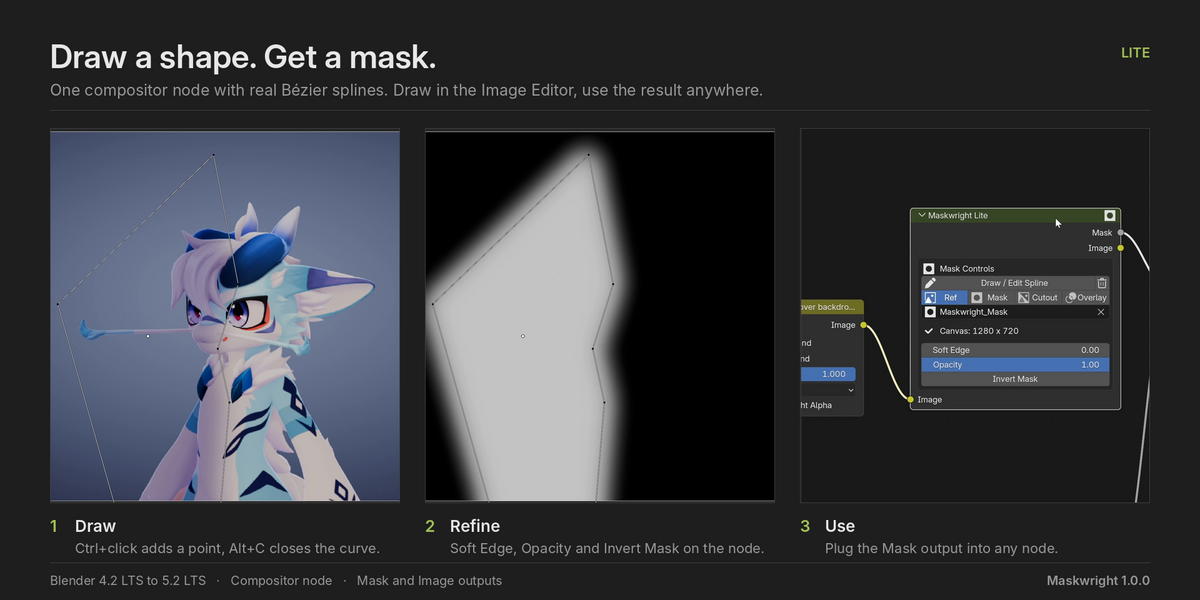
Every mask usually means the Image Editor, a Mask datablock, a Viewer, a Blur, a Dilate, a Mix… and then you build it all again for the next shot. Maskwright puts the whole chain behind one node. Press Draw / Edit Spline, draw with Blender's own mask tools, soften it, plug it in and get on with your shot.
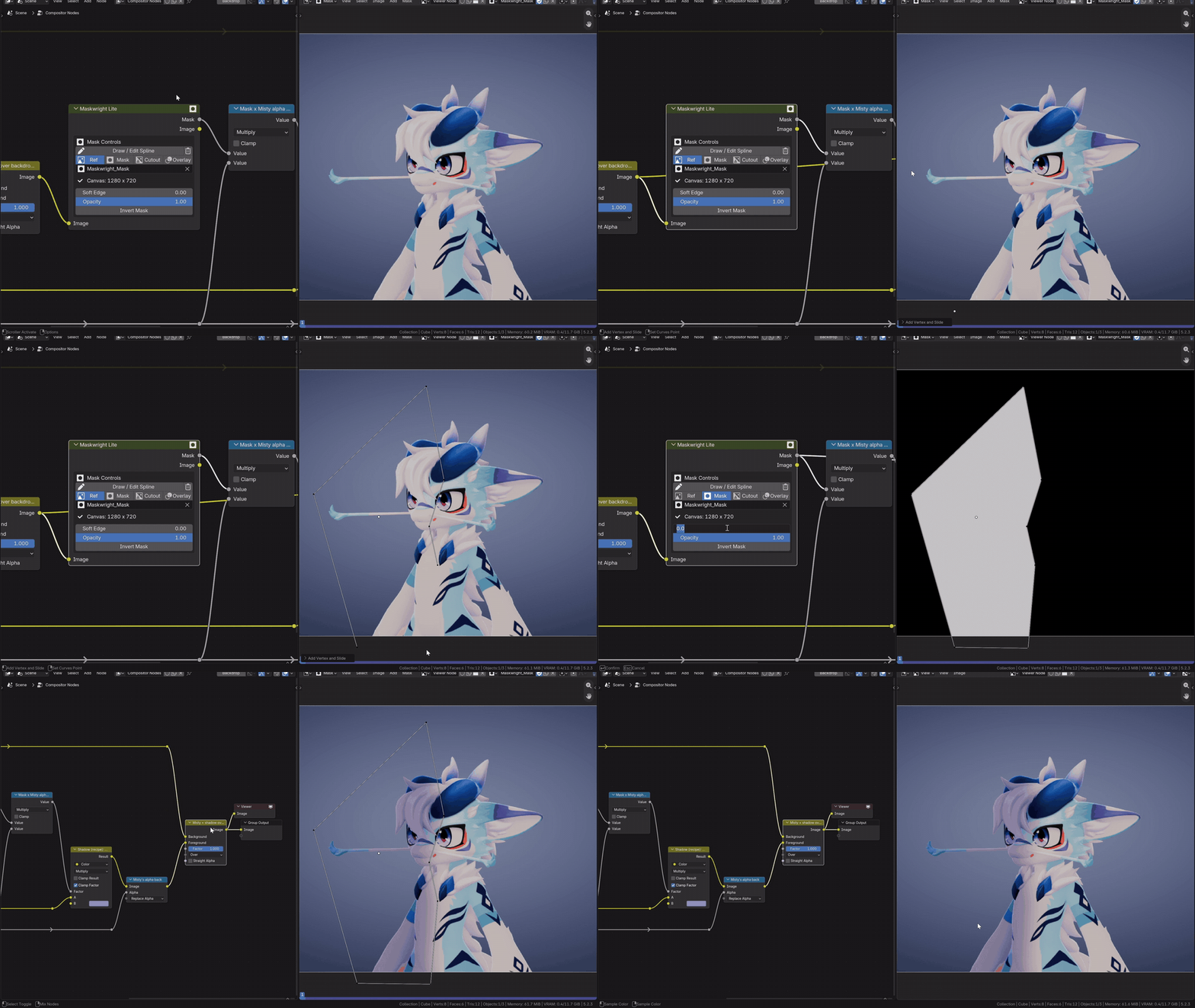
Draw a shape on her body, raise Soft Edge, and the shadow melts into the fur. No Mask datablock, no extra nodes to set up.
Why people will want this one
- It's fast. One node, one button. The Viewer and the canvas are prepared for you.
- It's flexible. Everything you make is real spline layers you can edit, feather, animate and combine, even when Maskwright drew them for you.
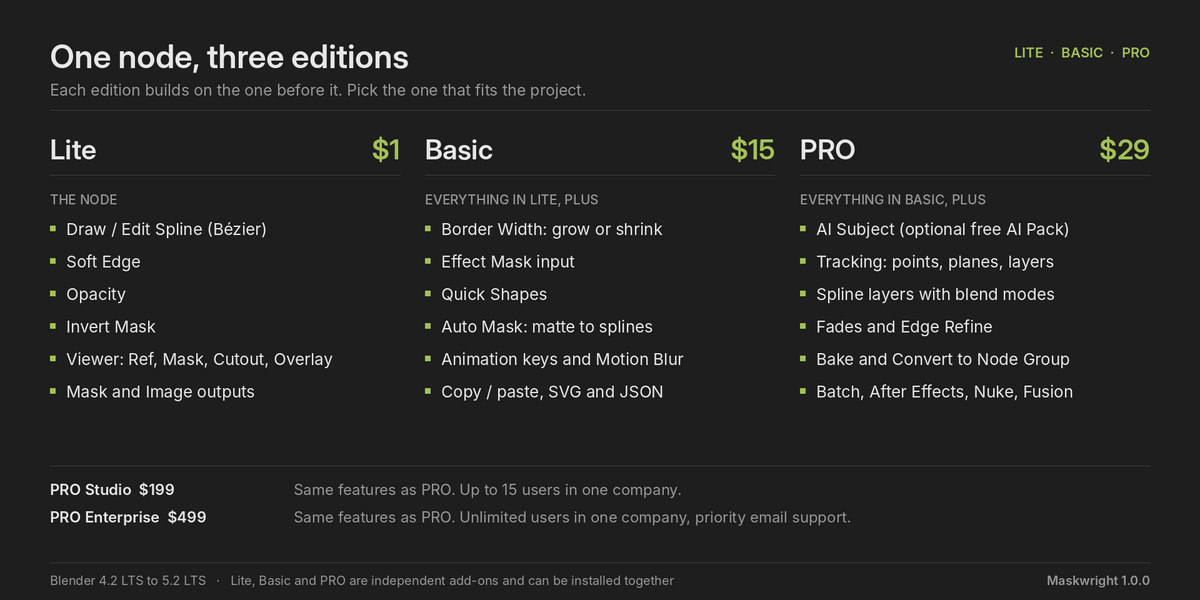
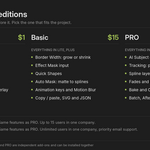
- It grows with you. Start with Lite ($1 here, free on Gumroad). Move up to Basic or PRO when a project needs more. All three work side by side.
- It stays on your machine. The AI runs locally: no account, no subscription, no uploads.
Stop tracing by hand (Basic and PRO)
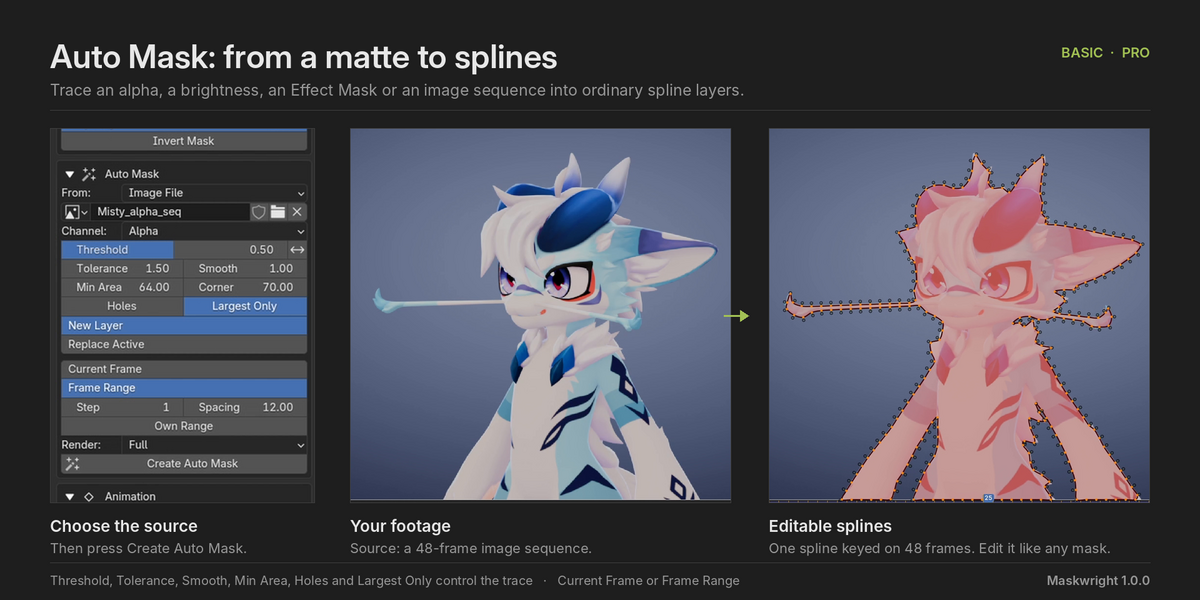
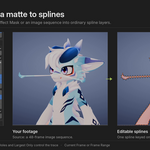
Already have a matte? Auto Mask turns it into editable splines in one press: a Cryptomatte, an ID Mask, a keyer, the alpha or brightness of an image, even an image sequence from another program.
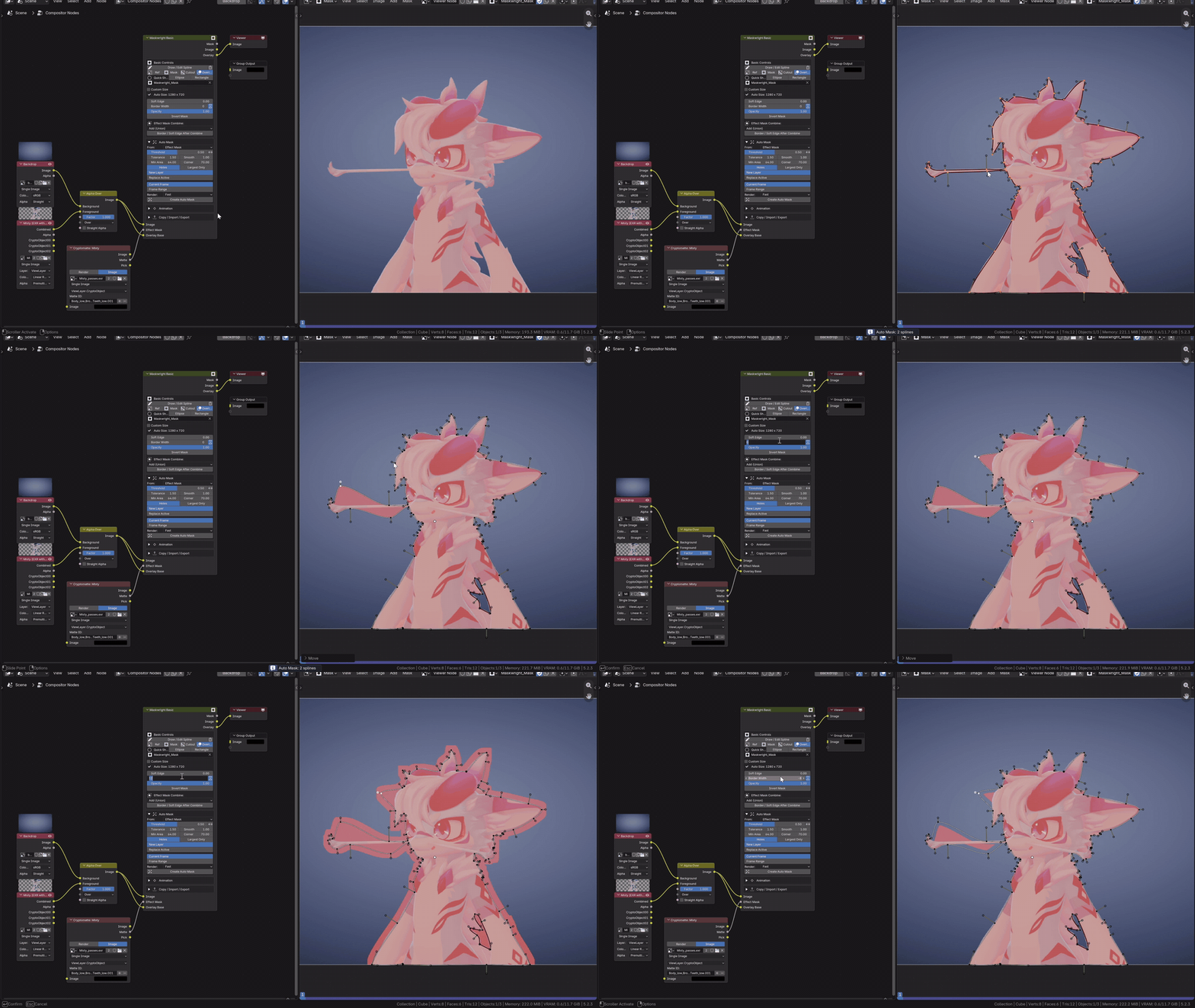
Pick the character in a Cryptomatte, press Create Auto Mask, and the matte becomes splines you can edit. Border Width grows or shrinks it.
One frame or the whole shot: choose Frame Range and Maskwright keys the shape for you.
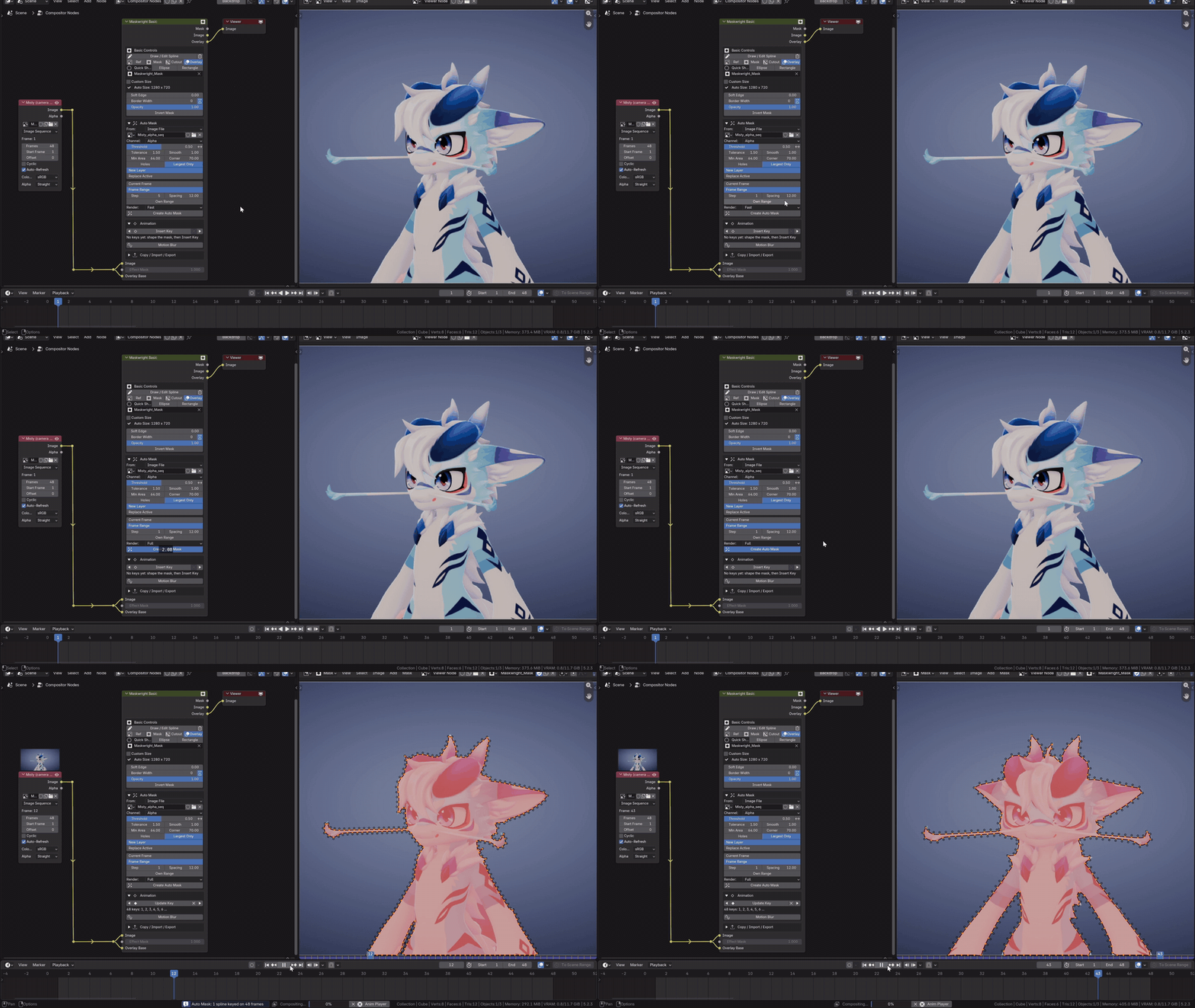
The camera orbits Misty. One press traces her silhouette on every frame. Scrub the timeline and watch it follow.
Working from Render Layers? It renders the scene at Fast, Draft or Full quality and keeps the renders, so changing Threshold or Tolerance only re-traces.
One click on the subject (PRO)
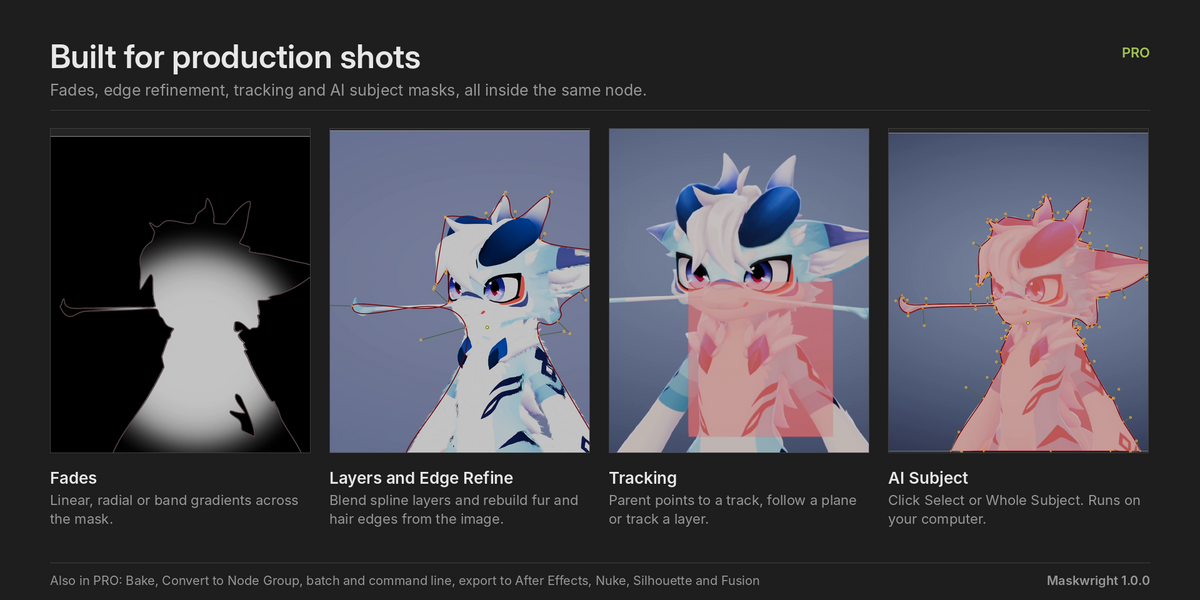
AI Subject is the shortcut you wished you had. Click the subject (Shift+click what is not part of it) and get clean, editable splines. Or choose Whole Subject and don't click at all: it finds the main subject of the frame.
It runs on your own computer with the free, optional AI Pack. No account, no internet while you work, no extra fee.
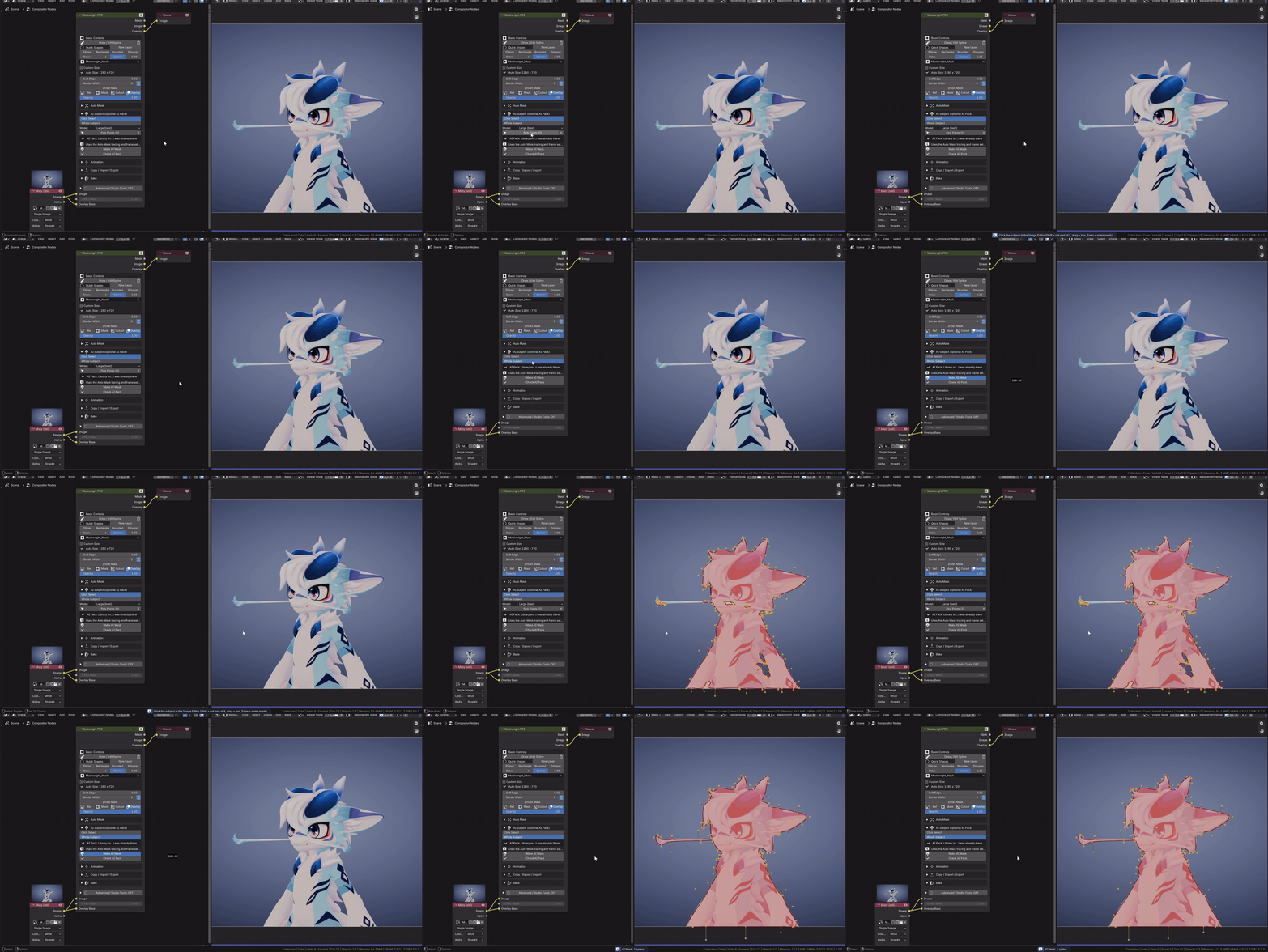
A few clicks on Misty, Enter, and the whole subject comes back as splines.
Hair, fur and fine detail (PRO)
A spline can't follow every hair, and that is where most masks look fake. Edge Refine rebuilds the edge from the image itself: the core stays solid, the outside stays clean, and the picture decides the fine detail in between. Choose Edge Snap (any background), Color Key (hair against a sky, a screen or a plain wall) or Brightness. It even refines a Cryptomatte or a keyed matte.
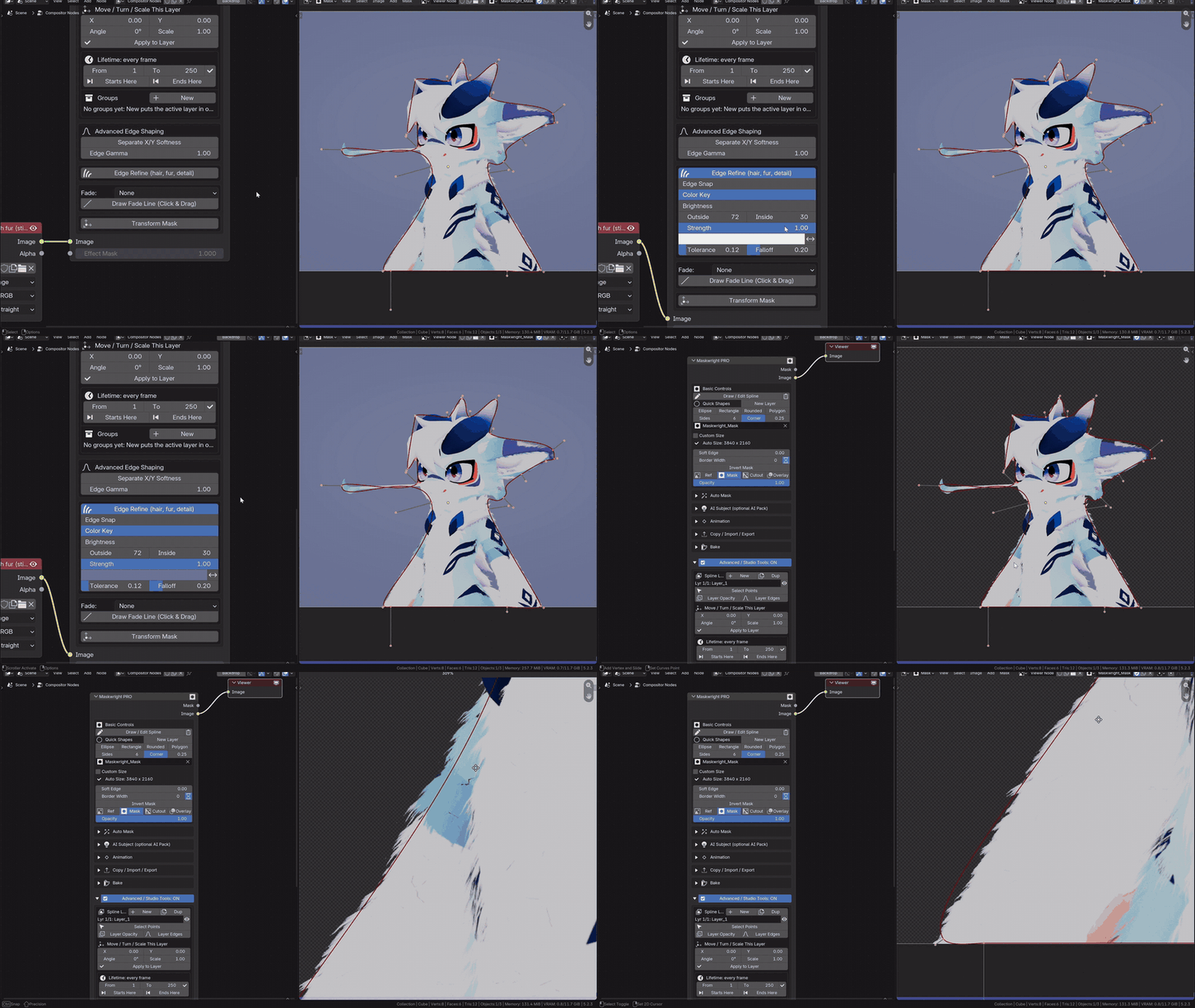
A loose shape around the furry head. Edge Refine brings the fur back at the edge.
Draw once. It stays stuck. (PRO)
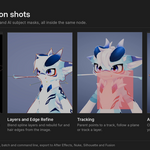
Draw a shape on a wall, a shirt or a screen at one frame and press Track Layer. Maskwright finds trackable detail, follows it forwards and backwards through the clip, throws out anything that slides or gets covered, and keeps your shape glued to the surface with perspective. When it's done it tells you which frames are weak and takes you straight to them, so a drift never reaches the final render unnoticed.
Prefer your own plane track? Follow Plane uses it. Bake Tracking to Keys turns any tracked movement into ordinary mask keys.
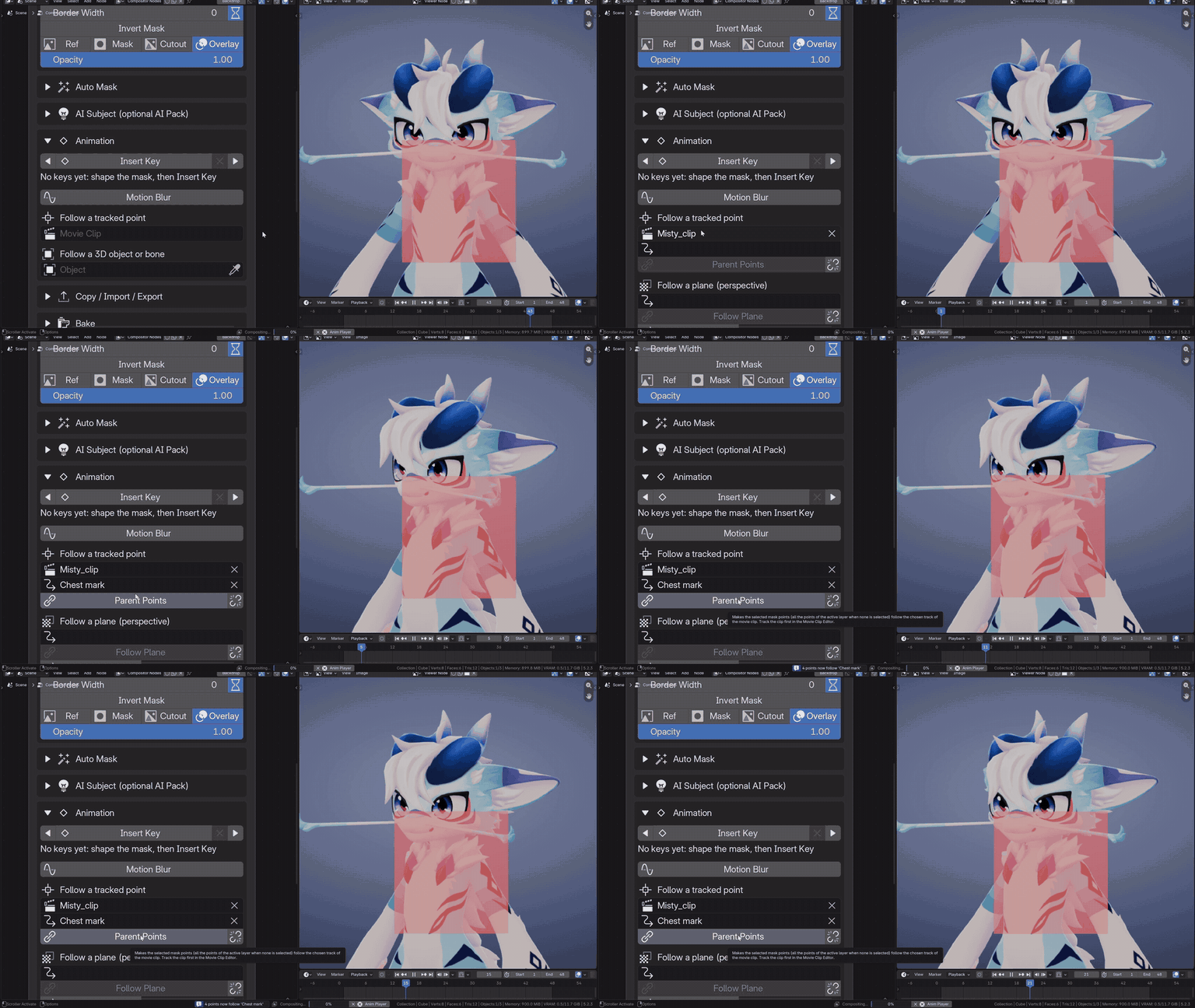
The camera turns around Misty. A shape drawn once on the markings of her chest sticks to them.
Layers, fades and control (PRO)
Need more than one shape? Switch on Advanced / Studio Tools and stack spline layers with blend modes (Merge Add, Merge Subtract, Multiply and more), each with its own opacity, edge and falloff. Drag a Directional, Circular or Band Fade right in the Image Editor. When you don't need it, the node goes back to being as simple as Basic.
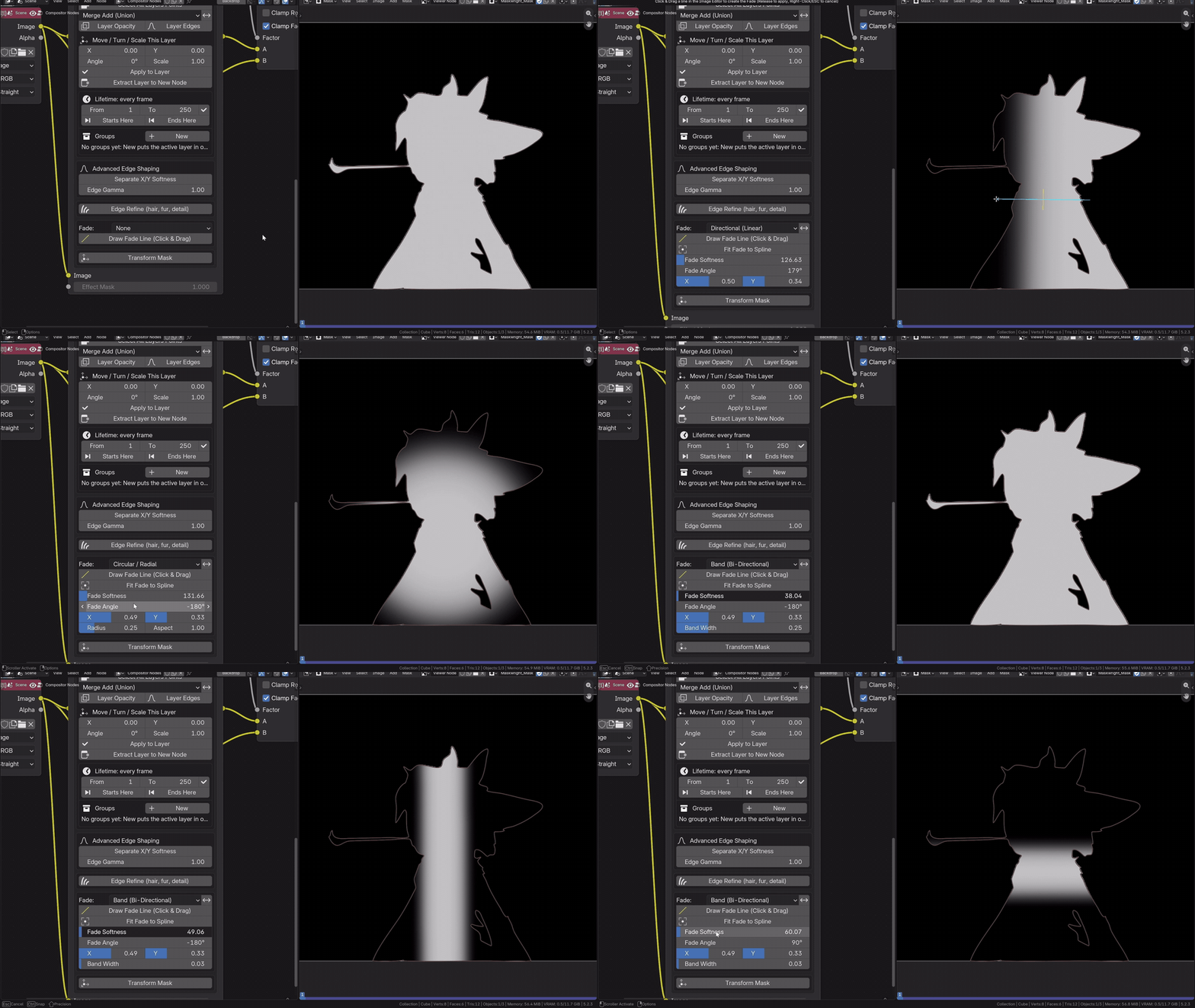
Layers added and subtracted, then a circular fade dragged in the Image Editor drives a colour grade.
Masks that follow the action (PRO)
Ease your shape keys in and out (Linear, Ease In, Ease Out, Ease In-Out, Hold), parent mask points to a tracked marker, or let a mask chase a 3D object or a bone through the scene camera, size included (Blender 4.4 or newer).
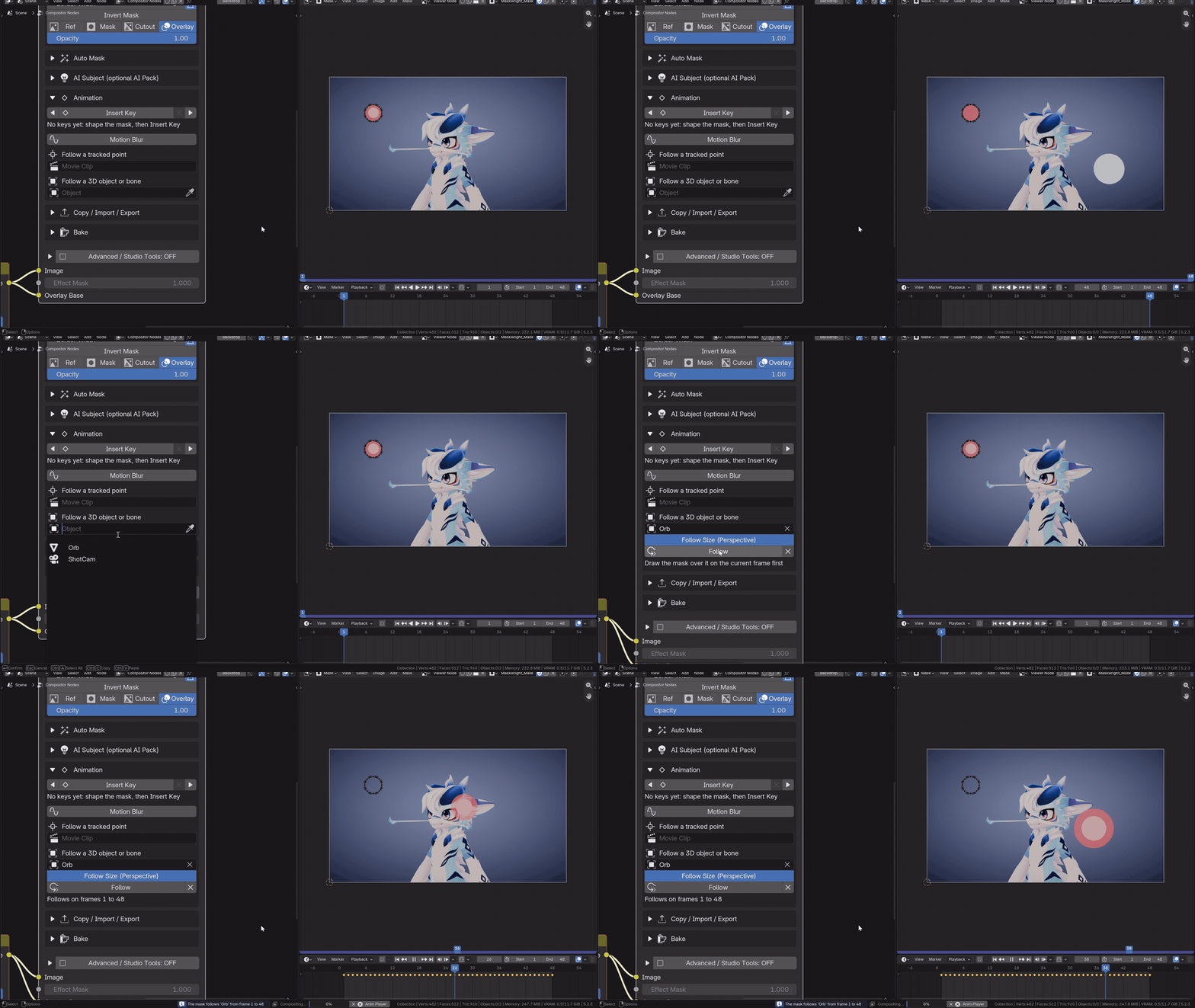
A glowing orb flies through the shot. Choose the object, press Follow, and the mask goes with it.
Built for real pipelines (PRO)
Send your masks wherever the shot goes next: After Effects, Nuke, Silhouette and Fusion / DaVinci Resolve. Bake a heavy mask once and play it back from a light node. Convert to Node Group to render on a farm without the add-on. Batch every node of a file from the command line.
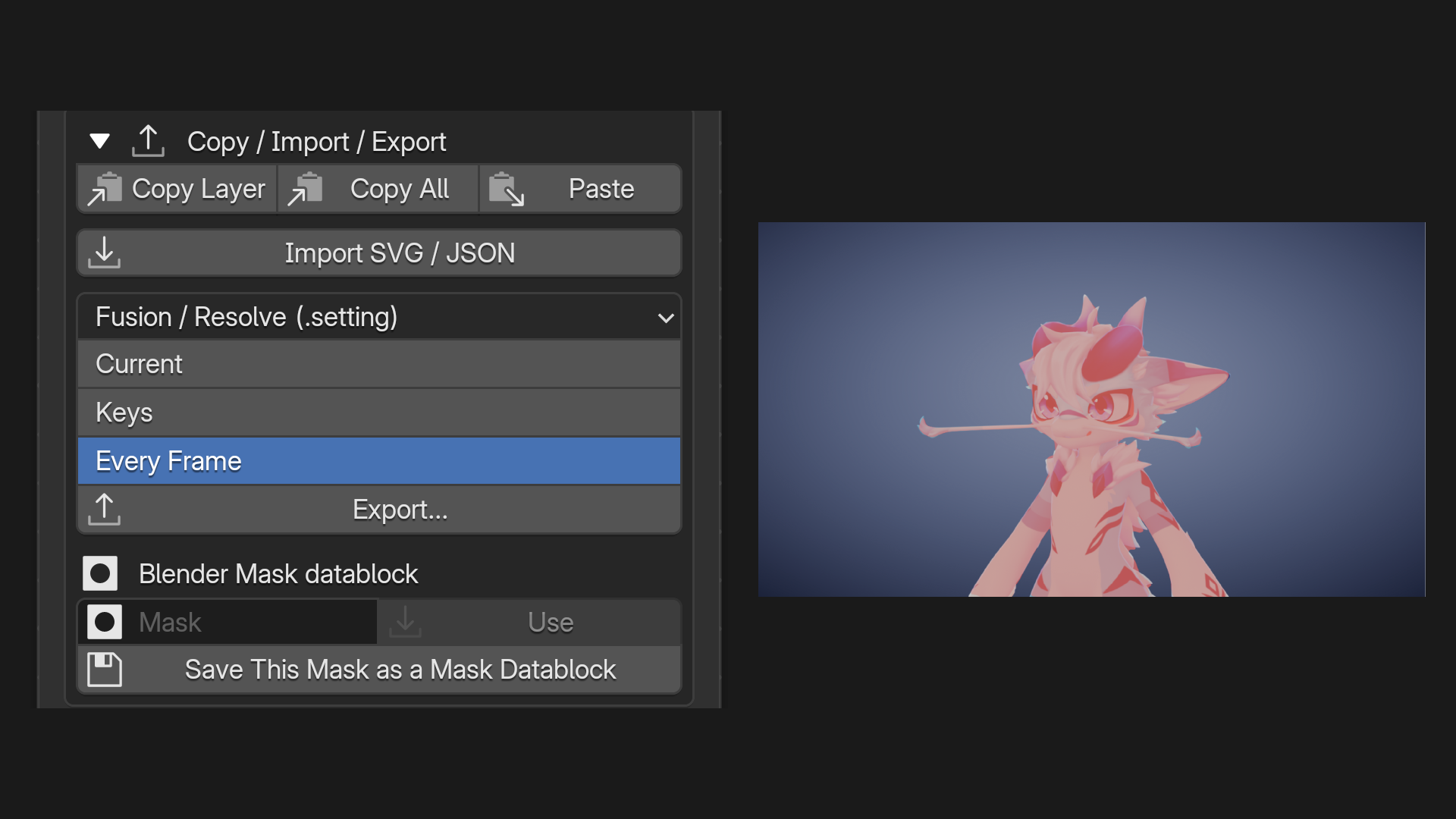
Copy, import and export the shapes: After Effects, Nuke, Silhouette, Fusion / DaVinci Resolve, SVG and JSON.
Pick your version
- Lite ($1): the node, Bézier spline masks, Soft Edge, Invert, Opacity.
- Basic ($15): adds Border Width, Effect Mask, Quick Shapes, shape keys with Motion Blur and Auto Mask.
- PRO ($29 launch price): adds AI Subject, Edge Refine, Track Layer, layers, fades, following, export, Bake and Batch.
Maskwright Lite is also available for free on Gumroad.
Checked on seven Blender versions, from 4.2 LTS to 5.2 LTS.
Full feature list
Maskwright Basic – $15
Everything in Maskwright Lite, plus:
- Border Width: grow or shrink the shape, in pixels (with a fast mode for 4K).
- Effect Mask input: combine another mask with Multiply, Add or Subtract.
- Border / Soft Edge After Combine: grow, shrink and soften any mask (Cryptomatte, ID Mask, Box Mask…) through the node.
- Quick Shapes: Ellipse and Rectangle in one click.
- Custom Size: your own canvas size, independent of the input.
- Animation: shape keys with Blender's own mask keys, plus Motion Blur (Samples, Shutter).
- Auto Mask: a matte (Cryptomatte, ID Mask, keyer, alpha, brightness, image sequence) traced into editable splines, still or keyed over a frame range. Render Layers sources rendered at Fast / Draft / Full quality and kept for re-tracing.
- Copy / paste shapes between nodes, files and editions. Import SVG paths. Export SVG and Maskwright JSON.
Maskwright PRO – $29 launch price
Everything in Basic, plus:
- Advanced / Studio Tools (off by default): spline layers with nine blend modes, per-layer opacity, soft edge, border and falloff, Separate X/Y Softness, Edge Gamma.
- Fades: Directional, Circular / Radial or Band, drawn in the Image Editor; Fit Fade to Spline.
- Transform Mask: offset, rotate and scale without touching the curves.
- Layer tools: Move / Turn / Scale This Layer, Extract Layer to New Node.
- Quick Shapes also with Rounded and Polygon (New Layer, Sides, Corner).
- Easing between mask keys: Linear, Ease In, Ease Out, Ease In-Out, Hold.
- Follow a tracked point: parent mask points to a motion-tracking marker.
- Follow a 3D object or bone through the scene camera, with Follow Size (Perspective). Blender 4.4 or newer.
- AI Subject: Click Select (SAM 2.1) or Whole Subject (BiRefNet), runs locally with the free AI Pack.
- Edge Refine: hair, fur and fine detail rebuilt at the edge (Edge Snap, Color Key, Brightness).
- Planar tracking: Follow Plane, Track Layer (with a weak-frame report) and Bake Tracking to Keys.
- Layer lifetime (a layer counts only on a frame range) and nested layer groups (show, hide, isolate, select, transform).
- Export to After Effects, Nuke, Silhouette and Fusion / DaVinci Resolve; Blender Mask datablocks in and out.
- Bake: a still mask stored inside the .blend, an animated one written as an EXR sequence. Opacity, Effect Mask and the Image input stay live; Edit Source brings the full mask back. Own frame range, Bake All / Edit All.
- Convert to Node Group: the .blend renders without Maskwright installed.
- Batch on every node of a file, also from the command line.
Does baking speed things up?
It depends on the Blender version. Time to composite one 4K frame with a deliberately heavy mask (4 spline layers, per-layer edges, soft edge, circular fade), best of 4 runs on one Windows PC. Your numbers will differ.
| Blender | Still mask: live → baked | 16-sample Motion Blur: live → baked |
|---|---|---|
| 4.2 LTS | 4.28 s → 0.04 s (×112) | 5.33 s → 0.04 s (×138) |
| 4.5 LTS | 0.88 s → 0.10 s (×8.4) | 3.89 s → 0.10 s (×40) |
| 5.1 | 0.70 s → 0.10 s (×7.2) | 3.00 s → 0.10 s (×29) |
| 5.2 LTS | 0.13 s → 0.14 s (no gain) | 0.85 s → 0.14 s (×6) |
On Blender 5.2 a still mask is already quick live; masks with Motion Blur still gain.
Editions
| Lite ($1) | Basic ($15) | PRO ($29) | |
|---|---|---|---|
| Draw / Edit Spline, Soft Edge, Invert, Opacity | ✓ | ✓ | ✓ |
| Viewer Output: Ref, Mask, Cutout, Overlay | ✓ | ✓ | ✓ |
| Mask and Image outputs, canvas follows the input | ✓ | ✓ | ✓ |
| Node groups and the video-strip Compositor modifier (Blender 5.0+) | ✓ | ✓ | ✓ |
| Border Width (grow / shrink) | – | ✓ | ✓ |
| Effect Mask input, Border / Soft Edge After Combine | – | ✓ | ✓ |
| Custom canvas size | – | ✓ | ✓ |
| Quick Shapes | – | Ellipse, Rectangle | + Rounded, Polygon |
| Shape keys and Motion Blur | – | ✓ | ✓ |
| Auto Mask (matte → editable splines) | – | ✓ | ✓ |
| Copy / paste, SVG import, SVG and JSON export | – | ✓ | ✓ |
| Spline layers, blend modes, per-layer edges, X/Y softness, Edge Gamma | – | – | ✓ |
| Fades, Transform Mask, layer tools | – | – | ✓ |
| Easing between keys | – | – | ✓ |
| Follow a tracked point / a 3D object or bone (4.4+) | – | – | ✓ |
| AI Subject (free AI Pack) | – | – | ✓ |
| Edge Refine | – | – | ✓ |
| Follow Plane, Track Layer, Bake Tracking to Keys | – | – | ✓ |
| Layer lifetime and nested layer groups | – | – | ✓ |
| Export to After Effects, Nuke, Silhouette, Fusion / DaVinci Resolve | – | – | ✓ |
| Bake, Convert to Node Group, Batch and command line | – | – | ✓ |
Licences and prices
| Licence | Price | Covers |
|---|---|---|
| Maskwright Basic | $15 | 1 user |
| Maskwright PRO | $29 (launch price) | 1 user |
| Maskwright PRO Studio | $199 | Up to 15 users in one company |
| Maskwright PRO Enterprise | $499 | Unlimited users in one company, plus priority email support |
Compatibility and requirements
- Blender 4.2 LTS to 5.2 LTS. Installed and checked on 4.2.23, 4.3.2, 4.4.3, 4.5.15, 5.0.1, 5.1.2 and 5.2.3.
- Developed and tested on Windows.
- Lite, Basic and PRO are independent add-ons and can be installed together. A Basic node and a PRO node are not interchangeable: choose one per node.
- A .blend that contains a Maskwright node needs the add-on on every computer that opens or renders it, render farms included. In PRO, Convert to Node Group removes this need: the node becomes an ordinary node group that renders the same without Maskwright.
- Follow a 3D object or bone needs Blender 4.4 or newer. The video-strip Compositor modifier needs Blender 5.0 or newer.
- AI Subject (PRO, optional): the free AI Pack, about 15 MB for the library plus 110–800 MB per model. A graphics card is optional but much faster: on Windows any DirectX 12 card (NVIDIA, AMD, Intel); without one it runs on the CPU (several seconds per frame with the Large model).
What you get
Maskwright Basic
-
maskwright_basic-1.0.0.zip: the extension package for Blender 4.2 and newer. -
maskwright_basic.py: the same add-on as one classic add-on file. - The documentation in English (PDF), with every control explained.
Maskwright PRO, PRO Studio and PRO Enterprise
-
maskwright_pro-1.0.0.zip: the extension package for Blender 4.2 and newer. -
maskwright_pro.py: the same add-on as one classic add-on file. - The documentation in English (PDF), with every control explained.
-
Maskwright_AI_Pack_Guide.txt: how to install the optional AI Pack, with one click or by hand.
Installation
- In Blender open Edit → Preferences → Get Extensions (or Add-ons) and choose Install from Disk… from the drop-down menu.
- Select the .zip file and enable the add-on. The classic .py file also works: pick it instead in the same dialog.
- In the Compositor enable Use Nodes (Blender 4.2 to 4.5) or press New (Blender 5.0 and newer), then add the node with Shift+A → Mask → Maskwright Basic (or Maskwright PRO).
- PRO, optional: to use AI Subject, install the AI Pack from Edit → Preferences → Add-ons → Maskwright PRO → Install AI Pack… (see below).
Known limits
- On Blender 4.2, 4.3 and 4.4, mask boxes are limited to two canvas widths, so on very tall canvases a Directional or Band fade is cut short (the node shows a warning). Use a Circular fade or another angle. On Blender 4.5 and newer the limit is gone.
- The node's settings (Soft Edge, Opacity, Fade Angle…) cannot be animated with Blender's own keyframes. Animate the mask itself: mask keys, Move / Turn / Scale This Layer with a key, Follow a 3D object or bone, or Follow a tracked point.
- Track Layer runs only in Blender's interface (Blender's tracking tools are not available from the command line) and works best on surfaces with some texture. Auto Mask and AI Subject also run from the command line.
- A baked node is locked on purpose: press Edit Source to change the mask, then bake again.
- Animated bakes need the .blend to be saved first and keep their frames in a
maskwright_bakesfolder next to it. Move that folder with the project. - On Blender 4.2 and 4.3, switching the add-on off while a Maskwright node is still in the file can close Blender. Delete the nodes, or save and restart Blender, before switching it off.
Optional AI Pack (disclosure)
AI Subject in Maskwright PRO uses free components that are not included in the add-on, because they are large and made by other people:
| Component | Made by | Licence | Size |
|---|---|---|---|
| onnxruntime (AI library) | Microsoft | MIT | about 15 MB |
| SAM 2.1 models (Click Select) | Meta (ONNX conversion by vietanhdev) | Apache-2.0 | 117–805 MB per size |
| BiRefNet lite model (Whole Subject) | Peng Zheng et al. (ONNX build from the rembg project) | MIT | 224 MB |
- Nothing is downloaded by itself. The files are downloaded only when you press Install AI Pack… in the add-on preferences (or in the node's AI Subject panel), with Blender's Allow Online Access turned on. Or you install them by hand with the included guide.
- They come from their public sources: the library is installed with this Blender's own Python, and the models come from the download pages listed in the documentation (Hugging Face for SAM 2.1, the rembg project on GitHub for BiRefNet).
- The files go into a Maskwright AI Pack folder in your home folder (or folders you choose). Remove the AI Pack at any time by deleting those folders.
- All three licences allow commercial work. Their own licences apply to them.
- Your images never leave your computer. The AI runs locally: no account, no internet connection while you work, no fee.
- Everything else in Maskwright works without the AI Pack.
Licence
GPL-3.0-or-later. Copyright © 2026 FurryMisty.
The licence you buy sets how many people the purchase covers: Basic and PRO, one user; PRO Studio, up to 15 users in one company; PRO Enterprise, unlimited users in one company, plus priority email support.
Support
Read the documentation first: every control is explained, with a troubleshooting section at the end. For anything else: [email protected]
PRO Enterprise customers get priority email support.