Mat Assign
 Hisoka852




Overview
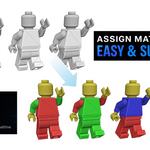
Mat‑Assign is a Blender add‑on designed for quick, seamless material copy/paste. It ensures context‑safe rendering updates, preventing crashes and workflow interruptions.
What It Includes
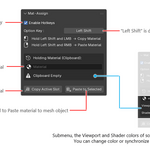
• Copy/Paste materials under the mouse or via UI buttons
• Safe viewport refresh (redraw_all_view3d)
• Safe dependency graph updates (safe_depsgraph_update)
• Automatic material creation with preserved colors
• Clipboard system for held materials
• Hotkey listener with customizable modifier keys
• Viewport ↔ Shader color sync tools
Installation
1. Download the .py file.
2. In Blender, go to Edit → Preferences → Add‑ons → Install.
3. Select the file and enable Mat‑Assign in the add‑ons list.
Where to Find It
• Located in View3D → Sidebar → Mat‑Assign panel.
• Hotkeys available when enabled:
Modifier + LMB → Copy material
Modifier + RMB → Paste material
Recommended Workflow
• Enable hotkeys for fast copy/paste during modeling.
• Use the clipboard panel to manage held materials.
• Sync viewport and shader colors for consistent rendering.
• Apply materials across multiple selected objects with the UI paste operator.
Safety Notes
• Copy operations are read‑only (no undo needed).
• Paste operations support undo for safe experimentation.
• Context guards prevent NoneType errors and undo crashes.
• Background listener auto‑restarts safely when projects load.
Compatibility
• Blender 4.2+
• Works with Mesh objects
• Supports Principled BSDF shader nodes for color sync
Author
• Developed by Hisoka852
• Version: 0.9.8
• Category: Material Tools
Have questions about this product?
Login to message
| Blender Extension Compatible | Yes |
| Published | 3 months ago |
| Blender Version | 4.2 - 5.1 |
| Extension Type | Add-on |
| Render Engine Used | Blender-Internal, Cycles, Eevee |
| License | GPL |