 loviz
loviz


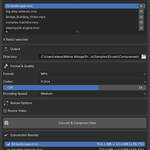
# MediaFlow Studio
**Professional media processing suite for Blender 4.2+**
A powerful Blender add-on that brings professional-grade video compression, format conversion, and batch processing capabilities directly into your Blender workflow using FFmpeg. Built for content creators who demand quality, efficiency, and control over their media processing pipeline.
## ✨ Key Features
### 🎬 **Multiple Processing Modes**
- **Convert & Compress**: Advanced video/image compression with size optimization
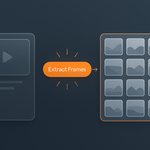
- **Extract Frames**: Convert videos to high-quality image sequences
- **Create Video**: Combine image sequences into video files
### 🔧 **Smart FFmpeg Integration**
- **Automatic Detection**: Checks system PATH and local installations
- **Installation Guidance**: Step-by-step instructions for all platforms
- **Portable FFmpeg**: Optional automatic download and installation
- **Cross-Platform**: Windows, macOS, and Linux support
### 📁 **Advanced File Management**
- **Multi-File Selection**: Batch process unlimited files
- **Format Support**: MP4, WebM, MOV, WebP, PNG, JPG, JPEG, TIFF, BMP, TGA, EXR, AVI, MKV, FLV, WMV, M4V, 3GP
- **Smart File Browser**: Integrated file selector with format filtering
- **Queue Management**: Add, remove, and organize files with visual list interface
### ⚙️ **Professional Quality Controls**
- **Codec Selection**: H.264, H.265 (HEVC) with optimal settings
- **CRF Control**: Constant Rate Factor (0-51) for precise quality control
- **Quality Presets**: 0-100 quality scale for different use cases
- **Compression Levels**: 6 levels of encoding effort vs. speed balance
- **Encoding Speed**: Ultra Fast to Placebo presets for time vs. quality optimization
- **Bitrate Control**: Custom target and maximum bitrate settings
### 📊 **Real-Time Processing Insights**
- **Live Progress Tracking**: Individual file and overall batch progress
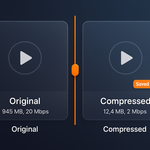
- **File Size Monitoring**: Before/after size comparisons with compression ratios
- **Processing Statistics**: Detailed conversion results with savings calculations
- **Error Handling**: Clear error messages and recovery guidance
- **Time Estimates**: Remaining time and processing speed indicators
### 🎨 **Intuitive User Interface**
- **Organized Panels**: Clean, professional interface in Blender's 3D viewport
- **Visual File Lists**: Drag-and-drop style file management
- **Results Dashboard**: Comprehensive conversion statistics and summaries
- **Context-Sensitive Help**: Tooltips and descriptions for all settings
- **Status Indicators**: Visual feedback for FFmpeg availability and processing state
## 🎯 Perfect For
- **Content Creators**: Optimize videos for social media, streaming, and web delivery
- **Web Developers**: Create lightweight media assets for websites and applications
- **Motion Graphics Artists**: Export optimized renders from Blender projects
- **Digital Archivists**: Batch convert legacy media formats
- **Small Studios**: Cost-effective alternative to expensive compression software
- **Freelancers**: Professional-grade tools without subscription fees
## 🚀 Quick Start
### Installation
1. Download the latest release from [GitHub Releases](https://github.com/LorenzWieseke/MediaFlowStudio/releases)
2. In Blender: `Edit > Preferences > Add-ons > Install...`
3. Select the downloaded `.zip` file and enable "MediaFlow Studio"
4. Find the panel in `3D Viewport > N-Panel > MediaFlow` tab
### First Use
1. **FFmpeg Setup**: The add-on will check for FFmpeg automatically
- If not found, use the built-in installation guidance
- Windows users can use the automatic portable installer
2. **Select Files**: Click "Select Files" to choose your media
3. **Choose Mode**: Convert & Compress, Extract Frames, or Create Video
4. **Configure Settings**: Adjust quality, format, and codec options
5. **Set Output**: Choose destination directory
6. **Process**: Click the convert button and monitor progress
## 📋 System Requirements
- **Blender**: 4.2.0 or higher
- **FFmpeg**: Required for all processing operations
- Automatic detection and installation guidance included
- Portable installation option for Windows
- **Platforms**: Windows x64, macOS x64, Linux x64
- **Storage**: Adequate space for input and output files
- **RAM**: Recommended 4GB+ for large file processing
## 🛠️ Technical Architecture
### Modular Design
- **Operators**: Core processing logic with threaded execution
- **Panels**: Professional UI with context-sensitive controls
- **Properties**: Comprehensive settings management
- **Utils**: FFmpeg integration and system utilities
### Performance Features
- **Non-Blocking Processing**: Background operations preserve Blender responsiveness
- **Memory Efficient**: Streams large files without excessive RAM usage
- **Progress Tracking**: Real-time feedback with detailed statistics
- **Error Recovery**: Robust handling of processing failures
- **Cross-Platform**: Native support for Windows, macOS, and Linux
- **Modal Operators**: Real-time progress tracking with timer system
## 📝 License
This project is licensed under GPL-3.0-or-later - see the [LICENSE](LICENSE) file for details.
## 👤 Author
## 🤝 Contributing
Contributions are welcome! Please feel free to submit a Pull Request.
## 🐛 Issues
Found a bug or have a feature request? Please open an issue on GitHub.
## ⭐ Support
If you find MediaFlow Studio useful, please consider giving it a star on GitHub!
$4.99
Have questions about this product?
Login to message