 hodgson3d



VIDEO TUTORIAL
Mesh Magnet is a robust, flexible upgrade to Blender's native Surface Deform modifier. Powered by Geometry Nodes and custom attributes, it delivers superior deformation without the limitations of the vanilla tool.
While the default Surface Deform modifier is unreliable and limited to mesh-on-mesh interactions, Mesh Magnet offers a robust workflow that supports Mesh, Curves, Groom Guides, Object Pinning, and Procedural Geometry out of the box.
Key Features & Modes
Mesh Magnet adapts to your specific needs with four distinct binding modes:
-
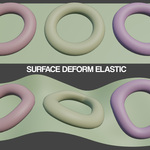
Mesh/Curve Elastic: Best for organic assets. It deforms your object along with the target, allowing for stretching and bending. Great for for fitting clothing to different character body for example.
Curve Support:
-
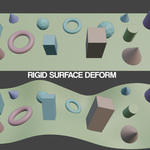
Mesh/Curve Rigid: Maintains the original scale and shape of your objects while "pinning" them to the surface. This is the go-to mode for hard-surface details like buttons on a shirt, rivets on a hull, or armor plates.
NOTE: Unlike Elastic Mode, when using Rigid Mode the Magnet objects origins do not need to match the Deform Mesh. Instead, Magnet objects should have their origin points close to the surface as this is where they will be anchored. -
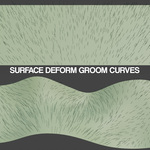
Groom Curve: Specifically tuned for hair and fur. Great for when you need to transfer a groom from one character to another.
-
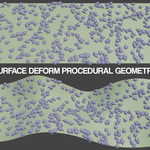
Procedural (Scatter): Keeps your scattered instances (like grass, rocks, or debris) locked to the surface without distorting their individual shapes. It's the perfect solution for keeping complex scattering systems synced with an animated, deforming character.
Workflow & Utility
How to Use:
Always ensure your target mesh has its rotations and scale applied in all deform modes - when using Elastic/Groom/Procedural mode, ensure origin/transforms match the target mesh. In Rigid mode however, objects can keep their local transforms)
Select the object(s) you want to deform.
Shift-select the target "Deform Mesh."
-
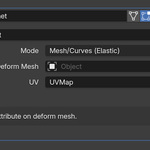
Run the Mesh Magnet operator (View3d > Object > Mesh Magnet) and select your desired deform mode and method of bind pose.You have two primary methods for setting the bind pose: using a Modifier or applying a Bind Pose Attribute directly to the deform mesh
Modifier Method: Disable "Apply Bind Pose" in the popup. This approach enables a non-destructive workflow, allowing you to manipulate the deform mesh using modifiers, simulations, or armatures.
Apply Bind Pose: Applying the bind pose as an attribute allows for direct manipulation in Edit Mode, ensuring the "magnets" dynamically follow your manual adjustments.
Management Tools:
Select by Deform Mesh: Instantly find and select every object currently bound to a specific deform mesh. No more hunting through the Outliner when working with hundreds of buttons or bolts.
Clean: One-click cleanup. Use this to instantly strip attributes and modifiers from a deform mesh and any object referencing it in a Mesh Magnet modifier, returning your scene to a clean slate.
Refresh Bind Pose: If you want to set a new bind pose, simply run this operator to re calibrate the system to the new default position.
NOTE: Its important that if you have any objects with Mesh Magnet modifiers referencing the deform mesh, you will want to apply the modifier before refreshing the bind pose.
How does it work?:
-
When you run the Mesh Magnet operator, the addon automates a sophisticated setup in two key steps:
Smart Modifier Assignment: Mesh Magnet identifies your active object as the "Deform Mesh" and automatically applies specialized Geometry Nodes modifiers to all other selected objects. It instantly links these modifiers to the Deform Mesh, saving you the hassle of manual targeting
The 'Bind Pose' Attribute: To ensure a perfect lock, the tool generates a custom attribute on your deform mesh called
bind_pose. This acts as a spatial memory, allowing the modifier to calculate the exact difference between the original rest position and the current deformation. The bind pose can also be set as a modifier to allow users to deform via armatures/simulations/modifiers.
