Migration "Universal Texture Disk Remapper "
 benoit dalmazzo




What happens if the missing textures are located on different hard drives?
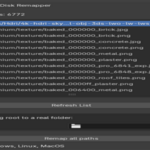
If your textures are spread across multiple drives or mount points, the add‑on will detect each missing root separately and display one folder‑selector dropdown per drive. Simply choose the correct folder for each missing root to remap all paths in one go.
If your textures are spread across multiple drives or mount points, the add‑on will detect each missing root separately and display one folder‑selector dropdown per drive. Simply choose the correct folder for each missing root to remap all paths in one go.
When I open a .blend project with missing textures and the list is empty, what should I do?
Click the Refresh List button to scan your project, populate the missing‐textures list, and enable you to remap each missing root to the correct directory on your drives.
$25
Have questions about this product?
Login to message
| Blender Extension Compatible | Yes |
| Published | about 1 year ago |
| Blender Version | 2.83 - 4.5 |
| Extension Type | Add-on |
| License | GPL |
