Mineral Forge - Procedural Minerals & Crystals
 SARASURRANO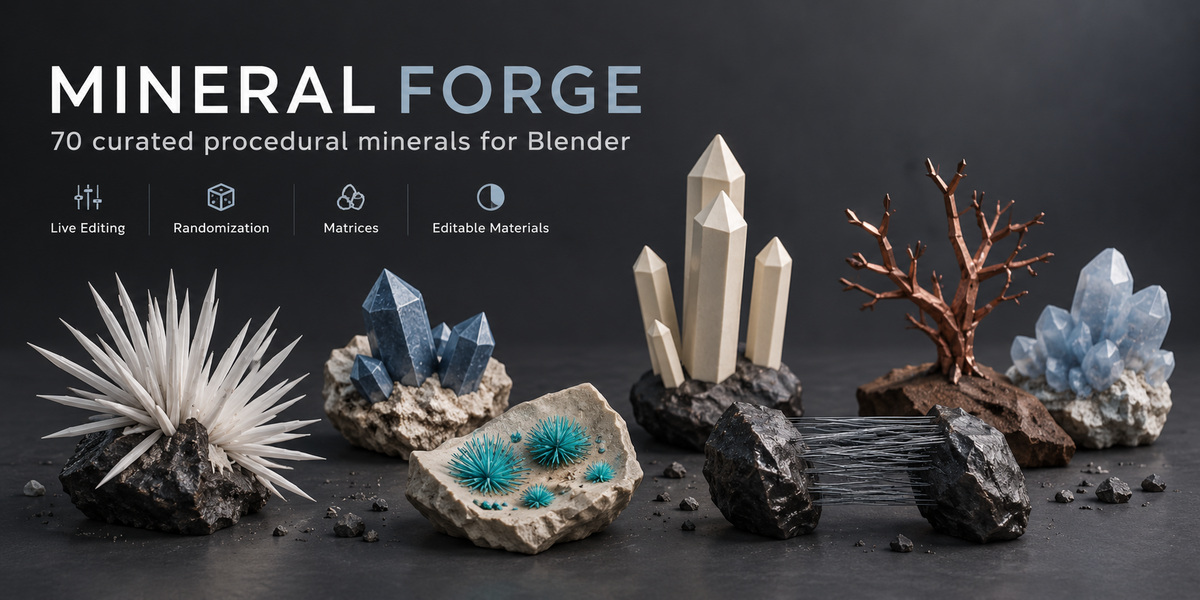




Installation
Keep Mineral_Forge_1.4.0.zip compressed. In Blender, open Preferences → Get Extensions → menu → Install from Disk, select the ZIP and enable Mineral Forge. Then open the 3D Viewport, press N and choose the Mineral Forge tab.
Getting started
Work in Object Mode, choose a mineral and preset, keep Include Material enabled if you want the preset material, then click Generate Mineral. Select the generated specimen to access its live controls. Changes update automatically in the viewport.
Main controls
Generate Mineral creates an additional specimen. Random Mineral replaces the active Mineral Forge specimen with another mineral from the filtered catalog. Previous / Next browses through recent or shuffled selections. Randomize All keeps the current mineral and varies its unlocked settings. Duplicate Variant creates another variation while preserving the original. New Seed changes the procedural variation.
Editing and randomization
Available controls depend on the selected mineral, specimen type and quality level. Depending on the specimen, you can edit Shape, Crystals, Distribution, Host Matrix, Surface and Material settings. Lock the parts you want to keep, then randomize the remaining unlocked properties.
Materials
Mineral Forge supports three material modes: Mineral Preset, None and Custom. Mineral Preset uses the included editable material, None removes assigned materials, and Custom lets you use your own Blender material. Use Make Material Unique before editing a material that may be shared with another object.
Host rock and quality
Supported specimens can use a host rock or matrix with controls for scale, surface variation, fractures, weathering, crystal coverage and embedded depth. Quality modes include Preview, Standard, High and Ultra. Preview and Standard are recommended while working; High and Ultra provide more close-up detail but may update more slowly on dense specimens.
Manual editing and saving
Before manually editing vertices, use Utility → Convert to Mesh Copy. This preserves the procedural source and creates an independent mesh for hand editing. Save the .blend file normally to preserve your specimen and its settings, and keep Mineral Forge installed if you want to continue procedural editing later.
Troubleshooting
If controls are missing, select a generated Mineral Forge object, return to Object Mode and check the selected mineral, specimen type and quality level. If generation becomes slow, lower the quality or density and use Preview while editing. If the catalog appears empty, clear the search and library filters. For support, include your Blender version, operating system, mineral name, preset, seed and steps to reproduce the issue.
Compatibility
Blender 4.2 LTS through Blender 5.2 LTS. Tested on macOS and Windows 10/11 x64. Supported render engines: Cycles and Eevee. No account, activation service or internet connection is required after installation.
 Included
Includes 12 months of
- Support from SARASURRANO
- Product updates
Extend this product’s Support Period +12 months: 50% of product price
Have questions before purchasing?
Login to message
| Blender Extension Compatible | Yes |
| Published | 4 days ago |
| Blender Version | 4.2 - 5.2 |
| Extension Type | Add-on |
| Render Engine Used | Cycles, Eevee |
| License | GPL |
Discover more products like this
gemstones randomization minerals geology crystals blender addon materials procedural rocks environment art mineral generator crystal generator