Modular Product Lighting Scene for Blender - Minimal White Studio
 Contrast 3D Design Studio


Documentation
Thank you for purchasing Modular Product Lighting Scene for Blender.
This Blender file is designed to help you create clean product visualization renders quickly. The scene includes a prepared lighting setup, cameras, procedural gobo, organized collections and a placeholder product position.
How to use the scene
- Open the Blender file.
- Find the PRODUCT collection.
- Replace the placeholder product with your own 3D model.
- Keep your product centered around the placeholder position for best results.
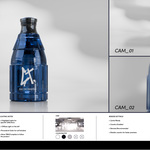
- Choose one of the included cameras: CAM_01, CAM_02 or CAM_03.
- Render using Cycles.
- If needed, adjust the highlight lights or move the tracking targets to better fit your product shape.
Scene organization
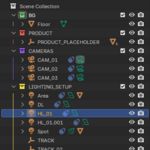
- BG — background and floor elements.
- PRODUCT — placeholder product area.
- CAMERAS — included camera views.
- LIGHTING_SETUP — diffuse light, highlight lights, procedural gobo and tracking targets.
Cameras
- CAM_01 — main hero product view.
- CAM_02 — clean front product view.
- CAM_03 — closer detail view.
Lighting controls
The scene includes a main diffuse light and two highlight lights for controlled reflections. The highlight lights use tracking targets, so you can move the targets to change where the lights point.
- DL — main diffuse light.
- HL_01 / HL_02 — highlight lights for glossy reflections.
- GOBO — procedural gobo used to create soft lighting patterns.
- TRACK / TRACK_02 — target objects used to control light direction.
Render notes
- This file is made for Blender only.
- Designed in Blender 5.1.
- Recommended render engine: Cycles.
- Caustics are enabled for better results with glass and reflective products.
- Caustics can increase render time. You can disable them during previews and enable them again for final renders.
Compositor
A compositor setup is included for basic color adjustment. You can use it to refine contrast, exposure, color balance and overall render mood. If you prefer a neutral render output, you can bypass or disable the compositor nodes.
Important
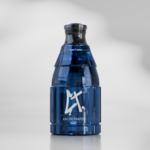
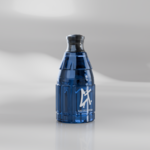
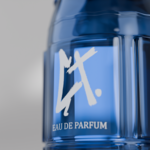
- The product shown in the preview images is for demonstration purposes only.
- Your final result will depend on your own product model, materials and render settings.
- This product does not include external software, plugins or add-ons.
- Do not resell, redistribute or repackage this Blender file as a separate asset product.
Created by Contrast 3D Design Studio.
Have questions about this product?
Login to message
| Published | 5 months ago |
| Blender Version | 4.5 - 5.1 |
| Render Engine Used | Cycles |
| License | Royalty Free |