 Contrast 3D Design Studio


Modular Product Lighting Kit for Blender
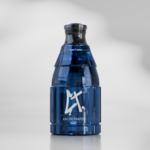
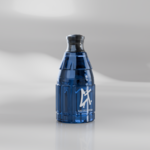
Modular Product Lighting Kit is a ready-to-render Blender scene designed for high-quality product visualization, commercial product renders, portfolio images and marketplace presentation.
This file gives you a complete product lighting setup without having to build the scene from scratch. Open the Blender file, replace the placeholder with your own product, choose one of the included cameras, adjust the lighting if needed and render.
What’s included
- Ready-to-render Blender product lighting scene
- Clean studio background and floor setup
- Product placeholder for scale, position and composition
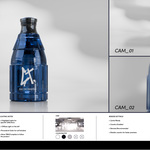
- 3 ready-to-use cameras
- Professional lighting setup
- 1 main diffuse light
- 2 highlight lights for controlled reflections
- Procedural gobo for soft editorial lighting patterns
- Tracking targets for easier light control
- Caustics enabled for glass, transparent and reflective products
- Compositor color adjustment setup
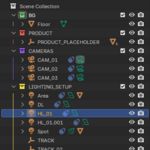
- Organized collections for easy navigation
Scene structure
The file is organized into clear collections so you can quickly understand and modify the setup:
- BG — studio floor and background setup
- PRODUCT — product placeholder area
- CAMERAS — CAM_01, CAM_02 and CAM_03
- LIGHTING_SETUP — diffuse light, highlight lights, procedural gobo and tracking targets
Included cameras
- CAM_01 — main / hero product view
- CAM_02 — clean front product view
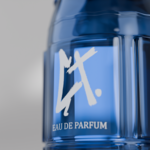
- CAM_03 — detail / close-up view
Lighting setup
The scene includes a controlled product lighting system designed to create clean reflections, soft shadows and a more professional studio look.
- DL — main diffuse light placed on the left side of the setup
- HL_01 / HL_02 — highlight lights used to create controlled glossy accents and reflections
- GOBO — procedural gobo for soft shadow patterns on the background and floor
- TRACK / TRACK_02 — tracking targets used to control where the lights point
The main lights use tracking constraints aimed at the product area. To adjust the direction of the lights, simply move the tracking targets. This makes it easier to adapt the scene to different product sizes, shapes and materials.
Designed for product visualization
This kit is ideal for artists, designers, brands and creators who need a fast and reliable way to render products with a more polished visual style.
It works especially well for:
- Perfume bottles
- Cosmetic packaging
- Glass products
- Glossy or reflective products
- Tech products
- Small accessories
- Packaging mockups
- Commercial product renders
- Portfolio presentation images
Caustics and render quality
Caustics are enabled in this scene to improve the look of glass, transparent materials, reflections and premium product shots.
Please note that caustics can increase render time. For faster previews, you can disable caustics while testing and enable them again for the final render.
Compositor color adjustment
A compositor node setup is included to help fine-tune the final image. You can use it to adjust contrast, color balance, exposure, highlights, shadows and the overall mood of the render.
If you prefer a neutral output, you can bypass or disable the compositor adjustments.
Important information
- This product is made for Blender only.
- Designed in Blender 5.1.
- Use for Cycles final renders.
- The preview product model is for demonstration purposes only.
- Final results may vary depending on your product model, materials and render settings.
Created by Contrast 3D Design Studio for professional product visualization inside Blender.