 pikopiko


Can I use this addon for commercial projects?
Yes. Any works you create with this addon (videos, images, models, etc.) belong to you and can be
freely used for both personal and commercial projects. However, reselling or redistributing the addon itself is strictly prohibited
Do I need an internet connection to install or use this addon?
No. All required libraries are bundled with the addon, so
no internet connection is required for installation or use
The baked animation looks jittery. How can I make it smoother?
You can control the smoothness of the animation by adjusting the "Smoothing" slider in the addon panel before you press "Bake". Higher values will result in a more fluid motion. Additionally, after baking, you can use the Graph Editor's
Channel > Simplify F-Curves function to further reduce keyframes
The audio plays during preview, but the lipsync doesn't move. Why?
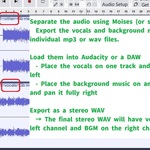
This usually means the Left (L) audio channel is silent or contains no vocals. This addon requires the vocal track to be on the left channel to detect volume for the lipsync animation. Mono or silent files will not be detected
Does this addon work on Mac or Linux?
Currently, Nom Nom Vox is for Windows 10/11 (64-bit) only. We hope to support macOS and Linux in future updates
$10
Have questions about this product?
Login to message
| Blender Extension Compatible | Yes |
| Published | about 1 year ago |
| Blender Version | 4.2 - 4.5 |
| Extension Type | Add-on |
| Render Engine Used | Cycles, Eevee |
| License | GPL |