 Compositing Academy





CA Grade — Nuke-Style Color Grading for Materials in Blender
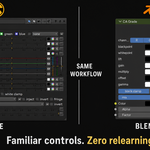
Stop chaining five separate nodes every time you need a proper grade. CA Grade brings Nuke's Grade node workflow into Blender as a single, clean panel: blackpoint, whitepoint, lift, gain, multiply, offset, and gamma, all in one place, per-channel or combined.
Features
Works in the Shader Editor
Blender already has color grading tools in Compositor mode, but it doesn't have a good one in the Shader Editor.
- All grade controls in one node — no more chaining Color Balance, Bright/Contrast, and Curves just for a basic lift-gamma-gain pass
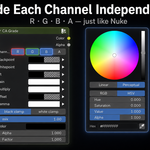
- Per-channel control — switch between R, G, B, and A independently, exactly like Nuke's Grade node
- Full Nuke parity — blackpoint, whitepoint, lift, gain, multiply, offset, gamma: same names, same order, same math
- Black & white clamp toggles — built in, one click each
- Non-destructive mix slider — blend the grade against the original input
- Alpha and Factor outputs — plugs cleanly into any node tree
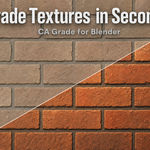
- Shader Editor — grade textures and materials in your shader graph
-
Delivered as a
.pyfile — append the node group and go, no dependencies
Who It's For
- Artists dialing in texture looks and material response with a familiar grading interface
- VFX artists working across Nuke and Blender who want one consistent mental model
- Anyone tired of Blender's fragmented default grading workflow for object materials / textures
- Node-group builders who want a single, readable grade node to reuse
Requirements
- Blender 5.0 or later
- Works in the Shader Editor and Compositor
- No external Python dependencies
- Delivered as a
.py or .zipfile, easy install
