Null Game Toolkit
 Null Station


What are the system requirements to run Null Game Toolkit in Blender?
Minimum: Blender 4.0+, 4GB RAM, Windows 7/macOS 10.13/Ubuntu 18.04.
Recommended: Blender 4.2+, 8GB RAM, dedicated GPU, SSD. The addon is lightweight
(<500KB) and adds zero performance overhead to Blender. It works on any system
that can run Blender 4.0 or higher.
Can I customize naming conventions for my own game engine pipeline?
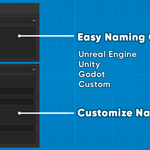
Yes! In addition to presets for Unreal, Unity, and Godot, Null Game Toolkit
includes a "Custom" naming option. Define your own collision prefix/suffix and
LOD naming format. The panel shows live examples as you type, ensuring your
naming convention is exactly what you need for your studio or engine pipeline.
How much time can Null Game Toolkit save in my Blender game development workflow?
Users report saving 80-90% of time on technical tasks. What previously took
30 minutes per asset (manual collision creation, LOD generation, naming,
organizing, exporting) now takes 30-60 seconds. For asset packs with 50+ objects,
this translates to saving 20+ hours of repetitive work. The bulk export alone
can process dozens of assets in minutes instead of hours.
Does Null Game Toolkit work with Godot Engine naming conventions?
Yes! Null Game Toolkit includes built-in support for Godot Engine naming
conventions. Select "Godot" from the Naming Convention dropdown, and collision
meshes will automatically use the "-col" suffix that Godot recognizes. You can
export as GLTF or FBX format depending on your Godot workflow preferences.
Is Null Game Toolkit suitable for creating assets for the Unreal Engine Marketplace?
Absolutely! Null Game Toolkit is perfect for Unreal Engine Marketplace creators.
It automatically applies Unreal's naming standards (UCX_ for collision, SM_ for
static meshes), generates LODs with correct suffixes, organizes collections
properly, and exports FBX files with all necessary settings. Many asset creators
use it to streamline their marketplace production workflow.
Can Null Game Toolkit embed textures when exporting FBX files for game engines?
Yes! Enable the "Embed Textures" option in the Bulk Export panel to include
textures directly in your FBX files. This ensures textures are portable and
won't be missing when importing into Unreal Engine, Unity, or other game engines.
The addon handles both packed and external textures automatically.
How does the bulk export feature work for FBX files in Blender?
The bulk export feature processes entire collections automatically. Organize
your assets into collections, click "Bulk Export", choose FBX format, and select
your destination folder. The addon exports each collection as a separate FBX
file with options for applying transforms, embedding textures, and exporting
from world center. Perfect for exporting dozens of game-ready assets
simultaneously.
What collision types does Null Game Toolkit support for game development?
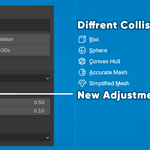
Null Game Toolkit offers 6 collision types optimized for different scenarios:
Box (fast, for simple shapes), Sphere (for round objects), Capsule (for
characters), Convex Hull (industry-standard automatic), Mesh (detailed collision),
and Accurate (maximum precision). Each type is designed for specific use cases
in Unreal Engine, Unity, and other game engines.
Can I use Null Game Toolkit to generate LOD levels for Unity games?
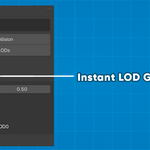
Absolutely! Null Game Toolkit includes a powerful LOD generator that creates
multiple levels of detail with custom reduction ratios. Select your mesh, set
the number of LOD levels (1-5), adjust reduction percentages, and click
"Generate LODs". The addon follows Unity's naming conventions (_LOD1, _LOD2,
etc.) and exports FBX files ready for Unity import.
How do I create collision meshes for Unreal Engine using Null Game Toolkit?
Creating Unreal Engine collision meshes is simple: 1) Select your mesh,
2) Set Naming Convention to "Unreal Engine", 3) Choose a collision type (Box,
Sphere, Convex Hull, etc.), 4) Click "Create Collision". The addon automatically
generates collision meshes with the correct UCX_ prefix that Unreal Engine
recognizes. You can then bulk export as FBX directly to your Unreal project.
Is Null Game Toolkit compatible with Blender 4.0, 4.1, 4.2, and Blender 5.0?
Yes! Null Game Toolkit is fully compatible with Blender versions 4.0 through
5.0 and beyond. We regularly test and update the addon to ensure compatibility
with the latest Blender releases. It works seamlessly on Windows, macOS, and
Linux operating systems.
What is Null Game Toolkit and what does it do for Blender users?
Null Game Toolkit is a professional Blender addon that automates collision
mesh creation, LOD generation, and bulk asset export for game development. It
saves hours of manual work by providing one-click collision generation,
automatic LOD creation, and batch FBX/OBJ/GLTF export with industry-standard
naming conventions for Unreal Engine, Unity, and Godot.
Discover more products like this
game development workflow tool blender addon batch-export Game asset technical-art mesh optimization unity3d LOD Generator collision mesh FBX Export Unreal Engine