 DC Labs


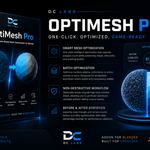
OptiMesh Pro Documentation
Installation
Installing the Addon
Download the OptiMesh Pro ZIP file.
Open Blender.
Navigate to Edit → Preferences → Add-ons.
Click Install.
Select the downloaded ZIP file.
Enable OptiMesh Pro from the addon list.
Open the 3D Viewport Sidebar (N Panel) to access the OptiMesh Pro tools.
Download the OptiMesh Pro ZIP file.
Open Blender.
Navigate to Edit → Preferences → Add-ons.
Click Install.
Select the downloaded ZIP file.
Enable OptiMesh Pro from the addon list.
Open the 3D Viewport Sidebar (N Panel) to access the OptiMesh Pro tools.
Quick Start Workflow
A typical production workflow:
Import or create your mesh.
Run Mesh Cleaner.
Generate UVs if needed.
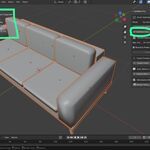
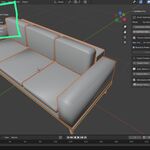
Optimize polygon count.
Generate LODs.
Create colliders.
Bake textures.
Review statistics.
Export to your target engine.
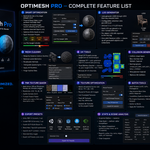
Smart Optimization
Reduce polygon counts while preserving visual quality.
Options
Decimation Ratio
Controls how much geometry is reduced.
Examples:
1.0 = Original mesh
0.5 = 50% reduction
0.25 = 75% reduction
Target Polygon Count
Specify an exact polygon budget.
Preserve Sharp Edges
Maintains hard-surface details during optimization.
Preserve UV Seams
Helps avoid UV distortion after decimation.
LOD Generator
Automatically create Level of Detail meshes.
Supported Levels
LOD0
LOD1
LOD2
LOD3
LOD0
LOD1
LOD2
LOD3
Features
Configurable reduction ratios
Automatic collection organization
Per-object processing
Batch generation
Configurable reduction ratios
Automatic collection organization
Per-object processing
Batch generation
Remove LODs
Deletes all generated LOD objects and collections.
Mesh Cleaner
Prepare assets for export and optimization.
Operations
Merge by Distance
Delete Loose Geometry
Recalculate Normals
Triangulate Meshes
Apply Modifiers
Purge Orphan Data
Merge by Distance
Delete Loose Geometry
Recalculate Normals
Triangulate Meshes
Apply Modifiers
Purge Orphan Data
Recommended before exporting any production asset.
UV Tools
Smart UV Project
Automatically unwraps selected meshes.
Lightmap UV Generator
Creates a secondary UV channel suitable for light baking.
Texel Density Checker
Reports texture density compared to a target value.
Status Indicators:
LOW
OK
HIGH
Remove UV Channels
Deletes UV channels from selected meshes.
Collision Generator
Generate game-engine-ready colliders.
Supported Collider Types
Box Collider
Fast and efficient for simple shapes.
Convex Hull
Accurate collision approximation.
Sphere Collider
Ideal for rounded objects.
Capsule Collider
Suitable for characters and vertical props.
Naming Conventions
Unreal Engine
UCX_
UBX_
USP_
UCP_
UCX_
UBX_
USP_
UCP_
Unity
_ConvexCollider
_BoxCollider
_SphereCollider
_CapsuleCollider
_ConvexCollider
_BoxCollider
_SphereCollider
_CapsuleCollider
PBR Texture Baker
Bake texture maps directly inside Blender.
Supported Bake Passes
Diffuse
Roughness
Normal
Ambient Occlusion
Emission
Diffuse
Roughness
Normal
Ambient Occlusion
Emission
Output Resolutions
512
1024
2048
4096
512
1024
2048
4096
Output Format
PNG
Requirements
Cycles Renderer must be enabled.
Texture Optimization
Optimize textures for game engines.
Features
Resize oversized textures
Force power-of-two dimensions
Detect large textures
Pack textures into .blend files
Unpack textures to disk
Resize oversized textures
Force power-of-two dimensions
Detect large textures
Pack textures into .blend files
Unpack textures to disk
Batch Tools
Manage large asset collections efficiently.
Rename Tools
Prefix
Suffix
Find and Replace
Prefix
Suffix
Find and Replace
Material Consolidation
Merge duplicate materials automatically.
Example:
Material.001 → Material
Origin Tools
Geometry Center
World Origin
Bottom of Bounds
Geometry Center
World Origin
Bottom of Bounds
Transform Tools
Apply:
Location
Rotation
Scale
Export Presets
Unity FBX
Configured for Unity import workflows.
Unreal Engine FBX
Configured for Unreal Engine asset pipelines.
Godot GLTF/GLB
Optimized for Godot 4.
Sketchfab / Fab GLB
Includes embedded textures.
Generic GLTF
Supports texture embedding and Draco compression.
Export All
Exports all configured formats in a single operation.
Statistics & Analysis
Monitor optimization results.
Snapshot
Captures current scene metrics.
Comparison Report
Displays:
Polygon Count
Triangle Count
Vertex Count
UV Channels
Material Count
Texture Usage
Poly Budget Monitor
Provides live visual feedback on optimization targets.
Marketplace Media
Create presentation assets for marketplaces.
Render Thumbnail
Generate preview images.
Supported resolutions:
256
512
1024
2048
4096
Render Turntable
Create rotating showcase animations.
Setup Turntable Rig
Automatically creates:
Camera
Empty Controller
Rotation Animation
All render settings are restored after rendering completes.
Have questions about this product?
Login to message
| Published | 4 months ago |
| Blender Version | 4.4 - 5.0 |
| Extension Type | N/A |
| Render Engine Used | Cycles, Eevee |
| License | Mit |
Discover more products like this
unity decimation LOD game assets performance Polygon Reduction Batch processing Asset Optimization 3D workflow low poly mesh optimization unreal