 Tristan Muzzu


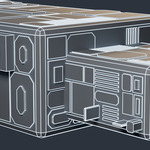
Hull plating without the afternoon.
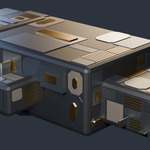
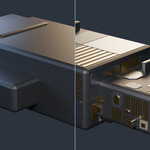
Point PanelForge at any hard-surface mesh and press one button. It builds the panel layout, the recessed sections, the slatted vents, the raised blocks and the blade fins, across five material slots, following the shape you gave it.
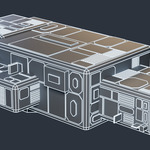
On the blockout in these images that is 262 plates, 74 vents, 28 fins and 11,388 triangles, in roughly 20 to 45 milliseconds, depending on the Blender version and on what else the machine is doing at the time. You press it and the result is already there.
Blender 3.6 through 5.2, and I actually check.
Every release gets installed, enabled, run on real geometry and unloaded again on all seven builds before it ships: 3.6.23, 4.2.23, 4.5.12, 4.5.13, 5.0.1, 5.2.0 and 5.2.1. Eighteen edge cases run on each of them as well, so a hundred and twenty-six runs, and the whole sweep last went green on 7 September 2026. The usual worry with add-ons is that they stop working after an update and the developer has vanished, so that's the part I automated first.
Installs the way you expect it to.
The zip carries a proper extension manifest, so on 4.2 and newer you drag it into Blender and confirm one dialog. On 3.6 and 4.1, where extensions don't exist, the same zip installs through Preferences the old way. One file, both routes, no separate download to pick between.
It doesn't look sprayed on.
Most greeblers scatter detail evenly and you can spot it across a room. PanelForge steps plate depths in fixed increments instead of drifting them, gathers detail into hotspots the way real hardware does, and skips some plating on purpose so bare hull shows through. Structural bays go down first, so the big shapes read before the small ones.
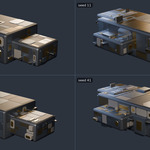
Change the seed, get a different ship.
The same seed always gives the same result, so nothing shifts under you when you reopen a file. Sixteen settings for when you want something specific: more vents, fewer fins, tighter panels, detail pushed toward one end. The manual below says what each one does with the numbers to go with it, including one control that has fewer steps than its slider suggests, which I would rather tell you than have you find.
Works on your real meshes.
Low poly blockouts or subdivided surfaces, both fine. It adds geometry over your mesh rather than cutting into it, so the original surface stays intact underneath: 280 vertices in, all 280 still there afterwards. Five material slots get created and assigned, empty, so your own materials drop straight in.
If nothing generates, it tells you which setting blocked it and what number to try instead, rather than doing nothing and leaving you guessing.
What it won't do.
No UVs, so textured panels need unwrapping. No cutting into the surface, only plating over it. Curved and organic surfaces come out as lots of small plates rather than large ones spanning the form, because plate size comes from the Min Panel setting in metres rather than from your topology. A 128 face sphere gives 273 to 289 of them and a 512 face one gives 229 to 263, so more faces doesn't mean more plates. It panels a station hull. It won't panel a character, and if that's what you came for this isn't the add-on.
GPL v3, the same licence as Blender. The full manual is further down this page, in the Documentation section: installation for someone who has never installed an add-on, every setting with the numbers to go with it, and nine FAQs.
A note on how this was built
Parts of this add-on's code were written with an AI coding assistant and then reviewed and directed by me. Nothing in it calls an AI model when you run it, and every image here is a render of the add-on's own output rather than a generated picture.
