 None
None



Overview
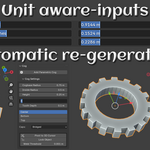
Parametric Primitives lets you create precise shapes in Blender with unit-aware inputs (metric & imperial) and per-object controls. Objects remain editable until you Lock them for further modeling.
Included in v1.0
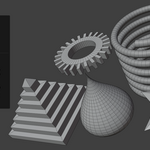
Box, Capsule, Cog, Cylinder, Drop, Pyramid, Sphere, Spring, Star, Tube.
Key Features
-
Unit-aware fields: enter values like
25 mm,1.5 m,3 in. -
Creation popup: choose World or 3D Cursor placement, set base parameters.
-
Per-object panel (N-panel → Parametric): only the active parametric object shows controls.
-
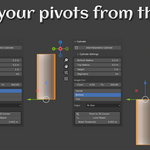
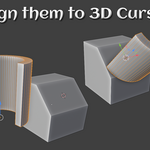
Pivot control: Top / Center / Bottom; quick align to 3D Cursor.
-
Caps & segments: N-gon / Triangle Fan caps, adjustable segments.
-
Lock Parametric: finalizes the mesh and runs Merge by Distance (
0.001/adjustable) to weld seams. After locking, parameter updates are ignored (use Undo to revert).
Quickstart
-
Add → Mesh → Parametric → pick a primitive (or Shift+A → Mesh).
-
In the creation popup, set base dimensions (unit-aware).
-
Open N-panel → Parametric and fine-tune per-object settings.
-
When you’re ready to edit topology, enable Lock Parametric to bake & weld.
Notes & Tips
-
For exact heights with caps, remember the cap fill can affect perceived height in some views.
-
Keep objects unlocked while exploring parameters; Lock only before manual edits.
Compatibility
Tested on Blender 4.0 (portable) and 4.4.1.
License
GPL-3.0-or-later (see LICENSE).
Support & Feedback
Questions, bugs, or feature requests? Email: [email protected]
Suggestions for new primitives are welcome!
Have questions about this product?
Login to message
| Sales | 10 |
| Dev Fund Contributor | |
| Published | about 1 year ago |
| Blender Version | 4.0 - 4.4 |
| Extension Type | N/A |
| Render Engine Used | Arnold, Blender-Internal, Blender-Game-Engine, Cycles, Eevee, Freestyle, Luxrender, Mental-Ray, Octane, Vray, Yafaray |
| License | GPL |

Discover more products like this
3D Generator adjustable parameters 3d object slicing 3D parametric smart