Pbr Connector Pro
 Mergim Sahiti



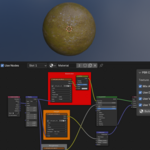
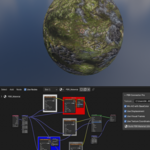
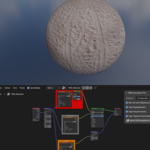
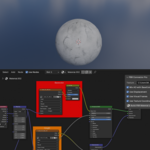
Overview
PBR Connector Pro is a Blender addon that automates the creation of professional PBR materials. It links Base Color, Roughness, Metallic, Normal, Height/Displacement, and AO textures into a single, organized Node Tree. The addon uses color-coded Frame Nodes for quick visual reference and supports optional UDIM tiles.
Installation
-
Download
PBR Connector Pro.zip. -
In Blender, go to
Edit > Preferences > Add-ons > Install. -
Select the ZIP file and click
Install Add-on. -
Enable the addon by checking the box next to “PBR Connector Pro Ultimate + Color Frames”.
-
Save preferences if desired.
Usage
-
Select your object in the 3D viewport.
-
Go to Shader Editor or Material Properties.
-
In the PBR Pro panel, set the following:
-
Texture Folder: Select the folder containing your PBR textures. -
Use AO: Enable/disable AO multiplication with Base Color. -
Use Displacement: Enable/disable displacement. -
Highlight Frames: Toggle color-coded frame nodes. -
Use Mapping: Enable/disable Texture Coordinate + Mapping node.
-
-
Click “Build PBR Material Ultimate + Color Frames”.
The addon will automatically:
-
Create a Principled BSDF shader and Material Output.
-
Detect PBR textures in the folder using fuzzy matching.
-
Create one Mapping Node for all textures (keeps Node Editor clean).
-
Create Frame Nodes with color coding:
-
Base Color → Red
-
AO → White
-
Metallic → Silver
-
Normal → Blue
-
Roughness → Grey
-
Height/Displacement → Orange
-
-
Connect textures to the appropriate Principled BSDF inputs.
Supported Textures
-
Base Color / Albedo / Diffuse
-
Roughness
-
Metallic / Metalness
-
Normal / NRM / Norm
-
Height / Displacement / Bump
-
AO / Ambient Occlusion
Optional: UDIM tiles are supported; the addon links them through the same Mapping Node.
Have questions about this product?
Login to message
| Dev Fund Contributor | |
| Published | about 1 year ago |
| Blender Version | 4.0 - 4.5 |
| Extension Type | N/A |
| Render Engine Used | Cycles, Eevee |
| License | GPL |

Discover more products like this
PBR Height/Displacement normal normal map metallic roughness mapping texture Visual Node Material Node Editor Shader