 Ace Of 3D






Installation for Blender 4.2+:
- Just drag and drop zip file into Blender! Or alternatively...
- Edit > Preferences > Get Extensions > Click the arrow in the far upper right > Select "Install from Disk..." in the dropdown > Find and select zip file > Install from Disk
Installation for Blender 4.1 or previous:
Edit > Preferences > Add-ons > Install > Find Zip File > Install Add-on > Activate it!
Example video with instructions by Jayanam:
https://www.youtube.com/watch?v=14G_YIVdBd0&ab_channel=Jayanam
How Do I Find the Addon in Blender?:
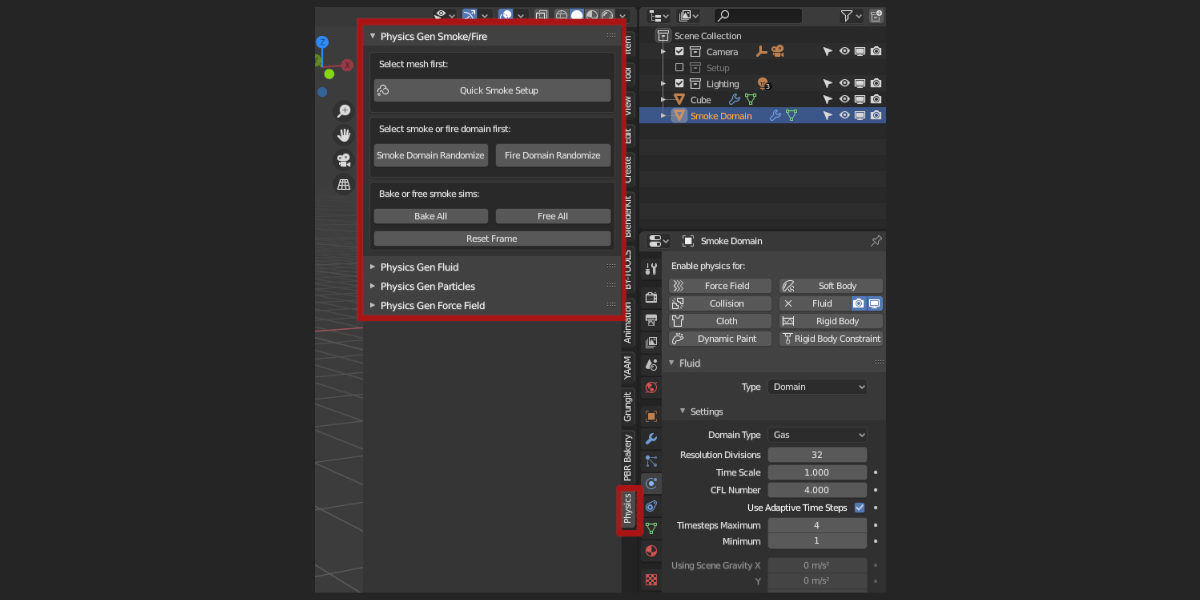
Find it in the 3D viewport under the 'N' tab (On the right-hand side) > Physics
How Do I Use the Addon?:
- Select any object
- Add a quick simulation setup or make your own
- Make sure the domain is selected for smoke or fluid sims
- Find the Physics Gen panel in the object properties
- Use Physics Gen as much as you like!
Follow my YouTube channel for video tutorials!
Physics Gen Tutorial Playlist
Problems or Suggestions:
Contact me on Blender Market (on the right of the page) to let me know of any errors you encounter or suggestions you may have.
Check back on the downloads page for access to all future updates!
Discover more products like this
quick generation simulation animation Fluid smoke particle simulations in blender easy physics