 3DGameObjects


Build Any Atlas Layout
Start with a blank atlas and shape it around your asset.
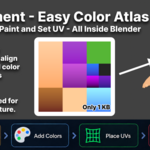
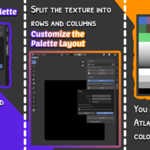
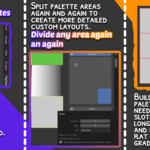
Divide your palette into as many sections as you need. Then divide any slot again, merge sections, split them back, or leave areas open for custom painting.
Your atlas doesn’t have to follow a fixed grid.
Custom Layouts · Nested Divisions · Merge & Split · Flexible Atlas Design
Everything Pigment Can Do
Atlas
Custom Layouts · Nested Divisions · Merge & Split · Flat Colors · Gradients · Exact HEX Colors
UV Tools
Slot Placement · Axis Fit · View Projection · Radial Projection · Path Projection · UV FlipColor Workflow
Recent Colors · Blender Palettes · Palette Import · Image Color Extraction
External Editing
One-Click Export · Photoshop Support · Krita Support · One-Click Reimport
Flat Colors & Gradients. Together.
Not every part of your model needs the same kind of shading.
Use flat colors for clean surfaces and gradients where you need more depth. Mix both freely inside the same atlas and adjust each slot independently.
Choose your colors, set the gradient direction, and switch between smooth or stepped results.
One atlas. Different shading styles.
Flat Colors · Gradients · Multiple Directions · Smooth & Stepped
Let Pigment Handle the UVs
Stop spending time manually dragging UV islands into tiny color slots.
Select your faces, choose your target slot, and let Pigment place the UVs for you.
Use simple slot placement or more advanced projection tools depending on the result you need.
Spend less time managing UVs and more time working on the asset.
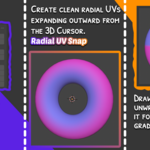
Slot Placement · Axis Fit · View Projection · Radial Projection · Path Projection
Need More Than Colors? Keep Painting.
Your workflow doesn’t have to stop inside Blender.
Send your atlas directly to Photoshop or Krita with one click. Add painted details, decals, logos, or anything else your texture needs.
When you’re done, bring it straight back into Blender with one click and continue working from where you left off.
Blender → Photoshop / Krita → Blender. Without breaking your workflow.
One-Click Export · External Editing · One-Click Reimport · Continue Instantly
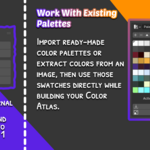
Bring Your Colors Into Blender
Already have a palette? Use it.
Import color data from external palette files or extract colors directly from an image and turn them into usable swatches inside Blender.
Concept art, reference images, existing palettes — bring everything into the same workflow.
From reference to usable palette in seconds.
Palette Import · Image Color Extraction · Saved Colors · Recent Colors
Made for Stylized Game Art
Pigment is built around the way stylized and low-poly assets are actually textured.
Characters, props, weapons, environments, modular assets — keep multiple colors and gradients packed into a single compact texture.
Instead of creating and managing separate textures for every asset, build reusable atlases and keep your entire color workflow consistent.
Simple textures. Fast iteration. Clean assets.
One Small Texture. A Lot Less Work.
Build your atlas, create your colors, place your UVs, paint custom details, and keep refining — all through one workflow.
Use the final texture anywhere your asset goes.
Blender → Unity · Unreal Engine · Godot · Your Pipeline
One Addon · One Atlas · One Complete Color Workflow
Full Tutorial