 Click & Snap


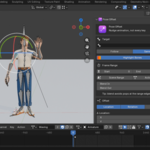
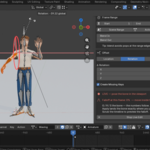
Pose Offset fixes the most tedious job in animation: nudging a bone across a whole stretch of keys without touching them one by one. Pick a bone (with or without its children), pick a frame range, dial in a location / rotation / scale offset — and it's applied to every keyframe in the range at once.
The offset feathers in and out with Blend In / Blend Out, so instead of popping at the range borders, the change ramps up and back down smoothly and melts into the surrounding animation. You choose the falloff shape — Linear, Smooth, Ease In, Ease Out, or Sharp.
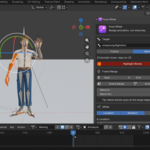
Everything is non-destructive and reversible. Apply is a single undo step, "Revert Last Offset" plays the exact inverse, and "Bake to New Action" leaves the original untouched. While you work, the affected bones glow orange in the viewport so you always see exactly what you're about to change.
What it does
Offset a whole range at once — location, rotation and/or scale applied to every key in the range, no key-by-key drudgery.
Smooth falloff with profiles — Blend In / Blend Out ramps in Linear, Smooth, Ease In, Ease Out or Sharp, so fixes never pop at the edges.
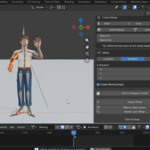
Live viewport editing — pose the bone with the normal G/R/S tools and the panel deltas follow live; type exact values or scrub the timeline to preview the falloff before you commit.
Copy / paste offset — grab a set of deltas and reapply them to another bone or range.
Bone + children — affect a single bone or a whole subtree (e.g. curl all fingers at once).
Fully reversible — single-undo Apply, exact-inverse Revert, and a non-destructive Bake to New Action.
Visual feedback — affected bones are highlighted orange in the viewport.
Wide Blender support — works on Blender 3.x, 4.x and 5.x (including the new slotted actions), with correct handling of quaternion and euler rotations.
How it works
-
Pick a bone (and optionally its children).
-
Set the frame range, with optional Blend In / Out and a falloff profile.
-
Dial in the location / rotation / scale offset — or pose it live in the viewport.
-
Apply — every key in the range shifts, feathered by the falloff. Revert or bake to a new action as needed.
Who it's for
Character animators cleaning up mocap or hand-keyed shots, game animators adjusting a limb across a whole cycle, and anyone who's ever had to re-touch dozens of keyframes just to move one bone a little.
Requirements
Blender 3.x, 4.x or 5.x
Works with armature actions (quaternion and euler rotations supported)
ADDITIONAL DETAILS
Detail 1 — Title: One click, whole range. Text: Offset location / rotation / scale across every key in a frame range at once — no key-by-key editing.
Detail 2 — Title: Smooth falloff, your way. Text: Blend In / Blend Out ramps with Linear, Smooth, Ease In, Ease Out or Sharp profiles, so fixes never pop at the edges.
Detail 3 — Title: Live viewport editing. Text: Pose with G/R/S and the panel follows — or type exact numbers into the panel. Scrub to preview the falloff before committing; nothing is keyed until Apply.
Detail 4 — Title: Copy/paste & fully reversible. Text: Copy/paste offsets between bones and ranges, undo via single-step Apply, play the exact inverse with Revert, or Bake to a New Action non-destructively.
Detail 5 — Title: Blender 3.x, 4.x & 5.x. Text: Full support for the new slotted actions in Blender 5, plus correct quaternion and euler rotation handling across all versions.
